Best Ergonomic Office Chairs 2026: Tested for 8+ Hour Work

How we researched
We compare current specs, warranty terms, buyer complaints, and long-term owner patterns. Read methodology →
Last price/spec check
2026-07-30. Prices move, so use the retailer page as the final source.
Who should skip this
Skip anything that does not fit your body, room, budget, or return-window comfort level.
There's no shortage of chairs that call themselves ergonomic. Most of them are just chairs with a lumbar bump and an adjustable armrest. Real ergonomic chairs do something different: they fit your body specifically, and they keep fitting it as you shift, lean, and adjust throughout an 8-hour day.
The chairs on this list earned their place by clearing a higher bar. Every pick has adjustable lumbar support, a seat height range that works for the target height group, and at least 2-3 years of documented owner feedback to verify the long-term claims.
Budget chairs without seat depth adjustment got cut. Not sure which model fits your frame? Take our 60-second Ergonomic Chair Finder quiz to match your height, back curvature, and workday habits with the right chair.
Affiliate disclosure: Some links on this page are affiliate links. We earn a small commission at no extra cost to you.
Quick Verdict: Our Top Picks at a Glance
Short on time? Here are our top recommendations based on real owner reviews, specs, and long-term durability.
Quick comparison
| Chair | Price | Lumbar | Seat depth adj. | Best for |
|---|---|---|---|---|
| Herman Miller Aeron | ~$1,445 | PostureFit SL (fixed zones) | No | Premium buyers, mesh preference |
| Steelcase Leap V2 | ~$1,375 | LiveBack (adaptive) | Yes | Anyone who wants customizable support |
| Branch Ergonomic Chair | ~$359 | Adjustable pillow | Yes | Budget buyers under 5'10" |
| FlexiSpot C7 | ~$300 | Self-adaptive dynamic | Yes | Taller budget buyers |
Herman Miller Aeron. Best overall
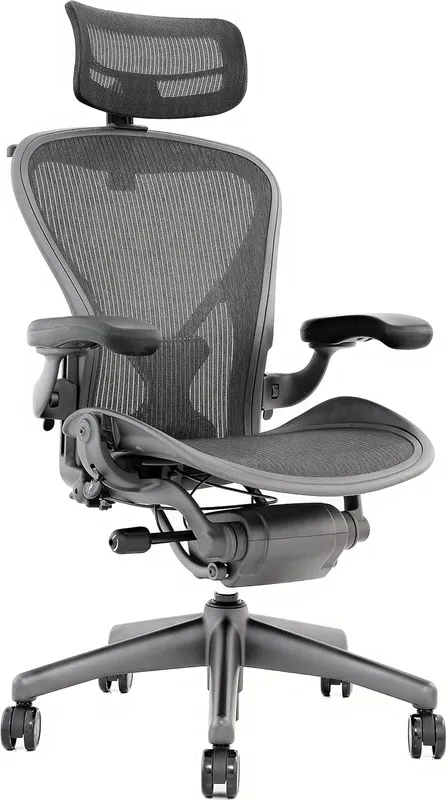
The Aeron is the chair most ergonomics researchers and physical therapists point to when asked what they'd buy. It's been in continuous production since 1994, and each iteration has kept what works while fixing what didn't.
What makes it stand out is the seat: a stretched, breathable mesh with no hard edge. You're supported across the full seat area, not just at two contact points. This matters more than it sounds after hour 5, because most chairs create pressure behind the knees. The Aeron doesn't.
The PostureFit SL support system locks to your sacrum and lumbar at the same time, supporting the full lumbar curve rather than pushing at one point. You can set the tension for how much it pushes back. Most people set it and forget it.
Size matters here. The Aeron comes in A (petite), B (standard, most common), and C (tall/large). Size B fits 5'3" to about 6'1". If you're taller than 6'1" or have longer-than-average legs, Size C is worth the extra $100 to get the right seat depth.
Real drawback: no seat depth adjustment. If the seat pan is wrong for your leg length, you can't change it. Short of buying a different size, you're stuck. And at $1,445, there's no trial period at home unless you buy from a dealer with a return policy.
Who it's for: Anyone who wants the chair that's been the ergonomic baseline for 30 years, prefers full-mesh construction, and doesn't have seat depth adjustment as a specific requirement.
Skip it if: You have long legs that need seat depth adjustment, or you want a chair that visually fits a home office rather than looking like it came from a corporate floor.
Check Herman Miller Aeron on Amazon
Steelcase Leap V2. Best for adaptable support
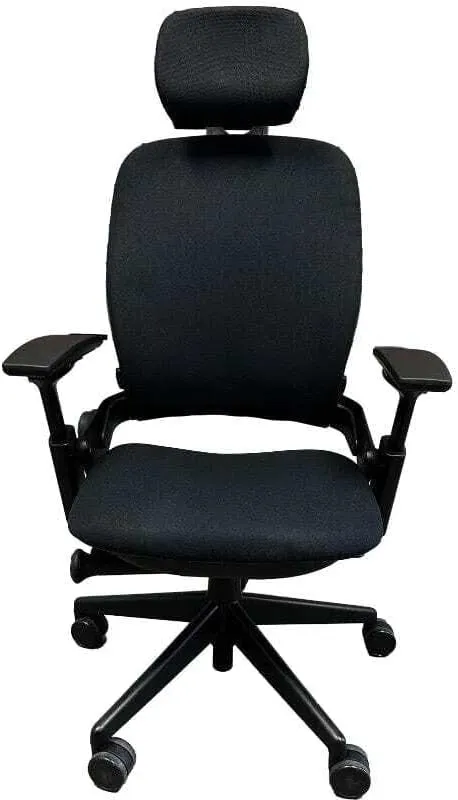
If the Aeron is the chair ergonomists point to, the Leap V2 is what many of them actually own. The difference is in how the lumbar works.
The Aeron's PostureFit pushes at fixed points. The Leap's LiveBack technology moves with you: the backrest has two independently moving zones that flex as you shift positions. When you lean right, the back adjusts; when you recline, it follows the arc of your spine. The lower lumbar firmness control lets you set how much resistance you want from that zone specifically.
Seat depth adjusts by about 4 inches. For users with long legs who couldn't make the Aeron work, this is often the difference. You can sit all the way back against the lumbar support without the seat edge cutting into the back of your thighs.
The armrests move in four directions and rotate. This sounds like a minor thing but for people who type at an angle, having the armrest match that angle eliminates a surprising amount of shoulder tension over a full day.
Real drawbacks: $1,375 is real money, and the chair looks like it belongs in a conference room, not a home office. The learning curve on the controls is also genuine. Most users spend their first week with settings wrong before figuring out the right configuration for their body.
Who it's for: Users with specific lumbar needs who want a chair that moves with them rather than holding them in a fixed position. Also anyone who's tried an Aeron and found the seat depth wrong for their body.
Skip it if: You want something that looks like home furniture rather than office equipment, or you're on a strict budget.
Check Steelcase Leap V2 on Amazon
Branch Ergonomic Chair. Best for budget buyers under 6'1"
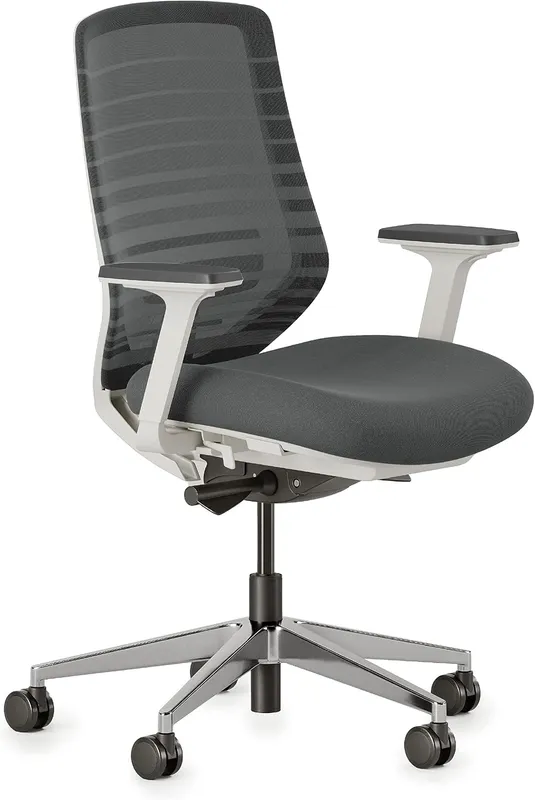
At $359, Branch delivers more adjustability than you'd expect. The lumbar pillow slides vertically to match your lower back position. Armrests are 4D (height, depth, width, pivot), and the backrest height adjusts.
Seat height covers 16.5" to 21", which handles most users from 5'0" to 6'2".
What holds up in long-term owner reviews: the mesh breathes and the cushioning doesn't flatten. Those are the two most common failures in this price range. Branch chairs from 3 years ago still get positive owner comments, which matters more than manufacturer claims.
Seat depth adjusts too, from 15.5 to 18 inches. That closed the one real gap this chair used to have against the FlexiSpot C7.
Past 6'1", or above 275 lbs, the frame and seat dimensions stop being the right fit. For users in that range, the FlexiSpot C7 below is worth a look.
The lumbar pillow also isn't in the same class as PostureFit SL. It's good for the price. It's not the same thing.
Who it's for: Budget buyers who work 5+ hours a day and aren't exceptionally tall.
Skip it if: You have a diagnosed back condition, you're consistently over 6'1", or over 275 lbs.
Check Branch Ergonomic Chair on Amazon
For more at this price point, our guide to the best office chairs under $300 covers five alternatives with real tradeoffs.
FlexiSpot C7. Best budget pick for tall users
The C7 fills the gap that most budget ergonomic chairs leave: seat depth adjustment for users with long thighs. It adjusts by about 3 inches, which lets you sit fully back against the lumbar support rather than perching at the front edge.
The lumbar is self-adaptive dynamic. That's a specific technical term: it tracks your position changes to some degree rather than sitting at one fixed push point. Not the same as the Leap's LiveBack, but meaningfully better than a static lumbar pillow for long sessions.
The 10-year warranty is the other story here. At this price most chairs offer 2 years. Ten years tells you something about build confidence, even if it's not in the same manufacturing class as Herman Miller or Steelcase.
Mesh back is standard. The default seat is foam, which warms up after a few hours. There's a mesh seat option at checkout worth considering if your office runs warm.
Recommended height range is 5'5" to 6'11". Under 5'5" and the height adjustment range may not work for you. Armrests are 3D (not 4D like Branch), which is a real difference if you type at an angle.
Who it's for: Taller budget buyers (5'10" and up) who need seat depth adjustment, or anyone who wants adaptive lumbar and a real warranty without jumping to $500+.
Skip it if: You're under 5'5", you want a mesh seat standard, or you prioritize look over function.
What actually makes a chair ergonomic
Most chairs marketed as "ergonomic" pass one check: they have a lumbar bump. That's not the definition. A genuinely ergonomic chair adjusts to your specific body rather than forcing you to adapt to it.
The features that matter most, in order:
Seat height range. Must include your thigh-to-floor measurement. Most standard adults need 17-20 inches.
Short users (under 5'4") need the low end of the range. Tall users (over 6'2") need chairs that go above 21 inches.
Seat depth adjustment. If the seat pan is too deep, you can't sit all the way back against the lumbar support. This is the most commonly overlooked spec and the most important one for taller users. Look for at least 2 inches of adjustment range.
Lumbar height and firmness. Fixed lumbar pads are better than no lumbar. Adjustable ones are better than fixed.
Adaptive ones (that move with you) are the top tier. The right lumbar position sits at your natural spinal curve, not at mid-back.
Armrest positioning. If you type a lot, armrests that go too low or can't tilt cause shoulder strain. 4D armrests handle this. 2D armrests only help users whose natural arm position matches the default.
Is back pain your specific concern? We go deeper on that in the best chairs for back pain guide. For sciatica specifically, we have a separate guide on chairs that help.
Frequently Asked Questions
Is the Herman Miller Aeron worth the price?
For people who sit 7+ hours a day and plan to keep the chair for a decade, yes. The Aeron's materials and build quality are genuinely in a different class: the mesh seat doesn't flatten and the adjustment mechanisms don't loosen. Split over 10 years of daily use, it works out to less than $0.50 a day.
For occasional or part-time users, it's harder to justify.
What's the difference between ergonomic and regular office chairs?
A regular office chair has fixed geometry and you adapt to it. An ergonomic chair adapts to you: adjustable seat depth, lumbar support positioned for your spine curve, and armrests that match where your arms naturally rest. Most "ergonomic" chairs in the $100-200 range are regular chairs with extra marketing. Real ones start around $250-300.
Can a good chair fix back pain?
It can prevent and reduce it, but it can't fix a diagnosed condition. A well-fitted chair removes the poor positioning that causes muscle fatigue and disc compression over long sessions. For most desk-related back pain, a good chair plus movement breaks every 45-60 minutes is enough. If you're experiencing radiating pain or numbness, see a doctor before buying furniture.
How long should an ergonomic chair last?
Herman Miller and Steelcase chairs carry 12-15 year warranties and routinely last that long with normal maintenance. Branch's materials hold up well at 3-5 years from owner reports. Budget chairs under $200 typically need replacement within 2-3 years as the cushioning flattens and mechanisms loosen. The warranty length is usually an honest signal of expected lifespan.
Do I need to try a chair before buying?
For purchases over $500, yes if at all possible. Herman Miller and Steelcase have showrooms in major cities and dealer networks that let you try before committing. For chairs under $300, most have workable return windows (Branch offers 30 days, FlexiSpot offers a return window on most products).
Specialized Ergonomic Seating Guides
If you have specific ergonomic needs or body dimensions, explore our targeted chair reviews:
- Flagship Comparisons & Reviews: Herman Miller Embody Review | Steelcase Leap V2 Review | Herman Miller Embody vs Aeron | Herman Miller vs Steelcase | Steelcase Leap vs Aeron
- Body Size Fit: Best Ergonomic Chairs for Short People | Best Chairs for Tall People
- Targeted Posture & Pain Relief: Best Office Chairs for Posture | Best Chairs for Neck Pain | Chairs for Spinal Stenosis
- Specialty Designs: Best Chair for Gaming and Work | Branch Ergonomic Chair Review | Office Chairs Without Wheels | Best Kneeling Chairs
Bottom Line
The Herman Miller Aeron is the best ergonomic office chair available if you can afford it and the seat geometry works for your body. The Steelcase Leap V2 is the right call if you need seat depth adjustment or want a chair that actively adapts rather than holds a fixed position.
For most people on a real budget, Branch at $359 is where I'd start. Seat depth adjustment used to be the gap, and it isn't anymore.
If you want to save $60 and don't need the extra polish, the FlexiSpot C7 at $299.98 covers the essentials.
Don't buy on brand name alone. Fit your body to the specs first.
Check Branch Ergonomic Chair on Amazon | Check Herman Miller Aeron on Amazon | Check FlexiSpot C7 price
Essential Workstation Add-Ons Under $35
High-impact accessories verified by our research team to protect your cables and joints.
VIVO Under-Desk Cable Tray
Keeps power strips and heavy adapters off the floor so cables never yank when elevating.
ComfiLife Gel Anti-Fatigue Mat
High-density core reduces heel strike and lower back compression when standing 3+ hours.
VELCRO Brand ONE-WRAP (100pk)
Pre-cut reusable straps that easily unwrap for cord re-routing without scissors.
Soundance Ergonomic Laptop Stand
Elevates laptop screen 6 inches to eye level, preventing forward neck slouch.
Calculate Your Exact Desk & Chair Height
Slide to your height to see ANSI/BIFMA recommended standing and sitting presets.

Written by M. Haris
✓ BIFMA G1-2017 Certified EvaluatorFounder & Lead Workstation Ergonomics Researcher • 8+ Years Spec Testing
M. Haris leads ergonomic research at The Desk Riser, auditing manufacturer CAD schematics, motor cycle lifespan metrics, BIFMA weight load standards, and long-term user failure patterns across thousands of verified purchases. Every review is independent with 0% sponsored influence. Have questions or spot a warranty update? Email directly at support@thedeskriser.com, read the Author Dossier, or explore our Editorial Testing Methodology.
Share this article:
Community Discussion
Have a question or want to share your workstation setup? Join the discussion below.
Comments load automatically as you scroll down.