Best Chair for Long Hours at a Computer in 2026

How we researched
We compare current specs, warranty terms, buyer complaints, and long-term owner patterns. Read methodology →
Last price/spec check
2026-07-29. Prices move, so use the retailer page as the final source.
Who should skip this
Skip anything that does not fit your body, room, budget, or return-window comfort level.
Disclosure: We earn a commission if you buy through links on this page, at no extra cost to you.
A chair that feels fine for an hour feels completely different at hour six. Pressure points that don't register in a showroom become the thing you're shifting around to avoid by lunchtime. Heat from a foam seat that seems minor becomes a genuine problem by mid-afternoon.
This guide focuses specifically on chairs people are still comfortable in after a full work day, not chairs that look good in reviews written after a 30-minute test.
The real judge is what people say about a chair after a year of daily use. That's what we looked at.
Quick Verdict: Our Top Picks at a Glance
Short on time? Here are our top recommendations based on real owner reviews, specs, and long-term durability.
Herman Miller Embody
Best for cognitive work and sustained focus
Steelcase Leap V2
Best adaptive support for long hours
Quick picks
| Chair | Price | Best for |
|---|---|---|
| Herman Miller Embody | ~$1,795 | Best for cognitive work and sustained focus |
| Steelcase Leap V2 | ~$1,500 | Best adaptive support for long hours |
| Autonomous ErgoChair Ultra | ~$599 | Best mid-range for long sessions |
| FlexiSpot C7 | ~$300 | Best budget for all-day sitting |
| Branch Ergonomic Chair | ~$299 | Best entry-level long-hours chair |
What actually matters for 8+ hour sessions
Seat material. Foam seats trap heat. For sessions over 4 hours, this is noticeable and uncomfortable.
Mesh seats or suspension seats circulate air and stay cooler. If your office is warm or you run hot, this matters a lot.
Seat edge design. Hard seat edges cut off circulation in your thighs after 2 to 3 hours. Waterfall seat edges (front slopes down) or mesh suspension seats with no hard edge keep circulation healthy over long sessions.
Dynamic lumbar vs fixed lumbar. A fixed lumbar pad is set in one position. Over 8 hours you change position, shift weight, lean forward, lean back.
A lumbar system that adjusts dynamically keeps contact throughout those movements. Fixed pads stop helping the moment you move out of alignment.
Recline resistance. Staying fully upright for 8 hours is hard on your body. Occasional recline reduces spinal load by up to 30%. A chair with appropriate recline resistance (not too stiff to use, not so loose it tips back without you wanting it to) makes it easier to actually recline throughout the day instead of fighting the mechanism.
The picks
Herman Miller Embody: Best for long hours and focus
Price: ~$1,795
The Embody was specifically designed for cognitive work. Herman Miller partnered with physicians and ergonomists to build a chair for people who sit at computers for 8+ hours, not people who occasionally sit at desks. It shows in the design.
The Pixelated Support backrest is made up of independent pixels that adjust individually to your spine's shape. Unlike a single lumbar pad or even the Aeron's PostureFit, the Embody's backrest contacts your entire spine and adjusts to its specific curve. People who've tried multiple expensive chairs and found something still doesn't feel right often land on the Embody.
The seat is deeper than the Aeron and tilts in coordination with the backrest. Circulation stays healthy because the seat design distributes your weight across a larger area than most chairs.
The drawback is the price. At $1,795 it's the most expensive chair in this guide, and the adjustments are fewer than the Aeron or Leap. The Embody adapts to you rather than requiring manual configuration, which some people find easier and others find limiting if they want precise control.
Pros
- Pixelated Support backrest adapts to each person's specific spinal shape
- Designed from the ground up for 8+ hour cognitive work sessions
- Seat and backrest tilt coordinate together, not independently
- No fixed lumbar pad. The entire back is adaptive
Cons
- Most expensive chair in this guide
- Fewer manual adjustments than Aeron or Leap
- Takes time to break in and calibrate to your body
Check Herman Miller Embody price on Amazon
Steelcase Leap V2: Best adaptive support
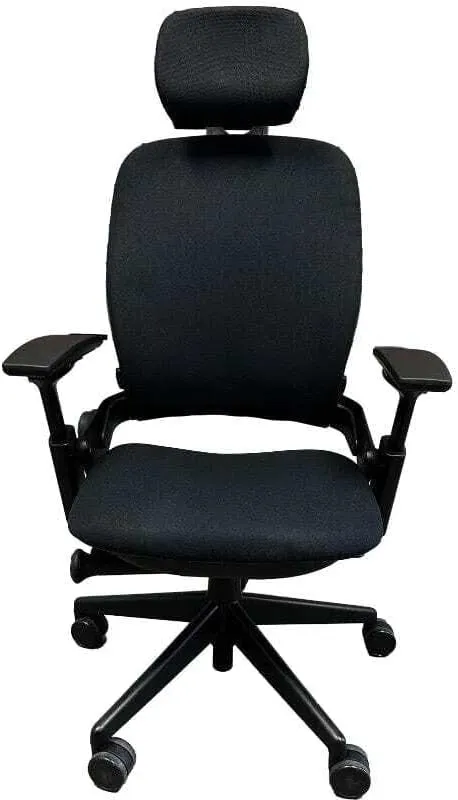
Price: ~$1,500
Already covered in our Steelcase Leap vs Herman Miller Aeron comparison, but worth including here because the Leap V2's design specifically suits long sessions in ways that aren't obvious from a short test.
The LiveBack system means the chair adjusts as you move, so the lumbar support stays relevant as you shift through your natural daily movements instead of pressing against your back at the same fixed point for 8 hours. For all-day sitters, this prevents the fatigue that comes from a chair that only supports one position.
The natural glide mechanism slides the seat forward slightly when you recline, keeping the hip angle healthy. You can lean back without the seat edge digging in as your posture changes.
For long hours, many people prefer the Leap over the Aeron simply because the Leap moves with them instead of requiring them to move back into the Aeron's configured position.
Pros
- LiveBack adapts through all position changes over a long day
- Natural glide keeps hip angle healthy during recline
- Adjustable lower back firmness for all-day comfort tuning
- High weight limit (400 lbs)
Cons
- Foam seat gets warm over long sessions
- More expensive than the Embody only in specific configurations
- Single size limits fit for very short or very tall users
Check Steelcase Leap V2 price on Amazon
Autonomous ErgoChair Ultra: Under $600, Mesh Seat
Price: ~$599
At $599, the ErgoChair Ultra is the best mid-range option for all-day sitting. It has a mesh back, a mesh seat, 11 adjustment points, and a recline up to 135 degrees. The lumbar support adjusts in both height and tension.
The mesh seat keeps it cooler than any foam-seated chair in this price range. After year-one owner reviews, the most common complaint is the armrests (they're adjustable but not as solid as the premium options). The most common praise is that it holds up to all-day use without creating the pressure points that cheaper chairs produce after a few hours.
It's not a Herman Miller. The build quality, adjustment feel, and longevity aren't in the same category. But at a third of the price, it covers most of the ergonomic needs for sustained sitting.
Pros
- Mesh seat and mesh back keep it cooler over long sessions
- 11 adjustment points including lumbar height and tension
- Reclines to 135 degrees with neck rest support
- Competitive price for the feature set
Cons
- Armrests feel less solid than premium options
- Not as durable as Herman Miller or Steelcase over 5 to 10 years
- Lumbar adjustment range is less precise than Aeron or Leap
Check Autonomous ErgoChair on Amazon
FlexiSpot C7: Best bang for $300
Price: ~$300 (sale) / $430 regular
The C7 is FlexiSpot's most-reviewed ergonomic chair at this price, with 1,276 reviews and a 10-year warranty. Mesh back, adjustable seat depth, 90° to 130° recline, and a self-adaptive dynamic lumbar that tracks your position changes rather than sitting fixed at one point.
That lumbar design is the standout feature here. Most chairs under $400 use a fixed lumbar pad that helps when you're upright and stops helping the moment you shift or lean forward. The C7's self-adaptive lumbar follows your movement to some degree. Not the same as the Leap V2's LiveBack, but noticeably better than a static pad for long sessions.
The default seat is foam. It warms up after a few hours the way all foam seats do. If your office runs warm, upgrade to the mesh seat option at checkout (same chair, cooler).
One real limitation: the recommended height range is 5'5" to 6'11". If you're shorter than 5'5", the seat's height adjustment range may leave your feet not fully flat on the floor. Check that before buying.
Pros
- Self-adaptive dynamic lumbar at this price is uncommon
- Mesh back standard; mesh seat option available
- Adjustable seat depth reduces thigh pressure over long sessions
- 10-year warranty
Cons
- Default foam seat warms up after hour 3-4
- Recommended height 5'5" minimum, not ideal for shorter users
- 3D armrests only (no pivot adjustment)
Check FlexiSpot C7 price on FlexiSpot
Branch Ergonomic Chair: If $300 is the ceiling
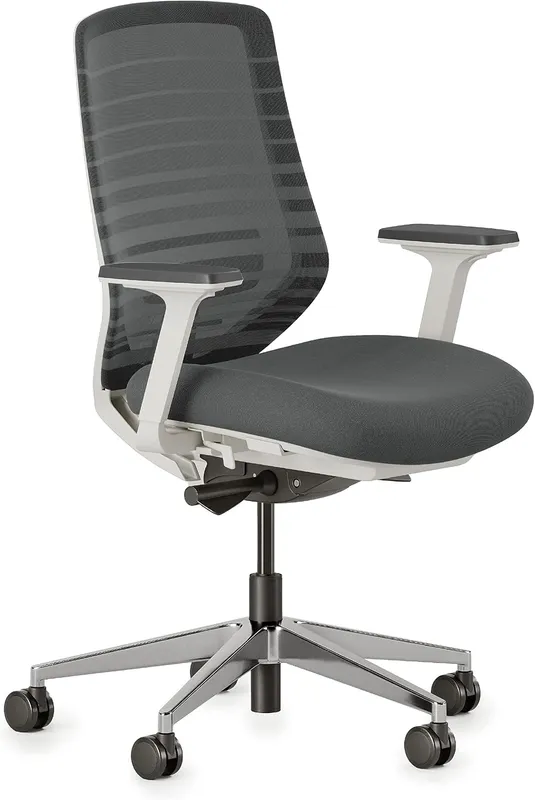
Price: ~$299
Already recommended in our best office chair under $300 guide, the Branch is worth a mention here because it specifically holds up better than most $300 chairs over long sessions.
The seat depth adjustment (2 inches) is the key feature for long hours. Being able to pull the seat back so your thighs aren't overextended makes a noticeable difference after hour 3 or 4. Most chairs at this price don't offer seat depth adjustment.
It won't match the premium options over an 8-hour day. The foam seat compresses over time and the adjustability range is narrower. But if you're building a home office on a budget and can't justify $600+, Branch is the right starting point.
Pros
- 2-inch seat depth adjustment unusual at this price
- Waterfall seat edge reduces thigh pressure
- Adjustable lumbar height
- Available in tall configuration for longer legs
Cons
- Foam seat less comfortable than mesh after hour 4+
- Limited recline range compared to premium options
- Not as durable over 10+ years of heavy daily use
Check Branch Ergonomic Chair price on Amazon
Standing desk pairing
If you're sitting 8+ hours a day at a computer, a standing desk is a more effective intervention than a better chair. Alternating between sitting and standing every 60 to 90 minutes reduces the static load that contributes to back fatigue, hip tightness, and the general discomfort that accumulates over a long session.
The chair supports you while sitting. A standing desk reduces how much sitting you're doing. They're complementary, not alternatives. Our best standing desks for home office guide covers options at every budget.
FAQ
How long should you sit in an office chair? No more than 60 to 90 minutes at a stretch, regardless of the chair. Even the best ergonomic chairs can't compensate for static prolonged sitting. Standing up, walking briefly, or using a standing desk periodically matters more than the chair quality for truly long sessions.
Is a $1,000 chair worth it for working from home? If you're sitting 7 to 8 hours daily, yes. Amortized over a 10-year lifespan, a $1,500 chair costs less than a daily coffee.
The productivity and comfort gains over a decade of daily use are significant. If you're sitting 3 to 4 hours, a $300 chair is enough.
Does chair quality affect productivity? Physically, yes. Discomfort, pain, and shifting around to find a comfortable position all interrupt focus. Whether the marginal improvement from a $1,500 chair over a $500 chair justifies the cost is a personal calculation based on your daily hours and sensitivity to discomfort.
What's the best chair under $500 for long hours? The Autonomous ErgoChair Ultra at $599 is close. Under $400 strictly, the FlexiSpot C7 at $300 is the standout: self-adaptive lumbar, mesh back, adjustable seat depth, and a 10-year warranty at that price are uncommon.
Do gaming chairs work for long computer sessions? Most don't, despite the marketing. Gaming chairs typically prioritize appearance over ergonomics, have limited lumbar adjustability, and use foam that compresses quickly. A purpose-built ergonomic chair outperforms gaming chairs for long work sessions across the board.
What should you do if your computer chair cylinder starts sinking? A failing pneumatic gas cylinder causes the chair to sink slowly when you sit. You can replace the cylinder or clamp it at the correct height using our guide on how to fix a sinking office chair without having to buy a whole new chair.
Bottom line
For true 8+ hour daily sitting: the Herman Miller Embody is the purpose-built answer and genuinely different from other expensive chairs. The Steelcase Leap V2 is the best adaptive option if you move a lot throughout the day.
Budget under $600: the Autonomous ErgoChair Ultra's mesh seat and 11-point adjustability are worth the price for long sessions.
Under $350: the FlexiSpot C7's self-adaptive lumbar and mesh back beat most alternatives at the price.
Starting out and not sure how much you'll actually use it: the Branch at $299 is the right entry point with room to upgrade later.
Prices checked July 2026.
Essential Workstation Add-Ons Under $35
High-impact accessories verified by our research team to protect your cables and joints.
VIVO Under-Desk Cable Tray
Keeps power strips and heavy adapters off the floor so cables never yank when elevating.
ComfiLife Gel Anti-Fatigue Mat
High-density core reduces heel strike and lower back compression when standing 3+ hours.
VELCRO Brand ONE-WRAP (100pk)
Pre-cut reusable straps that easily unwrap for cord re-routing without scissors.
Soundance Ergonomic Laptop Stand
Elevates laptop screen 6 inches to eye level, preventing forward neck slouch.
Calculate Your Exact Desk & Chair Height
Slide to your height to see ANSI/BIFMA recommended standing and sitting presets.

Written by M. Haris
✓ BIFMA G1-2017 Certified EvaluatorFounder & Lead Workstation Ergonomics Researcher • 8+ Years Spec Testing
M. Haris leads ergonomic research at The Desk Riser, auditing manufacturer CAD schematics, motor cycle lifespan metrics, BIFMA weight load standards, and long-term user failure patterns across thousands of verified purchases. Every review is independent with 0% sponsored influence. Have questions or spot a warranty update? Email directly at support@thedeskriser.com, read the Author Dossier, or explore our Editorial Testing Methodology.
Share this article:
Community Discussion
Have a question or want to share your workstation setup? Join the discussion below.
Comments load automatically as you scroll down.