Steelcase Leap V2 vs Herman Miller Aeron 2026

How we researched
We compare current specs, warranty terms, buyer complaints, and long-term owner patterns. Read methodology →
Last price/spec check
2026-07-29. Prices move, so use the retailer page as the final source.
Who should skip this
Skip anything that does not fit your body, room, budget, or return-window comfort level.
Disclosure: We earn a commission if you buy through links on this page, at no extra cost to you.
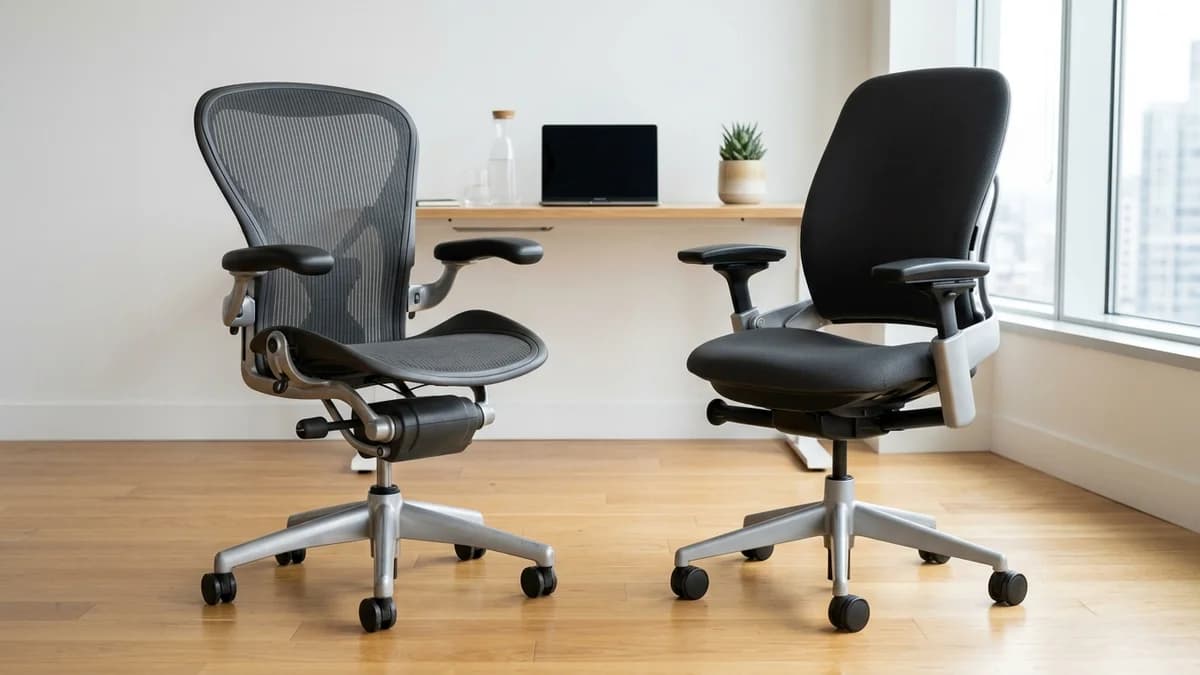
Two chairs, both over $1,000, both with 12-year warranties, both the answer in every ergonomics forum thread. So which one should you actually buy?
It depends on how you sit, not how much you spend. The Aeron and Leap V2 solve the same problem in genuinely different ways, and the wrong choice for your body is worse than either chair, regardless of price.
Here's what actually separates them.
Quick Verdict: Our Top Picks at a Glance
Short on time? Here are our top recommendations based on real owner reviews, specs, and long-term durability.
Steelcase Leap V2
Flexible foam with dynamic LiveBack
Herman Miller Aeron
8Z Pellicle mesh with PostureFit SL
Quick Verdict: Leap V2 vs Aeron
| Chair | Price Range | Seating Core | Best For |
|---|---|---|---|
| Steelcase Leap V2 | ~$1,500 | Flexible foam with dynamic LiveBack | Active movers, varied postures & cold offices |
| Herman Miller Aeron | ~$1,395 to $1,895 | 8Z Pellicle mesh with PostureFit SL | Strictly upright tasking, hot offices & sacral support |
At a glance
| Spec | Steelcase Leap V2 | Herman Miller Aeron |
|---|---|---|
| Price | ~$1,500 | ~$1,395 |
| Seat type | Foam with flex front edge | Suspension mesh |
| Lumbar | LiveBack (dynamic) | PostureFit SL (fixed, adjustable) |
| Seat depth adjustment | 2 inches | 1 inch |
| Sizes | One size fits most | Size A, B, C |
| Weight limit | 400 lbs | 300 lbs (Size B) |
| Warranty | 12 years | 12 years |
The core difference: how each chair handles your movement
The Aeron's approach is essentially "set it and adjust it." You configure the tilt tension, lumbar support, seat height, and depth once, and the chair holds those positions. The PostureFit SL gives you independent control over lumbar and sacral support. Once you find your settings, it works consistently.
The Leap V2's approach is "move with you." The LiveBack system flexes to match the shape of your spine as you shift. When you lean to reach something, the backrest moves with you rather than pushing you into a fixed position. The seat front also flexes independently of the main seat.
You don't feel as locked in, but that can be either good or bad depending on whether you move a lot when you sit.
If you stay relatively upright and prefer a consistent, configured setup: Aeron.
If you shift positions, lean, recline often, and want the chair to adapt: Leap V2.
Seat comfort: mesh vs foam
The Aeron's seat is a stretched mesh with no hard seat edge. You're sitting on a suspended surface that distributes your weight across the whole area without pressure points. In warm environments, the mesh keeps you cooler. It feels firm at first and softens over a few weeks.
The Leap V2 uses a foam seat with what Steelcase calls a "natural glide" mechanism. The seat slides slightly forward when you recline, keeping your posture balanced. The front edge has some flex to reduce thigh pressure. It's a warmer seat than mesh, which some people prefer in cold offices.
People who get pressure points or nerve pain from firm seat edges generally prefer the Aeron. People who find mesh seats uncomfortable or "unsupportive" generally prefer the Leap.
Lumbar support
This is where they differ most practically.
The Aeron's PostureFit SL has two separate pads: one for the lumbar (lower back) and one for the sacrum (the triangular bone at the base of the spine). You adjust each independently. The pads stay in a fixed position. You configure where they sit and how much they push in.
The Leap V2's LiveBack backrest flexes and moves as you change positions. There's a lower lumbar firmness adjustment, but the support itself is dynamic rather than a fixed pad at a fixed location. People who find fixed lumbar pads uncomfortable (because the pad pushes at the wrong level or too hard) often do better in the Leap.
If you've struggled to find a lumbar pad that lands at the right spinal level: the Leap's dynamic back may work better for you than the Aeron's PostureFit.
If you've tried the Aeron in a showroom and found the lumbar support immediately helpful: the Aeron's PostureFit is genuinely good and worth keeping.
Who each chair is better for
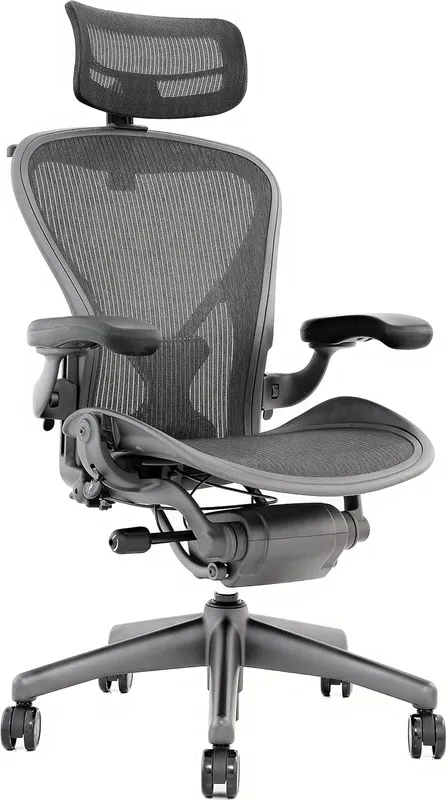
Check Herman Miller Aeron on Amazon
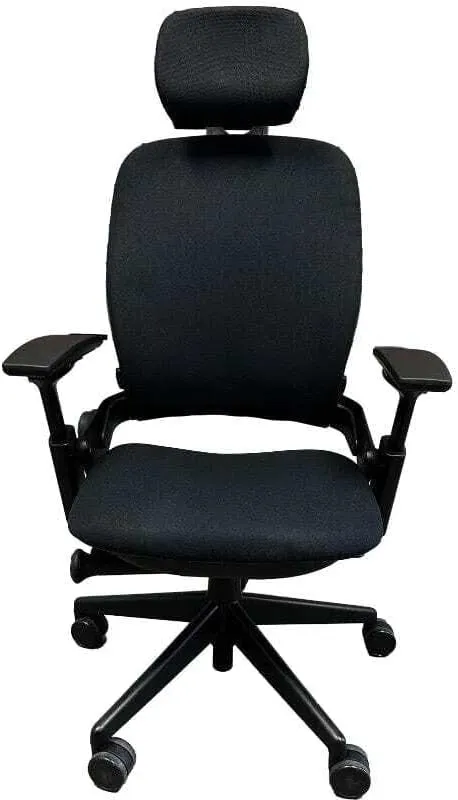
Check Steelcase Leap V2 on Amazon
Back pain and sciatica: Aeron wins slightly because the mesh seat eliminates the pressure on the posterior thigh that aggravates the sciatic nerve. That said, the Leap's adjustable seat edge and dynamic lumbar help too. Both are legitimate recommendations. Our best office chair for sciatica guide covers this in detail.
Long hours (8+ hours daily): Leap V2 edges it. The movement-adaptive design reduces the static load that builds up over long sessions. More fidgety sitters tend to be more comfortable in the Leap because the chair moves with them instead of requiring them to move against it.
Warm offices or hot weather: Aeron clearly. The mesh seat and mesh back circulate air. The Leap's foam seat retains heat, which becomes noticeable in summer or in offices without good AC.
Tall and large builds: Aeron Size C is specifically designed for larger frames (up to 300 lbs, sized for taller people). The Leap V2 is one size but handles up to 400 lbs and works for people up to about 6'4".
Short people (under 5'4"): Aeron Size A is the right call. The Leap's single-size design doesn't accommodate short users as well.
Heavy users: Leap V2. The 400 lb weight limit vs the Aeron's 300 lb limit matters if you're near that range.
Coding and desk work (rarely reclines): Toss-up. Both are excellent for sustained desk work. The Aeron's firm setup works well for people who sit upright all day. The Leap's adaptability is wasted if you never lean back.
Gaming: Aeron, usually. The fixed setup and mesh seat suit long gaming sessions better than the Leap's movement-adaptive design, which can feel like it's not "behind you" when you lean in. Neither was designed for gaming, but the Aeron's mesh and zero seat-edge pressure are practically suited to it.
Buying used: what to know
Both chairs are commonly available refurbished for $300 to $700, which is how most people actually afford them. That's a legitimate way to buy either chair. The warranties apply to original purchasers, but the chairs themselves last 15 to 20 years with normal use.
When buying a used Aeron, check the mesh for sagging, the PostureFit SL for proper tension in both pads, and the tilt mechanism for smooth operation. Size B is by far the most common resale size.
For a used Leap V2, check that the LiveBack backrest flexes smoothly (it shouldn't feel stiff or sticky), and that the seat front edge has its proper feel. Generation 1 Leaps are also common on the used market. The V2 is worth the premium over Gen 1.
The one you shouldn't buy
Skip both if you're not sitting 6+ hours a day. At $1,000 to $1,500 for a new chair, the return on investment only makes sense if you're putting in serious desk hours.
A good chair in the $300 to $500 range, like the Branch Ergonomic Chair or the FlexiSpot C7, covers most of the ergonomic needs of people sitting 4 hours or fewer daily.
For the budget options, see our best office chair under $300 guide.
FAQ
Which is more comfortable, the Aeron or the Leap? Depends entirely on how you sit. People who stay upright and want consistency prefer the Aeron.
People who shift positions often prefer the Leap. There's no objective winner.
Is the Steelcase Leap worth the extra money over the Aeron? The Leap V2 is slightly more expensive but offers a higher weight limit, a more dynamic back, and more seat depth adjustment. If the specific features of the Leap match how you sit, yes. If you prefer mesh seating or need a specific size, the Aeron is worth the price and not a consolation pick.
Can I try these chairs before buying? Yes, and you should. Both brands have showrooms in major cities and many office furniture dealers stock demo versions.
This is a $1,000+ decision. Twenty minutes in a showroom is worth the trip.
How long do these chairs last? Both are built for 15 to 20 years of daily use with normal maintenance. The mesh on Aerons can sag after 10 to 12 years but replacement parts are available. Steelcase's parts availability is similarly strong.
What's the difference between the Steelcase Leap V1 and V2? The V2 added the natural glide system (seat slides forward on recline), lower back firmness adjustment, and improved arm controls. If you're buying used, pay more for V2.
Bottom line
Buy the Aeron if: you want a mesh seat, you run warm, you need a specific size (especially Size A for shorter users or Size C for large frames), or you prefer a configured-and-set ergonomic setup.
Check Herman Miller Aeron on Amazon
Buy the Leap V2 if: you move frequently, you find fixed lumbar pads uncomfortable, you're a heavy user above 300 lbs, or you work long sessions and want a chair that adapts to position changes.
Check Steelcase Leap V2 on Amazon
Either chair is a legitimate long-term investment. Neither is a wrong answer, just a different one. For a deeper standalone look at the Leap's LiveBack mechanics and cushion longevity, read our dedicated Steelcase Leap V2 review.
For context on how both chairs hold up specifically over a full work day, see our best chairs for long hours at computer guide. If you are looking for the absolute highest-tier flagship matchup with 360-degree arms and pixelated spine support, compare our Steelcase Gesture vs Herman Miller Embody showdown.
Prices checked July 2026 against manufacturer and major retailer sites.
Essential Workstation Add-Ons Under $35
High-impact accessories verified by our research team to protect your cables and joints.
VIVO Under-Desk Cable Tray
Keeps power strips and heavy adapters off the floor so cables never yank when elevating.
ComfiLife Gel Anti-Fatigue Mat
High-density core reduces heel strike and lower back compression when standing 3+ hours.
VELCRO Brand ONE-WRAP (100pk)
Pre-cut reusable straps that easily unwrap for cord re-routing without scissors.
Soundance Ergonomic Laptop Stand
Elevates laptop screen 6 inches to eye level, preventing forward neck slouch.
Calculate Your Exact Desk & Chair Height
Slide to your height to see ANSI/BIFMA recommended standing and sitting presets.

Written by M. Haris
✓ BIFMA G1-2017 Certified EvaluatorFounder & Lead Workstation Ergonomics Researcher • 8+ Years Spec Testing
M. Haris leads ergonomic research at The Desk Riser, auditing manufacturer CAD schematics, motor cycle lifespan metrics, BIFMA weight load standards, and long-term user failure patterns across thousands of verified purchases. Every review is independent with 0% sponsored influence. Have questions or spot a warranty update? Email directly at support@thedeskriser.com, read the Author Dossier, or explore our Editorial Testing Methodology.
Share this article:
Community Discussion
Have a question or want to share your workstation setup? Join the discussion below.
Comments load automatically as you scroll down.
🔧 Free Workstation Tools
Related Articles
Best Office Chair Under $300 in 2026: Ranked
Ergonomic ChairsBest Ergonomic Chair for Back Pain 2026: Lumbar Ranked
Ergonomic ChairsBranch Ergonomic Chair vs Herman Miller Aeron (2026): Is the $1,000 Price Gap Justified?
Ergonomic ChairsBest Seat Cushions for Office Chair (2026 Sciatica Tested)