Best Ergonomic Chair for Back Pain 2026: Lumbar Ranked
How we researched
We compare current specs, warranty terms, buyer complaints, and long-term owner patterns. Read methodology →
Last price/spec check
2026-07-29. Prices move, so use the retailer page as the final source.
Who should skip this
Skip anything that does not fit your body, room, budget, or return-window comfort level.
Disclosure: We earn a commission if you buy through links on this page, at no extra cost to you.
Your lower back doesn't hurt because you have bad posture. It hurts because you're sitting in a chair that wasn't designed for your body. That's the part most people miss until they've spent $200 on something that felt fine for two weeks and terrible by month three.
The chairs in this list are ranked based on adjustability specs and long-term owner reviews, not marketing copy. Every one of them has real drawbacks. None of them are a miracle fix.
Quick Verdict: Our Top Picks at a Glance
Short on time? Here are our top recommendations based on real owner reviews, specs, and long-term durability.
Quick comparison
| Chair | Price | Lumbar | Seat Depth Adj | Recline | Warranty |
|---|---|---|---|---|---|
| Herman Miller Aeron | ~$1,445 | PostureFit SL | No | Forward tilt option | 12 years |
| Steelcase Leap V2 | ~$1,375 | LiveBack, adjustable firmness | Yes | Fully adjustable | 12 years |
| Branch Ergonomic Chair | ~$299 | Adjustable height pillow | No | 3-position lock | 5 years |
| Autonomous ErgoChair Ultra | ~$499 | Adjustable knob | Yes | Adjustable | 2 years |
| FlexiSpot C7 | ~$300 | Self-adaptive dynamic | Yes | 90°-130° | 10 years |
Herman Miller Aeron. Best overall for back pain
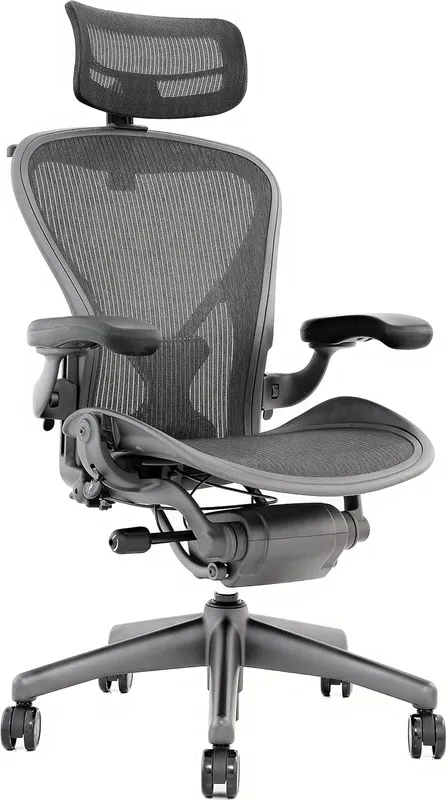
The Aeron has been the standard ergonomic recommendation since 1994 for a specific reason. The PostureFit SL system supports both your sacrum and your lumbar at the same time. Most chairs only address lumbar. When your sacrum isn't supported, you're constantly fighting to maintain the natural S-curve of your spine.
The 8Z Pellicle mesh distributes weight evenly with no pressure points and no heat buildup. Three sizes (A, B, C) exist so you're buying a chair for your actual body, not an average one. The 12-year warranty reflects the expected lifespan under daily use.
What you give up: no seat depth adjustment, which matters if your thighs are longer than average. And $1,445 is hard to justify without trying one first. Herman Miller offers a 30-day trial, but return shipping is your responsibility.
Who it's for: Anyone with chronic lower back pain who works 7 or more hours a day and plans to use the chair for a decade.
Skip it if: You're tall with long legs, not sure about long-term home office work, or can't try one before committing.
Check Herman Miller Aeron price on Amazon
Steelcase Leap V2. Best for adjustable lumbar support
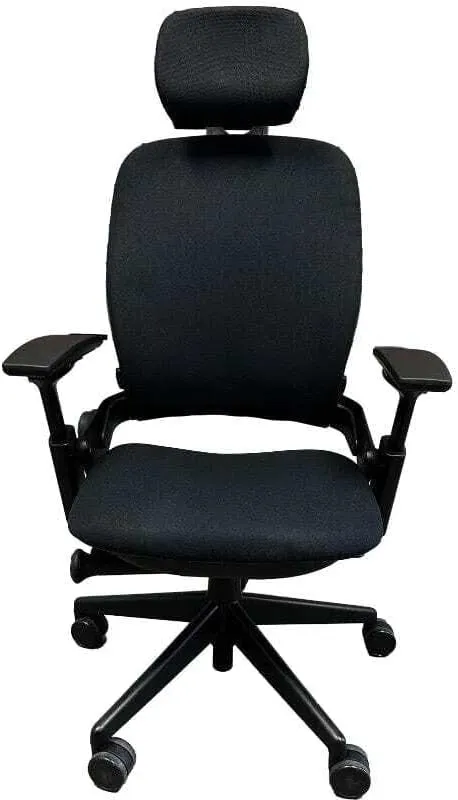
The Leap V2 is what ergonomics specialists often buy for themselves. The difference is LiveBack technology. The backrest has two independently moving zones and flexes to follow your spine as you shift position. You're not locked into a single lumbar setting throughout the day.
The lower lumbar firmness control is something no other chair in this list has. You set how much push-back you want from the lumbar zone. Some people need firm support. Others need gentle curvature.
This is the one feature that separates the Leap from everything else at any price. Seat depth adjusts, armrests move in four directions, and the recline is fully customizable.
Real downside: $1,375 and it looks like a conference room chair. Not every home office wants that. The learning curve on the controls is real, and most people spend their first week with everything set wrong.
Who it's for: Anyone with specific lumbar positioning needs, or anyone who's tried an Aeron and found the fixed position wrong for their body. Read our comprehensive Steelcase Leap V2 review for our full breakdown of the LiveBack system.
Skip it if: You want something that looks like home furniture rather than office equipment.
Check Steelcase Leap V2 price on Amazon
Branch Ergonomic Chair. Best under $300
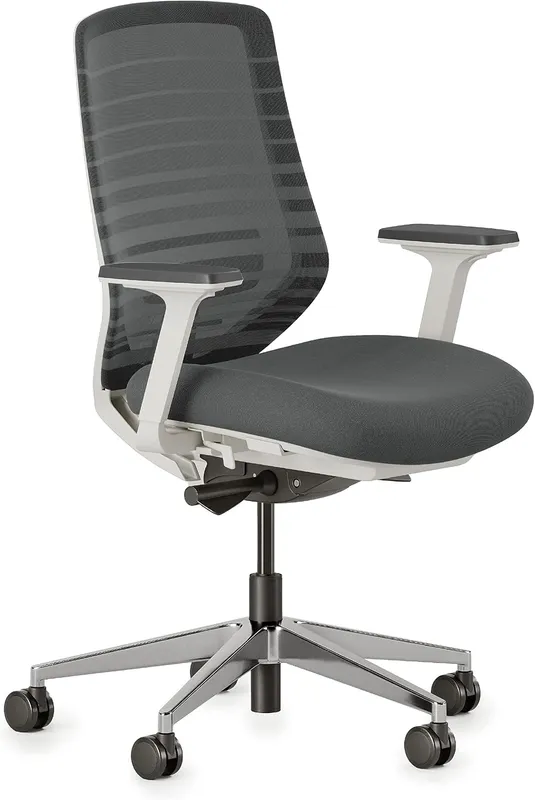
For under $300, Branch delivers the most adjustability in this price range. The lumbar pillow slides vertically to match where your lower back sits. Armrests are 4D. Recline locks in three positions.
Based on thousands of long-term owner reviews, it holds up well through daily use. The mesh breathes and the cushioning doesn't flatten quickly, which are the two most common failure modes for chairs at this price.
The limitation is no seat depth adjustment. Over 5'10" with longer-than-average thighs means you'll perch at the front edge and lose lumbar contact. The lumbar pillow is also genuinely good but isn't in the same class as PostureFit SL. If you have a diagnosed disc or structural issue, the gap to an Aeron is worth considering.
Who it's for: Budget-focused buyers working 5 or more hours a day who aren't exceptionally tall.
Skip it if: You have a diagnosed back condition, you're over 5'10", or you need seat depth adjustment.
Check Branch Ergonomic Chair price on Amazon
For more options at this price, our guide to the best office chairs under $300 covers five alternatives with honest comparisons.
Autonomous ErgoChair Ultra. Best mid-range option
At $499, the ErgoChair Ultra is full mesh from seat to back, which keeps it cooler than foam-seat chairs during long sessions. The lumbar support adjusts via a physical knob. Seat depth adjusts. Armrests are 4D.
For taller users who need seat depth adjustment but can't reach the Leap's price, this fills the gap that the Branch leaves.
The build quality is the honest concern. The mechanisms work but don't feel as solid as Steelcase or Herman Miller. Some owners report armrest wobble within the first year. Autonomous's warranty service has mixed reviews.
The 2-year warranty versus 12 years for premium chairs is the tell on expected lifespan.
Who it's for: Users 5'11" and up who need seat depth adjustment and prefer full mesh.
Skip it if: You want a chair that lasts ten years without issue.
FlexiSpot C7. Best budget pick
The C7 hits the key adjustability marks at around $300, and the warranty is the surprise. Ten years, at a price where most competitors offer two. That tells you something about build confidence.
Seat depth adjusts, which is the one feature that separates chairs for taller users from chairs that don't work for them. Lumbar is self-adaptive dynamic, meaning it tracks your spine's position across movements rather than sitting at one fixed point. That's a meaningful step above the fixed lumbar pillows you get from competitors at this price. Recline goes from 90° to 130°, armrests are 3D.
Recommended height range is 5'5" to 6'11". If you're shorter than that, the seat height adjustment range may not work for you. Check that before buying.
For the price, the combination of seat depth adjustment, adaptive lumbar, and a real warranty is harder to beat.
Who it's for: Taller budget buyers who need seat depth adjustment, or anyone who wants solid adjustability without jumping to $500+.
Skip it if: You're under 5'5" (height range doesn't support it) or want a mesh seat (the default is foam, though a mesh seat option exists at checkout).
The features that actually help back pain
Adjustable lumbar height. Not just "has lumbar support." Everyone's lower back sits at a different height. A fixed lumbar bump works for some bodies and fails for others.
Seat depth adjustment. When you sit fully back, you should have two to three finger widths of space between the seat edge and the back of your knees. Without seat depth adjustment, tall users end up perching forward and losing lumbar contact.
Lockable recline. Sitting at exactly 90 degrees compresses the lumbar discs. A slight recline, around 100 to 110 degrees, reduces that pressure. A good chair lets you lock the recline at an angle, not just rock loosely.
Armrests that adjust inward. Shrugged or dropped shoulders create tension that travels down your upper back and reads as back pain. Armrests that adjust in at least three directions fix this.
When a better chair won't solve the problem
If you have diagnosed disc herniation, spinal stenosis, or nerve issues, no chair fully addresses the root cause. A physical therapist's input plus targeted exercises will help more than any chair upgrade.
If you're sitting for 9 or 10 hours straight no matter what you're sitting in, movement is still the missing piece. Alternating between sitting and standing throughout the day helps more than the chair alone. If you're building out a full home office, our guide to the best standing desks for home offices covers what to look for.
FAQ
Is a $1,000+ ergonomic chair worth it for back pain?
For someone with a diagnosed back issue who sits 7 or more hours a day, yes. The adjustability range of an Aeron or Leap is genuinely different from budget chairs. At 10 years, the Aeron works out to roughly $12 a month, which is cheap for something that's affecting your health daily.
What chair feature matters most for lower back pain?
Adjustable lumbar height is the single most important feature. After that, seat depth adjustment and a recline that locks at angles beyond 90 degrees.
Do gaming chairs help with back pain?
Generally no. Gaming chairs prioritize aesthetics and bucket seating over ergonomic adjustability. Fixed lumbar pillows sit at the wrong height for many users and aren't adjustable.
How long should an ergonomic chair last?
Herman Miller and Steelcase warrant their chairs for 12 years under daily use. Budget chairs in the $200 to $300 range realistically last 3 to 5 years before mechanisms or foam wear out.
Mesh or foam seat for back pain?
Neither is automatically better. Mesh distributes pressure and stays cool. Dense foam provides more cushioning. For back pain specifically, the support architecture underneath the surface material matters more than the material itself.
Bottom line
Herman Miller Aeron for most people with chronic back pain, if budget allows. Steelcase Leap V2 if you move around a lot while working. Branch Ergonomic Chair as the best budget option for average-height users.
Don't pick a chair for back pain based on brand recognition. The adjustability specs tell you more than the price tag does.
If you already own an office chair and want to add targeted lower back support without buying a whole new chair, check our guide to the best lumbar support pillows for office chairs. If your pain radiates down your leg, that's typically sciatica rather than general back pain, with different seat requirements. Our best chairs for sciatica guide covers the seat-edge and nerve-compression angle specifically.
Exclusive Savings on Ergonomic Chair for Back Pain 2026
Click to copy coupon code and open the verified retailer discount page in a new tab.
Essential Workstation Add-Ons Under $35
High-impact accessories verified by our research team to protect your cables and joints.
VIVO Under-Desk Cable Tray
Keeps power strips and heavy adapters off the floor so cables never yank when elevating.
ComfiLife Gel Anti-Fatigue Mat
High-density core reduces heel strike and lower back compression when standing 3+ hours.
VELCRO Brand ONE-WRAP (100pk)
Pre-cut reusable straps that easily unwrap for cord re-routing without scissors.
Soundance Ergonomic Laptop Stand
Elevates laptop screen 6 inches to eye level, preventing forward neck slouch.
Calculate Your Exact Desk & Chair Height
Slide to your height to see ANSI/BIFMA recommended standing and sitting presets.
Written by M. Haris
✓ BIFMA G1-2017 Certified EvaluatorFounder & Lead Workstation Ergonomics Researcher • 8+ Years Spec Testing
M. Haris leads ergonomic research at The Desk Riser, auditing manufacturer CAD schematics, motor cycle lifespan metrics, BIFMA weight load standards, and long-term user failure patterns across thousands of verified purchases. Every review is independent with 0% sponsored influence. Have questions or spot a warranty update? Email directly at support@thedeskriser.com or explore our Editorial Testing Methodology.
Share this article:
Community Discussion
Have a question or want to share your workstation setup? Join the discussion below.
Comments load automatically as you scroll down.