Best Office Chair for Posture 2026: What Actually Works
Published 2026-08-06
How we researched
We compare current specs, warranty terms, buyer complaints, and long-term owner patterns. No fake hands-on claims.
Last price/spec check
2026-08-06. Prices move, so use the retailer page as the final source.
Who should skip this
Skip anything that does not fit your body, room, budget, or return-window comfort level.
Disclosure: We earn a commission if you buy through links on this page, at no extra cost to you.
By 2pm, your head is 3 inches forward of your shoulders. Your lower back has lost its curve. Your shoulders are rolled in.
You tell yourself you need to sit up straighter. You do, for about four minutes.
Here's the thing: if you need to think about sitting correctly, the chair is wrong. A proper posture chair should hold you in a neutral spine position without effort. When a chair is actually designed for posture, correct sitting happens automatically.
This article covers four chairs specifically evaluated for posture mechanics, not just general comfort. The criteria are different, and so are the picks.
If you're shopping for general ergonomic quality without a specific posture focus, the best ergonomic office chairs guide covers a wider range. If you already have back pain rather than trying to prevent it, the best chairs for back pain has more specific guidance.
What Actually Causes Bad Posture in a Chair
Bad posture is almost never a willpower problem. It's a geometry problem.
Your spine maintains its natural S-curve only when your pelvis is in a neutral position. Sitting in a chair that's too deep for your legs forces your pelvis to tilt back and your lumbar curve flattens. A backrest that pushes too hard makes you lean forward to escape it.
A seat pan that's too soft lets you sink and slump without noticing. None of these are things you can fix by concentrating harder.
The chairs that work for posture address one or more of these mechanics directly. The ones that don't just offer cushioning and call it ergonomic.
The 4 Chair Features That Fix Posture
Seat depth adjustment. If you can't sit all the way back in the chair with the lumbar support actually touching your back, the lumbar does nothing. A 2-inch seat depth adjustment range is often the difference between a chair that works for posture and one that doesn't.
Seat pan tilt (forward tilt). A forward-tilted seat pan rotates the pelvis forward, which automatically straightens the lumbar spine. It sounds minor.
It isn't. The Aeron and Leap V2 both have this. Budget chairs almost never do.
Lumbar height adjustability. Everyone's lumbar is at a slightly different height. A fixed lumbar bump set for average anatomy will push too high or too low on most people and cause more problems than it solves. Height-adjustable lumbar support is non-negotiable for real posture improvement.
Backrest tension control. A backrest that's too stiff pushes you forward out of it. Too loose and there's no support. Proper tension lets the chair hold you without resistance, which is what keeps you from fighting your way out of the correct position by 1pm.
What Doesn't Help Posture (despite what the marketing says)
Lumbar pillows attached with velcro almost never hit the right spot and shift throughout the day. Memory foam seats feel comfortable but let you sink into whatever position you naturally adopt rather than supporting a specific alignment. "Ergonomic curves" built into a fixed, non-adjustable frame only work if your measurements match the person the chair was designed for.
Best Office Chairs for Posture 2026
FlexiSpot C7: Best Under $400 for Posture
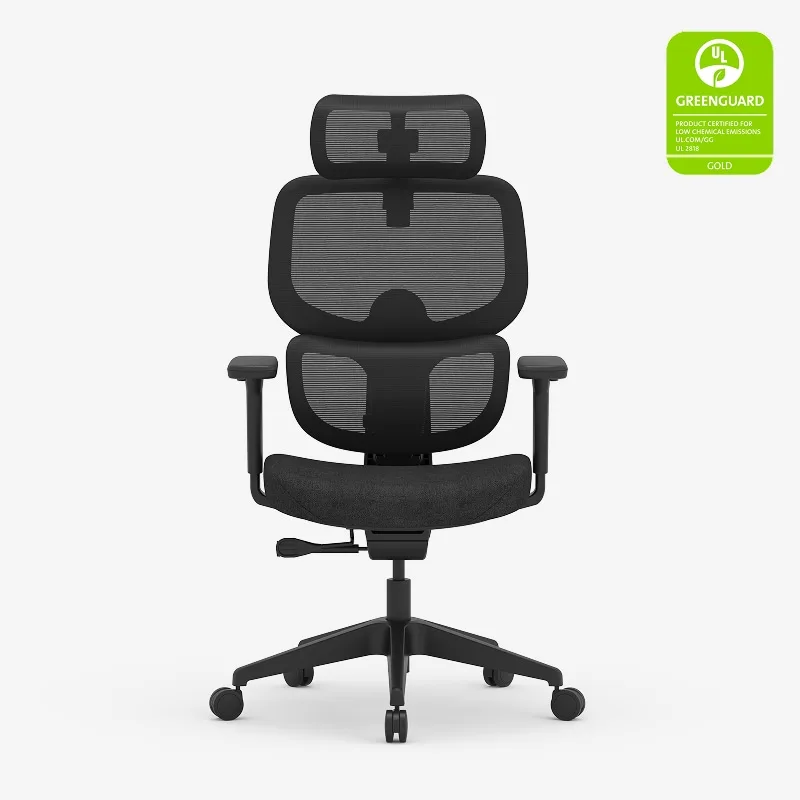
The C7 is the posture pick at the budget end, and the reason is specific: it has height-adjustable lumbar support and seat depth adjustment in the same chair at $300 to $430. Most chairs at this price have one or the other. The combination matters because you can actually get the lumbar to make contact with your back.
The self-adaptive lumbar system adjusts as you shift positions rather than locking you into one spot. For posture use, this is better than a firm fixed pad. The 3D armrests (height, width, depth, and angle) let you position them close enough to unload your arms and reduce the shoulder-rounding that comes from unsupported arm weight.
The seat depth adjusts about 2 inches. That's enough to make a real difference for taller users who normally end up perched on the front edge of chairs. You can sit fully back and have the lumbar in the right place.
Honest limitation: no forward tilt on the seat pan. The Leap V2 and Aeron both have that and it's genuinely useful for posture. The C7 gets you 80% of the way there at 30% of the price. For most people who can't spend $1,400 on a chair, that's the right trade.
Who it's for: Budget-focused buyers who need real posture support. Home offices where the chair cost is a genuine constraint.
Who should skip: If you work 8+ hours daily and posture is already causing symptoms, spend more. The mechanical advantages of the Leap V2 are worth the premium at that usage level.
Branch Ergonomic Chair: Best Under $350 Budget Pick
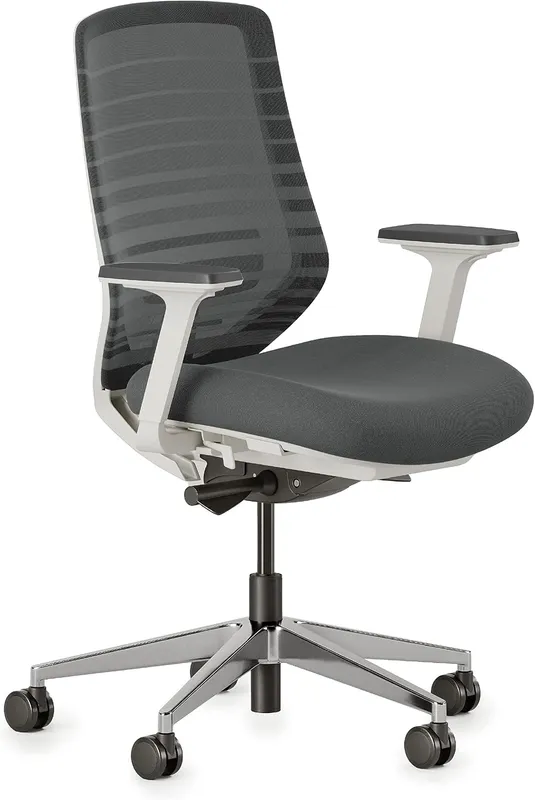
The Branch is the other budget posture option, with a height-adjustable lumbar support that can be moved to find your specific curve. At $299, it's the lowest price where you get actual posture mechanics rather than just cushioning.
The lumbar adjustment is the main posture feature here. You can move it up or down until it hits the right spot for your spine. For many buyers, that alone fixes the mid-afternoon slump because the support is finally in contact with the right vertebral level.
The honest limitation you need to know: no seat depth adjustment. If you're taller than about 5'11" or have longer legs relative to your torso, you'll end up sitting forward of the full seat depth to avoid pressure behind the knees. That moves you away from the lumbar support. It's a real problem for a posture chair, and it's why the C7 is the better pure-posture pick if you're in this price range.
The Branch works well for people with average or shorter leg proportions. If that's you, it's excellent value for posture support.
Who it's for: Buyers under $350, people with average or shorter legs who can sit fully back in the chair without adjustment.
Who should skip: Taller buyers or anyone with long legs relative to torso height. The seat depth limitation will undermine the lumbar support.
Steelcase Leap V2: Best Posture Mechanism at Any Price
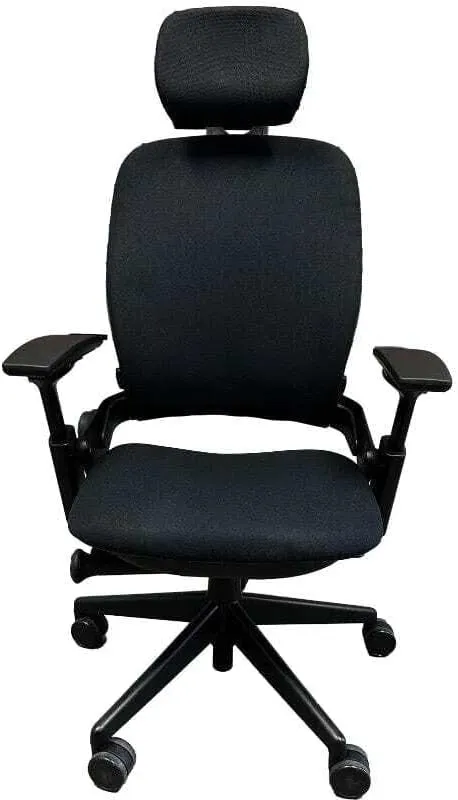
If you want to understand what a chair engineered specifically for posture looks like, sit in the Leap V2. Every other chair here is static. The Leap's backrest flexes with your movement.
The LiveBack system adjusts the shape of the backrest as you shift position throughout the day. When you lean forward, the backrest follows. When you lean back, it reclines with pressure proportional to your weight. Your spine stays supported regardless of what you're doing rather than losing contact the moment you move off the position the chair was set for.
The seat edge softens under your thighs automatically, which reduces the pressure that causes you to shift your weight and lose your posture setup. The lower back firmness dial controls how much the lumbar pushes. For posture use, turning it down slightly gives support without the resistance that makes you fight against the chair. The forward tilt option on the seat pan rotates the pelvis into the posture-neutral position.
No other chair at any price point combines these mechanisms in the same design. The Aeron is excellent. The Leap V2 is specifically built for what happens to your spine during a full working day, not just when you first sit down.
New Leap V2 chairs run around $1,375. Used ones (look specifically for V2, not V1) typically run $350 to $600 and are almost always a better buy than new budget alternatives for posture quality. For 8-hour days where posture is a real concern, the used market for the Leap V2 is worth your time.
Who it's for: Anyone sitting 6 or more hours daily where posture is genuinely affecting comfort or health. The mechanical difference is worth the price.
Who should skip: Buyers who need a stable, firm seat pan. The Leap's seat flexibility feels unstable to some users, particularly those with certain hip or knee issues.
See how the Leap V2 compares to the Herman Miller Aeron in our Steelcase vs Herman Miller comparison.
Herman Miller Aeron: Best for All-Day Posture Without Thinking
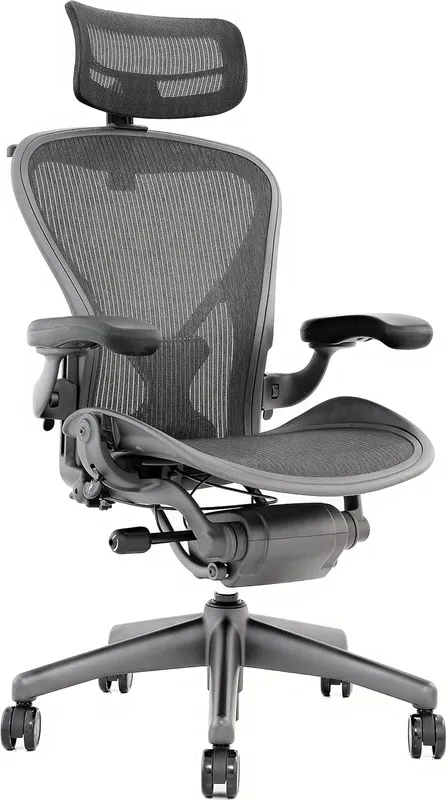
The Aeron's posture advantage is the one most chair comparisons miss: PostureFit SL supports the sacrum, not just the lumbar.
Your spine's S-curve has two parts. The lumbar curve is the upper part, which most chairs address. The sacral curve is lower, at the base of your spine where it meets the pelvis.
If the sacrum isn't supported, the lumbar curve collapses regardless of how good the lumbar support is. It's like trying to hold a rope taut when the anchor at the bottom is loose.
The PostureFit SL has dual pads: one at the sacrum and one at the lumbar, each independently adjustable. This is the mechanism that makes the Aeron genuinely different for posture rather than just well-built. You can dial back the lumbar pad and rely more on the sacral support, which holds the base of your S-curve in place.
The forward tilt feature tilts the entire seat pan forward by a few degrees, which shifts the pelvis into a neutral forward-tilt position. This is uncommon. Most chairs only recline. The Aeron can do both, and the forward tilt option specifically is what makes it recommended for people who work leaning slightly forward over their desk.
The honest limitations: no seat depth adjustment (the chair comes in three sizes: A, B, C). If you don't size it correctly, the PostureFit contact point can be in the wrong place. And the arm caps on older Aerons crack after 5-plus years.
New units run around $1,445. Used Aerons from the B or C size in good condition are often $400 to $700 and worth the look if budget is a factor.
Who it's for: All-day desk workers whose posture problems are rooted in pelvic tilt rather than lumbar issues specifically. Anyone who wants the chair to handle posture passively rather than requiring adjustment.
Who should skip: People who primarily work reclined. The Aeron's recline range is more limited than chairs like the Humanscale Freedom. Get the right tool for how you actually work.
Read the full Herman Miller Aeron review for the complete spec breakdown and size guide.
Setting Up Any Chair for Posture: The 3 Adjustments That Matter
No chair fixes posture out of the box. These three adjustments apply regardless of which chair you buy.
Seat height: Set it so your feet are flat on the floor and your thighs are level or angled slightly down. Knees should be at or below hip height. If you raise the seat to get your arms at desk level and your feet leave the floor, add a footrest.
Lumbar: Move it down until you feel it contact the lower part of your back, just above your beltline. If it feels like it's pushing into your mid-back, it's too high. Most people set it too high.
Armrests: Raise them until they take weight off your shoulders without forcing your arms up. The goal is a slight reduction in shoulder tension, not a full arm rest. Arms resting on armrests all day can cause their own elbow and wrist issues.
FAQ
Does an ergonomic chair actually improve posture?
A properly designed chair with the right adjustments reduces the effort required to maintain good posture by supporting the spine's natural curves. What it doesn't do is fix posture on its own if the adjustments aren't set correctly. The chair provides the structure; you still need to set it up for your body.
What's more important for posture: seat depth or lumbar support?
Seat depth is more foundational. If the seat is too deep and you can't sit fully back, the lumbar support can't make contact with your back regardless of how it's adjusted. Fix seat depth first, then dial in lumbar height and firmness.
How long does it take to adjust to a new ergonomic chair?
Most people need one to two weeks to feel natural in a properly set-up ergonomic chair. The first few days can feel unfamiliar because the chair is holding you in a position your muscles aren't used to supporting. Mild back fatigue early on is normal and usually resolves. If you have pain after two weeks, the chair isn't set up correctly for your body.
Is a $300 chair good enough for posture, or do I need to spend more?
The FlexiSpot C7 at $300 to $430 is the lowest price where you get the combination of adjustments needed for real posture support (seat depth + height-adjustable lumbar). Below that, you're mostly getting cushioning in an ergonomic shape, not actual posture mechanics. The Leap V2 and Aeron are meaningfully better; the used market for both makes them more accessible than the new prices suggest.
Can I fix posture with a lumbar pillow added to my current chair?
Sometimes, but not reliably. Lumbar pillows work when they happen to hit the right spot at the right firmness for your anatomy. They shift during the day, don't address seat depth, and don't adjust dynamically with your movement.
They're worth trying if you have a good chair that just needs a bit more lumbar contact. They won't fix a structurally wrong chair.
Bottom Line
For most budgets: start with the FlexiSpot C7. It has the seat depth adjustment and height-adjustable lumbar that most chairs at this price skip. That combination is what actually delivers posture improvement at the budget end.
For all-day use where posture is a real and persistent issue: the Steelcase Leap V2 is the mechanical answer. Nothing else combines the LiveBack flex, forward tilt, and seat edge adjustment in the same design. The used market makes it accessible.
For the most passive, set-and-forget posture support: Herman Miller Aeron. Size it correctly, set the PostureFit SL to sacral-heavy, and it holds you in neutral without constant adjustment.
The Desk Riser Research Team
Standing Desk & Home Office Researchers
We research standing desks, ergonomic chairs, and home office gear by analyzing manufacturer specs, warranty terms, and real owner review patterns across thousands of purchases. No sponsored placements. No fake hands-on claims.
Share this article: