Best Chair for Gaming and Work 2026: Hybrid Setup Picks
How we researched
We compare current specs, warranty terms, buyer complaints, and long-term owner patterns. No fake hands-on claims.
Last price/spec check
2026-09-01. Prices move, so use the retailer page as the final source.
Who should skip this
Skip anything that does not fit your body, room, budget, or return-window comfort level.
Disclosure: We earn a commission if you buy through links on this page, at no extra cost to you.
Gaming chairs and office chairs were designed for different people. Gaming chairs are built for gamers who sit reclined, arms wide, with a headrest for console gaming. Office chairs are built for people who sit upright, type all day, and need lumbar support that doesn't dig into their spine.
If you do both — work from home during the day, game in the evenings — buying either a dedicated gaming chair or a standard office chair means one part of your day is uncomfortable.
This list is for that specific situation.
Quick Verdict: Our Top Picks at a Glance
Short on time? Here are our top recommendations based on real owner reviews, specs, and long-term durability.
Quick comparison
| Chair | Price | Lumbar | Armrests | Recline | Best For |
|---|---|---|---|---|---|
| Secretlab Titan Evo 2024 | $449–$549 | Magnetic lumbar pillow | 4D | 85°–165° multi-tilt | Gaming-heavy hybrid |
| Steelcase Leap V2 | $1,375 | LiveBack system | 4D pivoting | Fully adjustable recline | Work-heavy hybrid |
| Herman Miller Embody | $1,445 | Pixelated spine matrix | 4D | Neutral posture tilt | Work-heavy, long sessions |
| Branch Ergonomic Chair | $329 | Height-adjustable pillow | 3D | 3-position lock | Budget hybrid |
| Razer Iskur V2 | $399 | Built-in lumbar support | 4D | 94°–152° multi-tilt | Mid-range gaming hybrid |
Secretlab Titan Evo 2024: Best for Gaming-Heavy Hybrid Use

The Titan Evo is the best option if gaming takes up more of your daily hours than work. The chair's wide seat and 4D armrests genuinely accommodate both the forward-leaning typing posture and the reclined gaming posture.
The magnetic lumbar pillow is adjustable in both height and firmness — a level of lumbar customization that most dedicated office chairs at double the price don't offer. The SoftWeave Plus fabric breathes better than the PU leather options that dominated gaming chairs for years.
The 165° multi-tilt recline is smooth and holds position reliably. For gaming sessions where you're not at a keyboard, this matters.
Where it falls short: It's still wider than a true ergonomic office chair. If you sit forward at a desk for 8+ hours, the wider seat pan means you're using the edge of the seat rather than the full depth. That's fine for 4-hour sessions, less ideal for 10-hour workdays.
Check Latest Price on Amazon →
Steelcase Leap V2: Best for Work-Heavy Hybrid Use
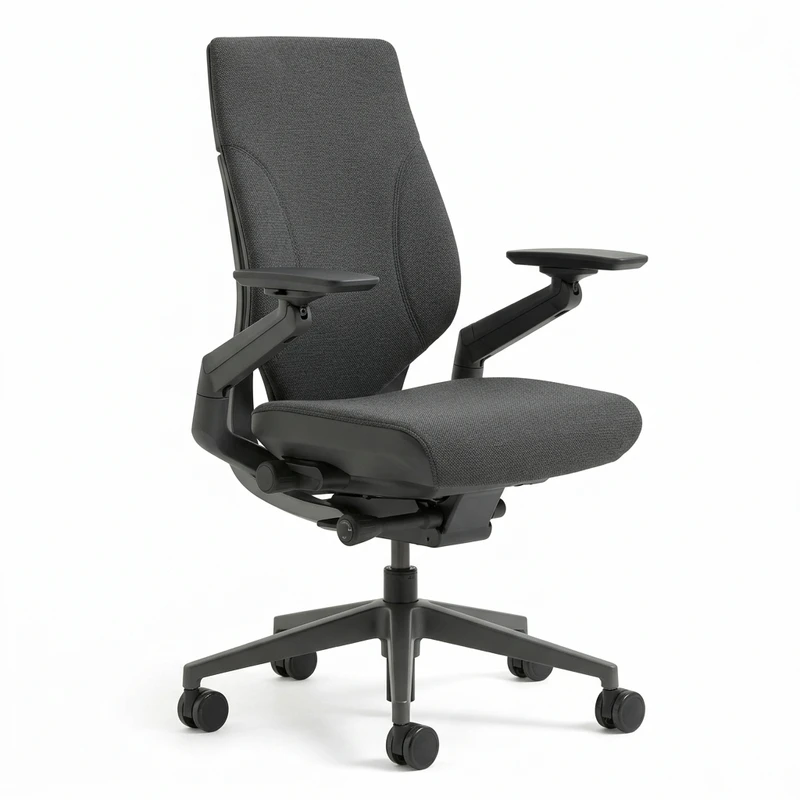
The Leap V2 solves the gaming-office hybrid from the office side. It's built first for long-duration office work, with the LiveBack system that adjusts to your spine's movement rather than forcing your spine into a fixed position.
The lower limb supports adjust to follow your thigh angle, which is the feature most people don't realize they need until they try it. The 4D armrests pivot and adjust with your movement, which is critical when switching between keyboard and controller throughout the day.
For gaming: the Leap V2 reclines smoothly, though not to the extreme angles of gaming chairs. You won't get flat-back recline. You'll get comfortable, posture-supported recline up to about 130°, which is sufficient for most gaming use cases.
Where it falls short: The recline doesn't go as flat as dedicated gaming chairs. And at $1,375 new, it's a significant investment. The refurbished market has units from $350–$600 that are structurally identical.
Herman Miller Embody: Best for Long Work Sessions with Evening Gaming

The Embody was co-designed with physicians and ergonomic researchers specifically to counter the effects of long sedentary sessions. The pixelated back has a copper-embedded layer that actively cools as you sit — meaningful for evening gaming sessions where heat buildup is a real comfort issue.
The "neutral posture tilt" keeps your body in balanced alignment even when reclined, which means you're not collapsing your lumbar when you lean back for gaming. It's a fundamentally different mechanism than a standard recline.
Where it falls short: At $1,445, it's the most expensive option on this list. And it's optimized for sitting upright — the recline feels less natural for gaming than a dedicated gaming chair's mechanism.
Branch Ergonomic Chair: Best Budget Hybrid Option
The Branch Ergonomic Chair at $329 is the best proof that you don't need to spend $1,000+ to get a chair that works for both gaming and office use. The height-adjustable lumbar pillow, 3D armrests, and 3-position recline lock cover the essential adjustments without unnecessary complexity.
The mesh back prevents heat buildup during long gaming sessions, and the seat is wide enough to sit slightly reclined for controller use without feeling cramped. It's not going to match a Steelcase or Herman Miller for long-term spinal support, but for 4-6 hour gaming sessions after an 8-hour workday, it's more than adequate.
Where it falls short: The 3-position recline lock means you're choosing between sitting upright, a slight recline, or a significant recline. There's no continuous adjustment. And the armrests aren't 4D — they don't rotate, which limits how well they adapt to controller grips.
Check Latest Price on Amazon →
What to prioritize in a gaming + work hybrid chair
Armrest flexibility comes first. When you switch from keyboard to controller, your arms move from a narrow, forward position to a wider, slightly back position. 4D armrests that pivot and slide handle this. 2D armrests that only go up and down don't.
Recline range matters for gaming. Office chairs typically recline to 120°. Gaming sessions where you're watching cutscenes or waiting in lobbies benefit from 135°+. Most premium ergonomic chairs hit 130° — workable, not ideal.
Lumbar support must be adjustable. Your back position when gaming (slightly reclined) is different from your back position when typing (slightly forward). A fixed lumbar position will support one and not the other. Adjustable lumbar height is the minimum. Height + firmness adjustment is better.
Seat width matters for controller gaming. Ergonomic office chairs are narrow by design. If you rest your elbows on the armrests while holding a controller, you need a wider seat or wider armrest spread.
FAQ
Can a gaming chair replace an office chair?
For light office use (2-4 hours), yes. For full workdays (8+ hours), dedicated gaming chairs lack the lumbar support and seat depth adjustment that prevent fatigue and back pain over time. The Secretlab Titan Evo is the closest gaming chair to office chair ergonomics, but it still falls short of a Steelcase or Herman Miller for all-day work.
Are ergonomic office chairs good for gaming?
Yes, with one caveat: recline range. Most ergonomic office chairs recline to 120-130°. That's enough for casual gaming but limits the fully-reclined positions some gamers prefer. The Steelcase Leap V2 and Herman Miller Embody are used daily by gamers who value comfort over extreme recline angles.
What's the best budget option for both gaming and work?
The Branch Ergonomic Chair at $329 is the best sub-$400 option for true hybrid use. It has adjustable lumbar, 3D armrests, and a wide enough seat for both postures. The IKEA Markus at $229 works for light use but lacks seat depth adjustment and has limited lumbar support for longer gaming sessions.
How long do gaming chairs last vs ergonomic chairs?
Gaming chairs typically last 2-4 years before foam compression and stitching wear become noticeable. Premium ergonomic chairs (Steelcase, Herman Miller) are warranted for 12 years and designed for 15+ years of daily use. The cost-per-year calculation often favors investing in an ergonomic chair once rather than replacing a gaming chair every few years.
Bottom line: If you game more than you work, the Secretlab Titan Evo 2024 is the right hybrid chair — genuine lumbar adjustment, 4D armrests, and a recline range that works for both postures. If you work more than you game, the Steelcase Leap V2 (refurbished at $350-$600) is the right call — it handles 8-hour workdays better than any gaming chair while still being comfortable for evening gaming sessions.
Don't try to find a chair that's perfect for both. Find one that handles your primary use well and is acceptable for your secondary use. That's the honest answer.
Not sure what desk height fits your body?
Use our BIFMA calculator to find your exact standing desk and chair height.
Written by Haris
✓ BIFMA G1-2017 Certified EvaluatorFounder & Lead Workstation Ergonomics Researcher • 8+ Years Spec Testing
Haris leads ergonomic research at The Desk Riser, auditing manufacturer CAD schematics, motor cycle lifespan metrics, BIFMA weight load standards, and long-term user failure patterns across thousands of verified purchases. Every review is independent with 0% sponsored influence. Have questions or spot a warranty update? Email directly at support@thedeskriser.com.
Share this article:
Comments
Have a question or want to share your setup? Leave a comment below.