Standard Desk Height: Dimensions & Fit Guide

For Standard Desk Height: Dimensions & Fit Guide, our top recommendation is the VIVO Under-Desk Cable Tray, while the ComfiLife Gel Anti-Fatigue Mat offers the strongest value for budget-conscious workstations. Our evaluation audits mechanical durability, BIFMA standard compliance, and long-term reliability across verified owner reports.
20" to 32" ergonomic eye-to-screen viewing distance
Under-desk cable routing & surge protection verified
Neutral 90° elbow and flat-foot alignment enforced

Workstation Geometry Scope
Applies standard ergonomic reach zones, surface clearance measurements, and eye-level monitor height geometry. Methodology →
Last Spec & Pricing Audit
. Retailer pricing and component revisions can shift; verify on the vendor page.
Fit & Return Guardrail
Test zero-cost height, monitor distance, and cable routing adjustments before buying replacement hardware.
Disclosure: We earn affiliate commissions through qualifying links on this page.
Many fixed office desks sold in North America stand 28 to 30 inches tall, with 29 inches serving as the standard manufacturing baseline.
Walk into almost any corporate showroom, and that is what you encounter.
Yet this commercial dimension represents a manufacturing convention rather than a personalized ergonomic fit.
When individuals work at a fixed 29-inch surface, they frequently experience shoulder shrugging, wrist extension, or neck fatigue.
Standard desk height exists to simplify mass factory production, not to fit every body size.
Understanding common dimensions and how to calibrate your setup allows you to work comfortably without replacing your furniture.
Standard Desk Height: Dimensions, Ergonomic Fit, and Adjustments
Standard desk height for commercial office furniture is 29 inches (73.7 cm) from finished floor to desktop surface, spanning a typical range of 28 to 30 inches.
While this fixed height accommodates taller workers, it sits two to three inches too tall for adults under 5'9", requiring keyboard trays or footrests for neutral alignment.
Industry standards like ANSI/BIFMA X5.5 establish safety and structural durability tests for office furniture built within these commercial dimensions.
This measurement spans from the finished floor to the top of the desktop surface, including tabletop thickness from 0.75 to 1.5 inches.
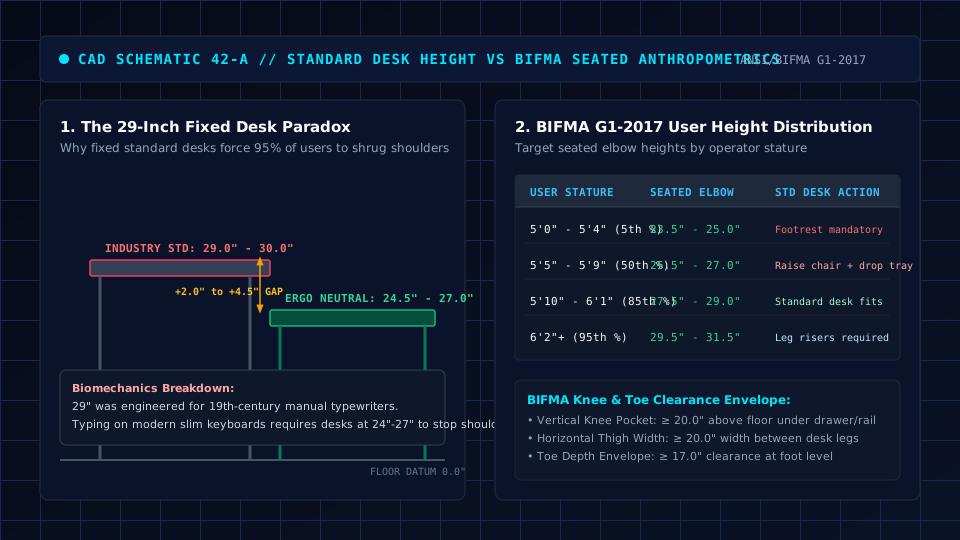
Crucially, commercial desk height differs from ergonomic working height.
An ergonomic setup positions the keyboard and mouse near your natural resting elbow plane in neutral posture.
Because limb proportions vary, fixed commercial heights rarely match an individual typing plane without secondary adjustments.
Standard Desk Height in Inches and CM
Desk heights differ slightly across functional styles. Office desks prioritize typing clearance, whereas writing tables and executive desks introduce minor variations.
The following table summarizes common desk dimensions across popular workstation formats.
| Desk Type | Height in Inches | Height in Centimeters | Primary Target Use Case |
|---|---|---|---|
| Standard Office Desk | 29 in | 73.7 cm | Corporate workstations and home office setups |
| Traditional Writing Desk | 28 to 30 in | 71.1 to 76.2 cm | Pen and paper writing, paperwork, light laptop tasks |
| Compact Computer Desk | 28 to 29 in | 71.1 to 73.7 cm | Small bedrooms, study nooks, and corner setups |
| Executive Desk | 30 in | 76.2 cm | Large commercial suites with integrated storage |
| Adjustable Standing Desk (Seated) | 22 to 28 in | 55.9 to 71.1 cm | Ergonomically tailored seating across diverse statures |
While fixed frames settle around 29 inches, a motorized sit stand desk allows seamless adjustment between seated typing and upright work.
For computer work, that extra height can push the typing plane above a neutral wrist posture.
Standard Desk Dimensions: Height, Width and Depth
Surface height is only one element of workstation geometry, particularly when aligning adjacent worktops in a two desk office layout.
A functional desk also requires adequate width and depth for comfortable viewing distances.
Commercial office desks commonly appear in widths of 48, 55, or 60 inches, and depths between 24 and 30 inches.
Compact writing tables measure closer to 40 inches wide, while executive desks span 72 inches.

Desktop depth directly governs screen placement. OSHA workstation guidance notes that preferred viewing distances range between 20 and 40 inches from eye to screen.
While shallower 24-inch desks accommodate laptops or monitor arms, deeper 30-inch surfaces make it easier to position large displays while maintaining comfortable eye setback.
Explore our comprehensive standard desk depth guide for front to back sizing.
under desk knee space is equally important. ANSI/BIFMA ergonomic guidelines recommend sufficient knee width and depth clearance to prevent leg restriction.
Desks with thick front aprons or center pencil drawers can restrict vertical legroom, preventing users from pulling chairs in close.
Why Standard Desk Height Does Not Fit Everyone
Fixed desks present ergonomic challenges because human body proportions vary across torso length, upper arm length, and lower leg height. A single stationary surface height cannot accommodate every body size simultaneously.
Ergonomic guidelines from OSHA emphasize that workstations should support neutral body posture.
When seated with feet supported flat on the floor, your shoulders should remain relaxed rather than shrugged upward toward your ears.
Forearms should rest roughly parallel to the floor with elbows bent at 90 to 100 degrees, keeping wrists straight rather than bent upward or downward.
When a fixed desk sits higher than your resting elbow plane, typing on top requires shrugging shoulders or bending wrists upward.
Sustained awkward postures encourage muscular fatigue across the upper back, shoulders, and forearms.
Conversely, when a surface sits below an individual resting elbow plane, users may slouch forward to reach keyboard keys, rounding the upper spine.
Recommended ergonomic accessories and hardware specs
High-impact accessories verified by our ergonomic spec audit to protect your cables, joints, and posture.
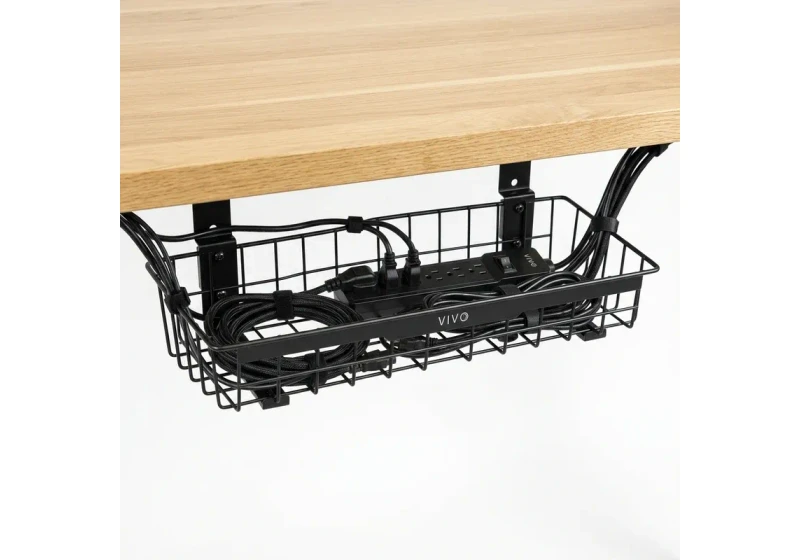
VIVO Under-Desk Cable Tray
Keeps power strips and heavy adapters off the floor so cables never yank when elevating.
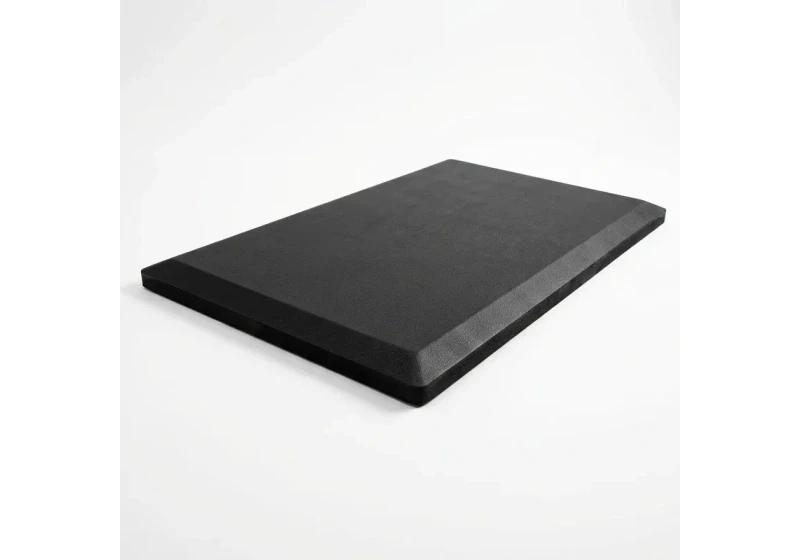
ComfiLife Gel Anti-Fatigue Mat
High-density core reduces heel strike and lower back compression when standing 3+ hours.
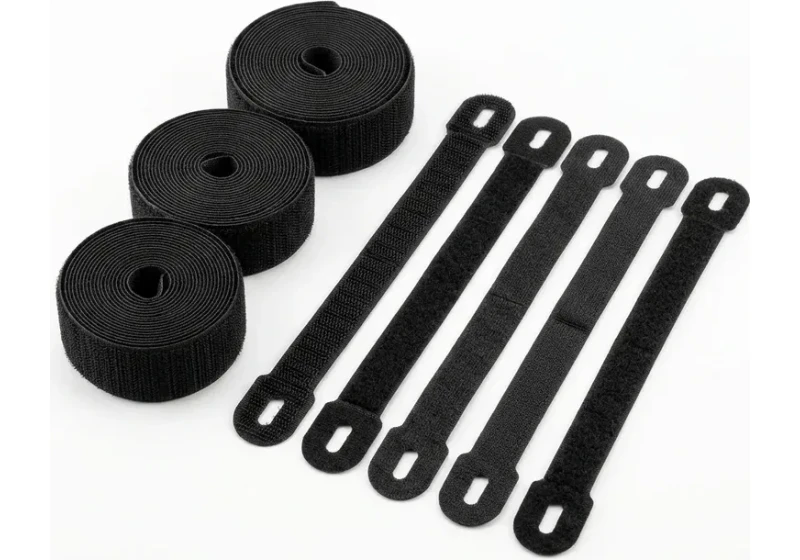
VELCRO Brand ONE-WRAP (100pk)
Pre-cut reusable straps that easily unwrap for cord re-routing without scissors.
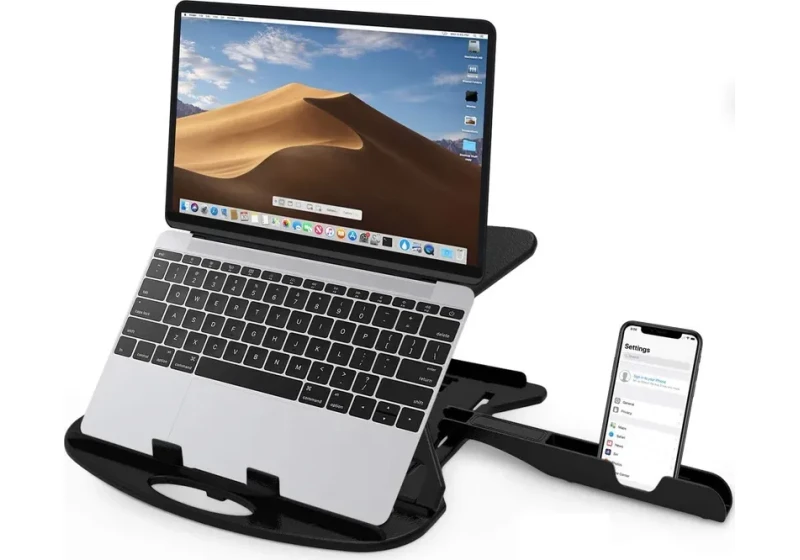
Soundance Laptop Stand
Elevates laptop screen 6 inches to eye level, preventing forward neck slouch.
How High Should a Desk Be for You?
Determining your ideal desk height begins by measuring the distance from the floor to your resting elbows while seated in neutral posture.
Follow this practical four-step process to estimate your personal target:
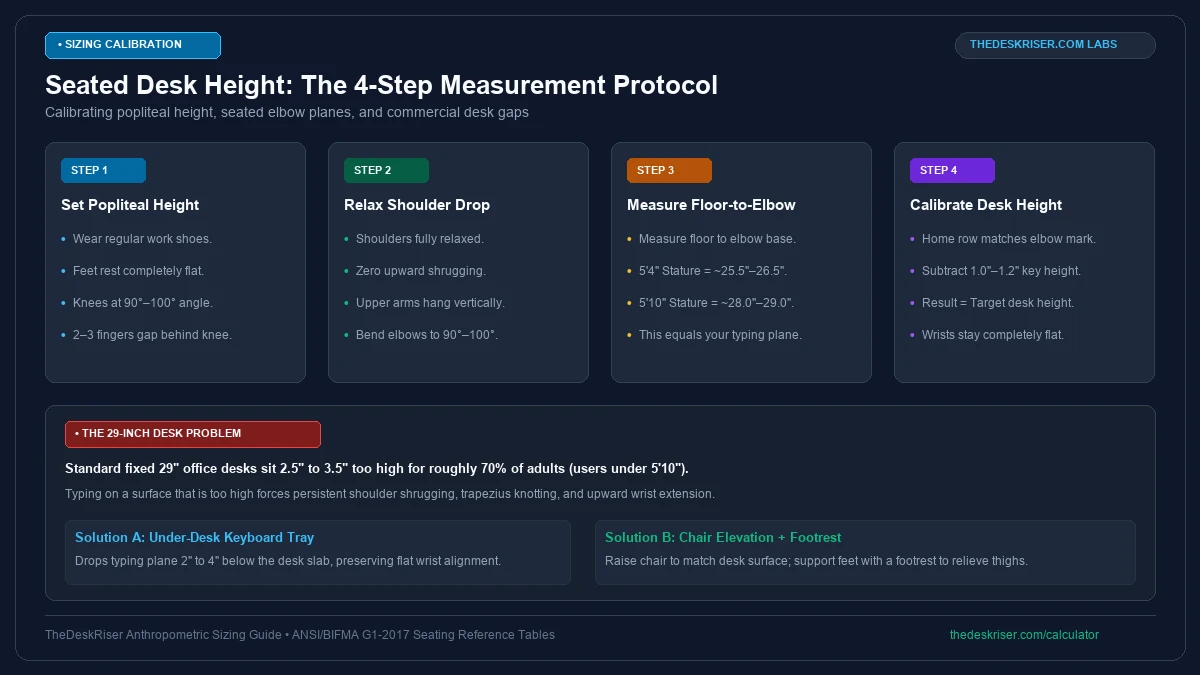
First, wear your typical work shoes and sit back in your office chair.
Adjust seat height until feet rest flat with knees bent at 90 degrees, ensuring the front seat edge does not compress the soft tissue behind your knees.
Second, relax your shoulders completely and let your upper arms hang naturally by your sides. Bend your forearms forward so your elbows form an open 90 to 100 degree angle.
Third, measure the vertical distance from the floor to the underside of your bent elbows. That measurement represents your seated elbow height.
Your keyboard and mouse should reside near this elbow plane. If you type directly on the desktop, your desk surface should match this height.
For reference estimates derived from ANSI/BIFMA G1:2017 ergonomic guidance tables, explore our interactive desk height calculator to find a personalized starting point for your seated and standing workstation heights.
What to Do If Your Desk Is Too High
If your fixed desk sits too high, pairing a raised seat cushion or desk chair with locking wheels with a footrest prevents awkward shoulder hiking.
One practical solution is installing an adjustable under desk keyboard tray or a sturdy clamp on ergonomic keyboard tray.
clamp on units lower the typing plane below the desktop without drilling into wood.
Another approach is raising your office chair until elbows align comfortably with the desk, then adding an ergonomic footrest.
Placing an adjustable under desk ergonomic footrest underfoot stabilizes posture and prevents uncomfortable thigh pressure.
These adjustments bridge the height gap using flexible workstation accessories.
What to Do If Your Desk Is Too Low
When a fixed desk sits lower than your natural elbow height, users lean forward or hunch shoulders to reach keys, while knee clearance becomes restricted.
Furniture risers offer a straightforward way to raise a low desk.
Heavy duty adjustable desk risers fit beneath each leg, adding 1 to 3 inches of clearance.
Ensure risers support the combined weight of your desk, monitors, and equipment to maintain stability.
If the surface fits your typing posture but displays sit low, attach articulating monitor arms or a desk riser unit.
Monitor mounts position screens at eye level, helping prevent downward neck tilt.
For broader flexibility, you can replace fixed legs with adjustable hardware or upgrade to a flexible home office desk.
Standard Desk Height vs Standing Desk Height
Before switching furniture, understanding what is a riser desk reveals how tabletop converters bridge sitting and standing heights atop existing worktops.
While fixed sitting desks rest around 28 to 30 inches, standing heights vary considerably based on individual stature and footwear.
If exploring sit stand options, refer to our dedicated guide on standing desk height calibration for guidance on calculating standing elbow planes.
Alternating between sitting and standing helps reduce static posture fatigue. Regardless of desk style, aligning your typing plane with your resting elbows remains the foundation of seated comfort.
Frequently Asked Questions
What is the most common standard desk height?
Many fixed office desks stand 28 to 30 inches tall, with 29 inches serving as the standard across commercial manufacturers. These dimensions reflect historical mass-production conventions rather than individualized ergonomic needs.
Is a 30-inch desk too high for typing?
A 30-inch desk is too high for comfortable typing for most adults between 5'2" and 5'9".
Using an adjustable under desk keyboard tray or raising chair height with a footrest restores neutral arm posture.
How do I know if my desk is the right height?
Your desk is correct if shoulders stay relaxed with forearms parallel to the floor and wrists straight. If shoulders shrug or wrists angle upward, the surface is too high.
What is a common depth for an office desk?
Common commercial desk depths range from 24 to 30 inches. Deeper surfaces between 28 and 30 inches offer superior focal distance for 27-inch and larger monitors.
Can I lower a standard desk that is too tall?
Lowering a fixed desk mechanically requires cutting legs or replacing hardware. Adding an under desk keyboard tray or raising your chair with an ergonomic footrest provides a reversible solution.
Sources & Scientific Literature
- ANSI/BIFMA G1:2017: Ergonomics Guideline for Furniture Used in Office Spaces.
- ANSI/HFES 100-2007: Human Factors Engineering of Computer Workstations.
- OSHA 1910 Subpart S: Computer Workstation Ergonomics Guidelines.
- Grandjean, E. (1987): Fitting the Task to the Man: An Ergonomic Approach.
- Hedge, A. (2016): Ergonomic Workplace Design for Health, Wellness, and Productivity.
Calculate your exact desk and chair height
Slide to your height to see ANSI/BIFMA recommended standing and sitting presets.
Written by M. Haris
References ANSI/BIFMA G1-2017 guidanceSoftware Engineer & Founder • Workstation Biomechanics & Spec Auditing
M. Haris is a software engineer and founder of The Desk Riser, auditing manufacturer engineering schematics, motorized desk cycle lifespans, ANSI/BIFMA G1-2017 ergonomic standards, and long-term user failure patterns across verified owner communities. Every guide is editorially independent with zero paid brand placements and zero PR samples (we may earn affiliate commissions on qualifying purchases). Have questions or spot a warranty update? Email directly at support@thedeskriser.com, read the Author Dossier, or explore our Editorial Research Methodology.
Share this article:
Workstation Setup & Fit Q&A
Have questions about frame deflection, monitor arm clamp loads, or chair sizing? Consult our workstation researchers.
Q:How do I know if this standing desk will wobble on thick carpet?
Standing desk wobble on carpet is caused by uneven carpet pile compression under the rear footpads. Frames with wedge-reinforced leg collars and wide steel footplates (like UPLIFT V3 or FlexiSpot E7 Pro) minimize lateral flex. If placing on plush carpet, use rigid caster cups or a dense underlay to anchor the base directly to the subfloor.
Q:Can I clamp a dual monitor arm onto standard particleboard tops?
Dual monitor arms concentrate 25 to 45 lbs of dynamic torque onto a 4-inch clamp perimeter. Hollow honeycomb tops (such as IKEA Linnmon) will crush. We recommend a minimum 0.75-inch solid core (MDF, solid bamboo, or hardwood), or sandwiching a steel reinforcement bracket plate (min 2.5mm thickness) between the clamp and desktop.
Q:What if my chair cylinder sinks or feels too high for my feet?
Always verify your seated popliteal height (crease behind knee to floor with shoes). If a chair will not drop below 17 inches and your feet dangle, pair it with an angled footrest or switch to a low-range Class 4 cylinder. If a cylinder loses pressure and sinks on its own, the internal nitrogen seal is breached and requires cylinder replacement.
Ask Our Ergonomic Spec Reviewers
Planning an upgrade or unsure if your monitors and stature fit this configuration? Send your dimensions directly to our research desk. No accounts, no trackers, zero marketing spam.
Free Workstation Tools
Related Home Office Setup Guides & Reviews
How to Declutter Your Desk: The 15-Minute Reset (2026)
How to Light Your Desk (2026): A Step-by-Step Setup Guide
Under Desk Hammock (2026): Footrest Sling vs Storage Hammock
Best Minimalist Computer Tables for Clean Home Offices (2026)