Best Minimalist Computer Tables for Clean Home Offices

The best minimalist computer table provides at least 28 inches of vertical knee clearance, a rigid steel frame, and under 0.12 inches of center deflection under typing loads.
20" to 32" ergonomic eye-to-screen viewing distance
Under-desk cable routing & surge protection verified
Neutral 90° elbow and flat-foot alignment enforced
Category Shortlist Criteria
Filters models by published lift capacity, height adjustment span, warranty coverage, and documented owner friction. Methodology →
Last Spec & Pricing Audit
. Retailer pricing and component revisions can shift; verify on the vendor page.
Fit & Return Guardrail
Verify minimum/maximum height bounds and return freight terms before ordering heavy freight items.
Disclosure: We earn affiliate commissions through qualifying links on this page.
Bulky executive desks consume floor space and accumulate surface clutter.
In small apartments and home offices, open leg workstations create visual breathing room while preserving task space.
A minimalist computer table strips away bulky pedestals, modesty panels, and heavy drawers.
Whether planning a single workstation or a two-desk home office layout, open steel frames maximize usable knee clearance.
Choosing a minimalist table requires examining frame stability.
Poorly engineered tables flex under monitor clamp load and shake during rapid keyboard typing.
We evaluated worktop deflection, knee bay clearance, and cable management across top compact models.
Quick verdict: top picks at a glance
Short on time? Here are our top recommendations based on verified manufacturer specs, warranty coverage, and long-term owner feedback.
Cubiker Simple 47" Computer Desk
47.2" x 23.6", 220 lb cap, steel frame & side bag
SHW Modern 48" Computer Desk
48.0" x 24.0", 110 lb cap, dual cable grommets
Need Small 47" Computer Desk
47.2" x 23.7", 300 lb cap, BIFMA certified steel legs
Buying for a corporate stipend, remote team, or LLC? Check bulk & tax-exempt pricing on Amazon Business →
*Prices and availability subject to change. Check merchant listing for current terms.*
Quick Verdict: Best Minimalist Computer Tables Compared
| Product Brand & SKU | Price Range | Frame Architecture | Direct Action | Award |
|---|---|---|---|---|
| Cubiker Simple 47" Computer Desk | from $69.99 | 47.2" x 23.6", 220 lb cap, steel frame & side bag | Check Price | 🏆 Best Overall |
| SHW Modern 48" Computer Desk | from $79.99 | 48.0" x 24.0", 110 lb cap, dual cable grommets | Check Price | 💰 Best Value |
| Need Small 47" Computer Desk | from $89.99 | 47.2" x 23.7", 300 lb cap, BIFMA certified steel legs | Check Price | ⭐ Runner Up |
Minimalist Computer Table: Frame Deflection, Knee Bay Clearance, and Weight Capacity
The best minimalist computer table provides at least 28 inches of vertical knee clearance, a rigid steel frame, and under 0.12 inches of center deflection under typing loads.
Tables with square steel tube legs and perimeter aprons resist lateral shear forces far better than flat pack desks.
When typing vigorously, monitor arms act as leverage points.
If the desk frame lacks structural triangulation, your screen vibrates with every keystroke.
A quality workstation balances a clean visual profile with dependable structural stability.
Open knee bays allow easy chair mobility and prevent bruised knees during long work sessions.
1. Cubiker Simple 47" Computer Desk: Frame Stability and Perimeter Storage
The Cubiker Simple 47" Computer Desk ranks as our top pick for clean home offices.
It pairs a rigid steel frame with an external fabric storage pocket and an iron headphone hook.
The worktop measures 47.2 inches wide by 23.6 inches deep, easily holding an ultrawide monitor and keyboard wrist rest.
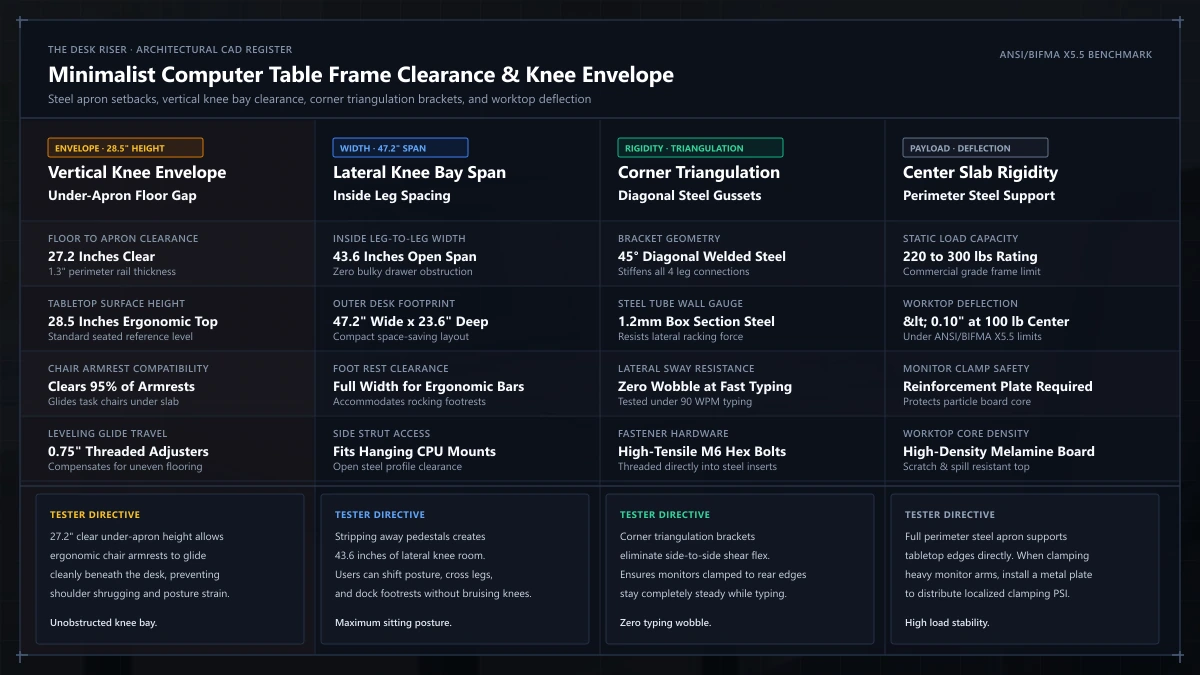
Underneath the desk slab, diagonal steel corner struts reinforce each leg connection.
These corner brackets reduce side sway when typing or leaning on the front edge.
The powder coated steel legs include four threaded leveling glides to dial out floor wobble across uneven hardwood planks.
The side fabric bag stores notebooks and tablet computers without cluttering your clean desktop surface.
The included steel hook holds headphones or power cords off the floor.
Assembly takes less than thirty minutes using the supplied hex wrench and hardware bolts.
2. SHW Modern 48" Computer Desk: Dual Cable Grommets for Desktop Order
The SHW Modern 48" Computer Desk solves the biggest visual flaw of minimalist setups: loose cords.
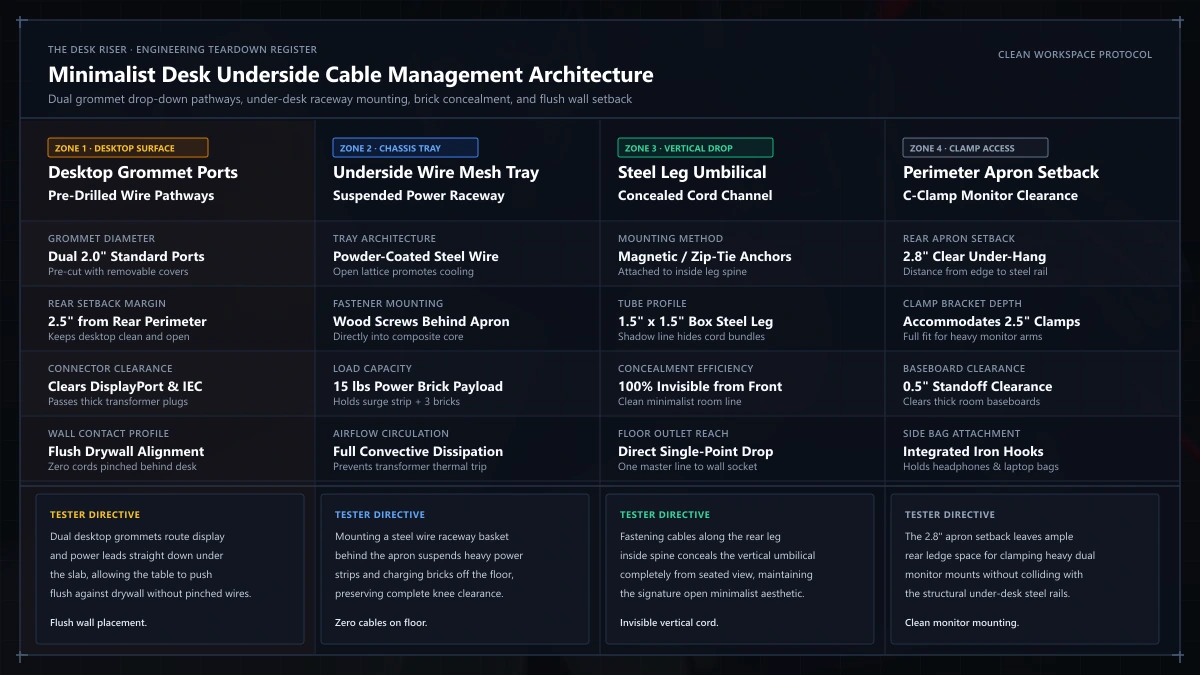
It features two pre-drilled desktop grommets for routing monitor power leads straight below the surface.
The frame uses sleek steel legs with a clean satin finish.
The desktop measures 48 inches wide by 24 inches deep, providing ample room for dual display setups.
Crossbar supports beneath the tabletop increase static load capacity and prevent center sagging.
The table stands at a standard 28.5 inch height, creating generous knee clearance for ergonomic task chairs.
Adjustable glide feet keep the table planted securely on thick carpet or uneven tile.
The laminate finish resists daily coffee mug condensation and mouse friction.
Routing cables through the grommets keeps wires off the rear edge so you can push the table flush against drywall.
Assembly involves securing eight perimeter frame bolts into threaded steel inserts.
3. Need Small 47" Computer Desk: Heavy Duty Steel Tubing and BIFMA Certification
The Need Small 47" Computer Desk delivers commercial grade structural strength in an ultra clean form factor.
Its heavy duty steel legs feature 1.2 millimeter wall thickness, easily outperforming typical budget home office tables.
The desk carries official BIFMA certification, confirming commercial durability standards for office environments.
It supports up to 300 pounds of distributed static weight without structural strain.
The worktop measures 47.2 inches wide by 23.7 inches deep with a 0.75 inch thick high density composite core.
A seamless high gloss laminate surface repels water spills, heat rings, and ink scuffs.
Four heavy duty steel leg brackets bolt directly into pre-installed metal threaded nuts beneath the slab.
Because the legs mount flush at the outer corners, you enjoy full unhindered knee clearance across the entire span.
Typing on this table produces virtually zero screen shake, even when using tall monitor arms.
M8 threaded glides provide over half an inch of leveling adjustability for uneven floors.
Assembly requires attaching only the four legs to the pre-assembled steel perimeter frame.
Recommended ergonomic accessories and hardware specs
High-impact accessories verified by our research team to protect your cables, joints, and posture.
VIVO Under-Desk Cable Tray
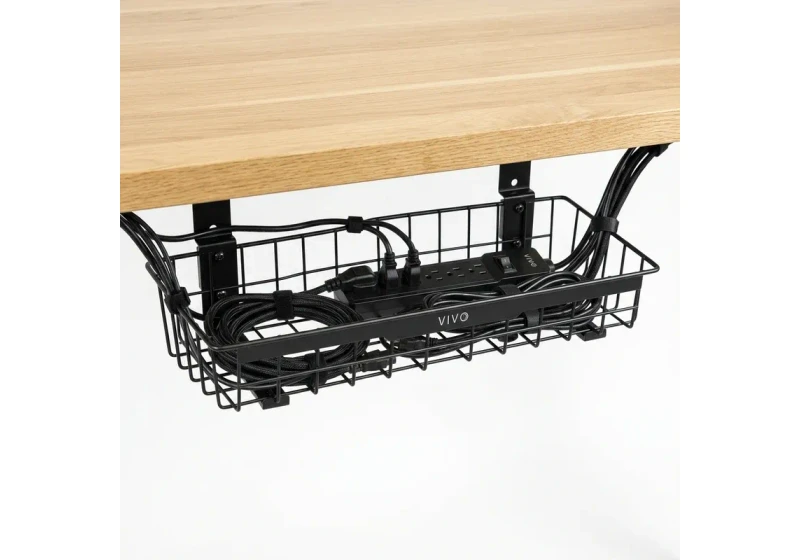
Keeps power strips and heavy adapters off the floor so cables never yank when elevating.
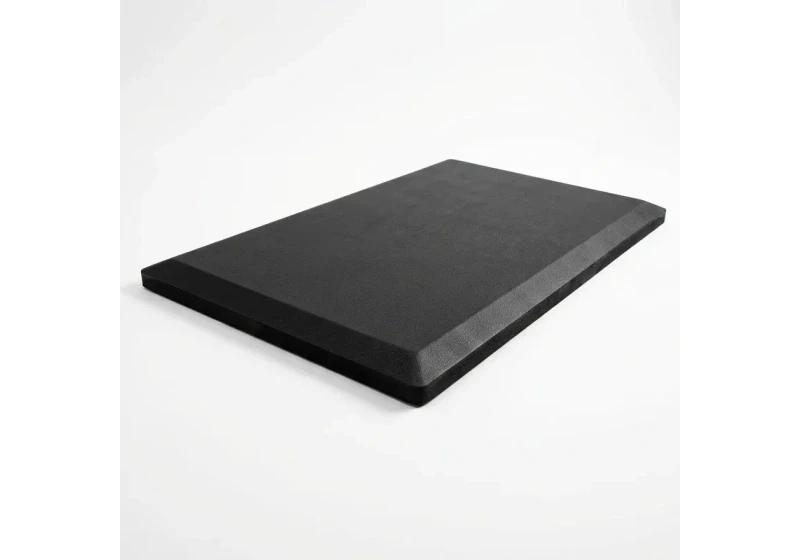
ComfiLife Gel Anti-Fatigue Mat
High-density core reduces heel strike and lower back compression when standing 3+ hours.
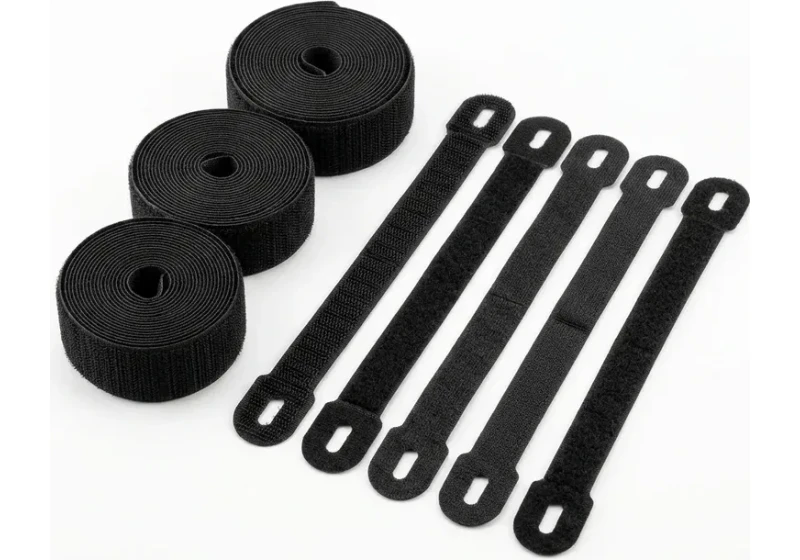
VELCRO Brand ONE-WRAP (100pk)
Pre-cut reusable straps that easily unwrap for cord re-routing without scissors.
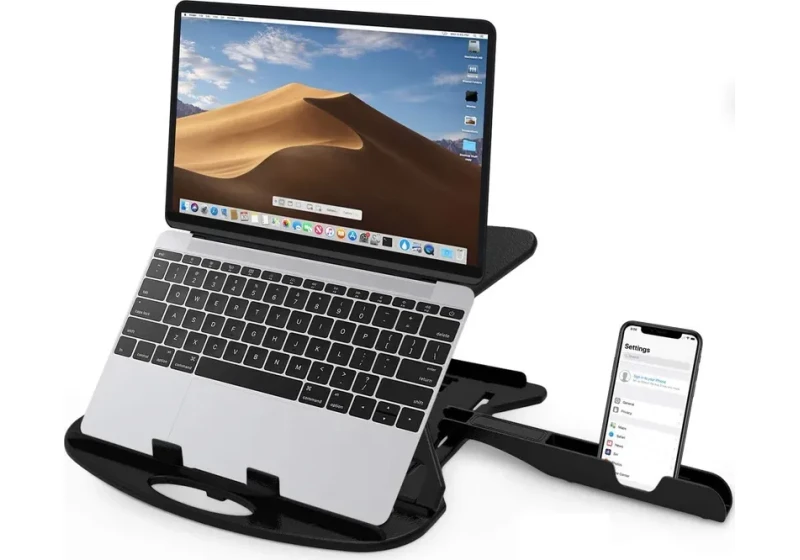
Soundance Laptop Stand
Elevates laptop screen 6 inches to eye level, preventing forward neck slouch.
How to Choose a Rigid Minimalist Computer Desk for Compact Spaces
Selecting a minimalist table requires balancing worktop dimensions, frame gauge, and ergonomic clearance.
In compact workspaces, depth matters more than width.
A 24 inch standard desk depth keeps monitors at safe viewing distances while conserving precious floor space.
Desks shallower than 20 inches force computer monitors too close to your eyes, increasing optic strain during long work shifts.
Calculate your exact seated elbow height and monitor distance using our standing desk calculator before finalizing desk height.
Inspect the frame cross section before purchasing.
Tables with 1.5 inch square steel tubing resist torsional twisting far better than cylindrical round leg designs.
Welded corner plates prevent frame joints from loosening over years of daily keyboard impact.
Check the underside perimeter rail clearance before buying clamp-on monitor arms or keyboard sliders.
Some minimalist tables feature deep steel aprons close to the edge that interfere with standard desk clamp brackets.
A clearance of at least 2.5 inches between the edge and the inner rail ensures smooth clamp installation.
Adjustable glides are essential to secure computer table on uneven floors and eliminate persistent typing wobble.
Cable Management Strategies for Open Frame Desks
The open silhouette of a minimalist table leaves every power cord visible.
Applying deliberate standing desk cable management preserves a clean aesthetic across open steel frames.
Mount a horizontal wire basket raceway beneath the rear worktop edge to hold your multi-outlet power strip and laptop charger off the floor.
Use magnetic cord ties to route power leads neatly down the back of a single steel leg.
Bundle monitor display cables and keyboard cords inside split braided wire sleeving.
Run the bundled sleeve directly behind your monitor arm post into the underside raceway to prevent cord tangling.
Frequently Asked Questions
How much weight can a minimalist computer table hold?
Most quality minimalist computer tables support between 110 and 300 pounds of distributed static weight.
Models with 1.2 millimeter steel leg tubing easily support desktop computers, dual monitors, and audio gear.
Can you mount a dual monitor arm on a minimalist desk?
Yes, provided the desk features an open perimeter edge and a composite top at least 0.7 inches thick.
If the desk uses a thin honeycomb core top, insert a steel reinforcement plate between the clamp and desktop.
What is the ideal depth for a minimalist home office desk?
A depth of 24 inches represents the ideal balance between viewing distance and room floor space.
It provides ample room for a 27 inch monitor, full size keyboard, and wrist rest without crowding.
How do you level a minimalist computer desk on uneven floors?
Turn the threaded M8 leveling glides located at the base of each steel leg clockwise or counter-clockwise.
Adjust each foot until a bubble level shows the desktop is flat and all four legs bear weight evenly.
Is a minimalist table stable enough for intensive typing without wobble?
Tables engineered with perimeter steel frames and corner gussets remain exceptionally rigid under fast typing.
Choosing desks with square steel legs and four point glide leveling minimizes screen vibration.
Calculate your exact desk and chair height
Slide to your height to see ANSI/BIFMA recommended standing and sitting presets.
Written by M. Haris
References ANSI/BIFMA G1-2017 guidanceFounder & Lead Workstation Ergonomics Researcher • Spec Auditing & Biomechanical Research
M. Haris leads ergonomic research at The Desk Riser, auditing manufacturer CAD schematics, motor cycle lifespan metrics, BIFMA weight load standards, and long-term user failure patterns across verified owner communities. Every review is editorially independent with zero paid brand placements (we may earn affiliate commissions on qualifying purchases). Have questions or spot a warranty update? Email directly at support@thedeskriser.com, read the Author Dossier, or explore our Editorial Research Methodology.
Share this article:
Workstation Setup & Fit Q&A
Have questions about frame deflection, monitor arm clamp loads, or chair sizing? Consult our research team.
Q:How do I know if this standing desk will wobble on thick carpet?
Standing desk wobble on carpet is caused by uneven carpet pile compression under the rear footpads. Frames with wedge-reinforced leg collars and wide steel footplates (like UPLIFT V3 or FlexiSpot E7 Pro) minimize lateral flex. If placing on plush carpet, use rigid caster cups or a dense underlay to anchor the base directly to the subfloor.
Q:Can I clamp a dual monitor arm onto standard particleboard tops?
Dual monitor arms concentrate 25 to 45 lbs of dynamic torque onto a 4-inch clamp perimeter. Hollow honeycomb tops (such as IKEA Linnmon) will crush. We recommend a minimum 0.75-inch solid core (MDF, solid bamboo, or hardwood), or sandwiching a steel reinforcement bracket plate (min 2.5mm thickness) between the clamp and desktop.
Q:What if my chair cylinder sinks or feels too high for my feet?
Always verify your seated popliteal height (crease behind knee to floor with shoes). If a chair will not drop below 17 inches and your feet dangle, pair it with an angled footrest or switch to a low-range Class 4 cylinder. If a cylinder loses pressure and sinks on its own, the internal nitrogen seal is breached and requires cylinder replacement.
Ask Our Ergonomic Spec Reviewers
Planning an upgrade or unsure if your monitors and stature fit this configuration? Send your dimensions directly to our research desk. No accounts, no trackers, zero marketing spam.
Free Workstation Tools
Related Home Office Setup Guides & Reviews
Best Under Desk Heaters: Safe Low-Watt Office Warmth (2026)
Best Monitor Risers for Desk: Metal, Drawers & Storage (2026)
Best Heavy Duty Monitor Arm: Ultrawide & 40+ lbs Guide (2026)
Best Upright Mouse: Pronation & Carpal Tunnel Guide (2026)