Best Heavy Duty Monitor Arm: Ultrawide & 40+ lbs Guide

For Heavy Duty Monitor Arm: Ultrawide & 40+ lbs Guide, our top recommendation is the Ergotron HX with HD Pivot, while the WALI Heavy Duty Single Arm offers the strongest value for budget-conscious workstations. Our evaluation audits mechanical durability, BIFMA standard compliance, and long-term reliability across verified owner reports.
Desktop bevel clearance, clamp depth, and track travel checked
Height, negative tilt, and swivel angles verified against BIFMA
Anti-snag routing channels and load capacity audited
Category Shortlist Criteria
Filters models by published lift capacity, height adjustment span, warranty coverage, and documented owner friction. Methodology →
Last Spec & Pricing Audit
. Retailer pricing and component revisions can shift; verify on the vendor page.
Fit & Return Guardrail
Verify minimum/maximum height bounds and return freight terms before ordering heavy freight items.
Disclosure: We earn affiliate commissions through qualifying links on this page.
Standard monitor arms collapse under the weight of massive curved ultrawides. Their weak tilt knuckles sag forward within days.
A dedicated heavy duty monitor arm uses reinforced springs and heavy knuckles to hold screens up to forty four pounds without drifting downward.
Before mounting a heavy display, calculate your screen eye line with our free monitor height calculator.
| Heavy Duty Monitor Arm | Price | Core Specifications | Award |
|---|---|---|---|
| Ergotron HX with HD Pivot | $399 | 42 lb capacity, reinforced tilt knuckle, polished aluminum, grommet and clamp | 🏆 Best Overall |
| WALI Heavy Duty Single Arm | $75 | 33 lb capacity, counterbalanced gas spring, dual clamp bolts, 4.3 inch grommet | 💰 Best Value |
| AVLT Heavy Duty Ultrawide Mount | $160 | 44 lb capacity, mechanical spring assist, dual USB passthrough, 49 inch support | ⭐ Runner Up |
Quick Verdict: Our Top Picks at a Glance
Short on time? Here are our top recommendations based on real owner reviews, specs, and long-term durability.
Ergotron HX with HD Pivot
42 lb capacity, reinforced tilt knuckle, polished aluminum, grommet and clamp
WALI Heavy Duty Single Arm
33 lb capacity, counterbalanced gas spring, dual clamp bolts, 4.3 inch grommet
AVLT Heavy Duty Ultrawide Mount
44 lb capacity, mechanical spring assist, dual USB passthrough, 49 inch support
Buying for a corporate stipend, remote team, or LLC? Check bulk & tax-exempt pricing on Amazon Business →
Heavy Duty Monitor Arm: How Reinforced Knuckle Springs Prevent Ultrawide Tilt Sag
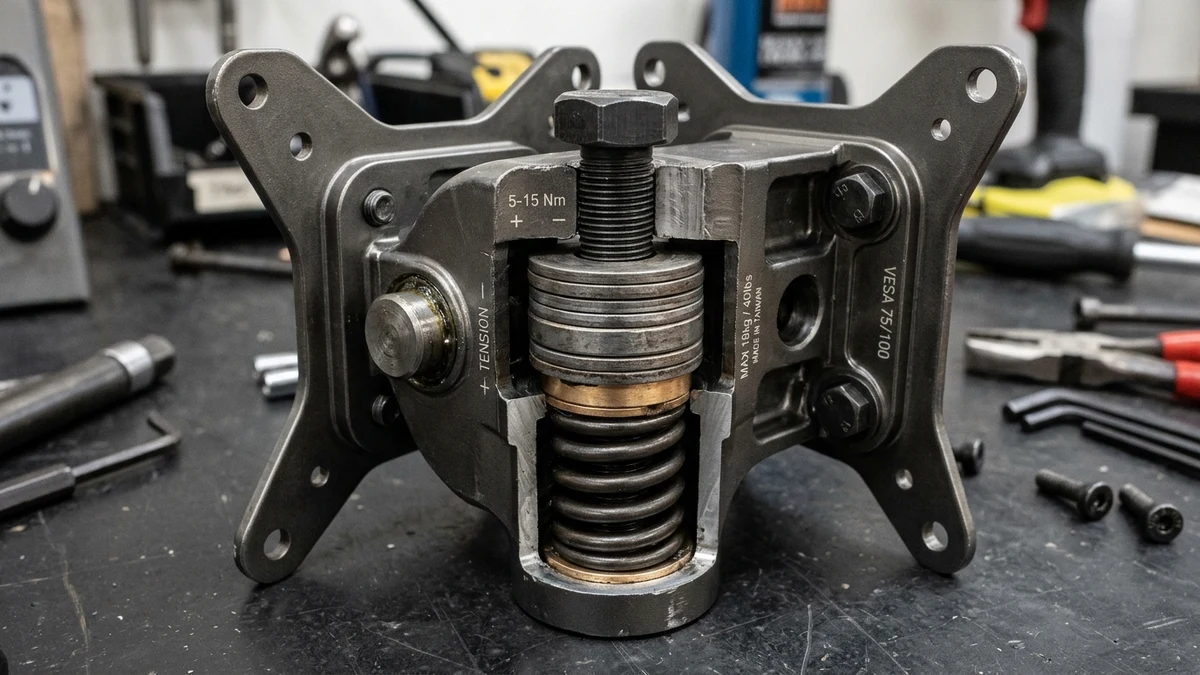
A heavy duty monitor arm prevents screen sag using high tension coil springs inside the VESA knuckle. Curved displays push mass forward, easily overpowering budget mounts.
Mounting a forty nine inch curved display on a standard arm extends weight forward from the mounting face, multiplying rotational torque on the tilt pivot.
Standard friction pads slip under this constant levered load. Heavy duty knuckle brackets lock that rotational torque with compression springs, keeping your screen perpendicular to your desk.
A drooping screen strains neck posture within minutes. Proper knuckle tension keeps the display elevated so your spine stays neutral.
The Rotational Torque Dilemma on Curved Displays
Monitor weight ratings tell only half the story. A flat monitor concentrates its mass directly along the vertical plane of the VESA plate.
Curved displays arch outward toward the user. This forward offset increases effective load on the pivot screw by thirty to fifty percent.
An aggressive 1000R curve exerts heavy rotational force. Even at thirty pounds, a shallow knuckle rated for thirty three pounds steadily pitches forward.
Thicker cast aluminum pivot housings and heavy gauge Belleville spring washers maintain clamping pressure against micro vibrations. Heavy arms compensate for this forward center of mass.
If your setup feels shaky during typing, review our recommendations for proper desk depth. Placing your clamp directly above a structural leg minimizes screen vibration.
Desktop Clamp Stress and Punch Through Risks
Heavy monitors generate concentrated downward pressure at the desk clamp edge. A forty pound monitor hanging two feet outward creates an intense cantilever load.
This bending force can crush honeycomb cardboard desks or crack hollow laminate surfaces. Solid hardwood tops handle the pressure, but thin composite surfaces risk structural failure.
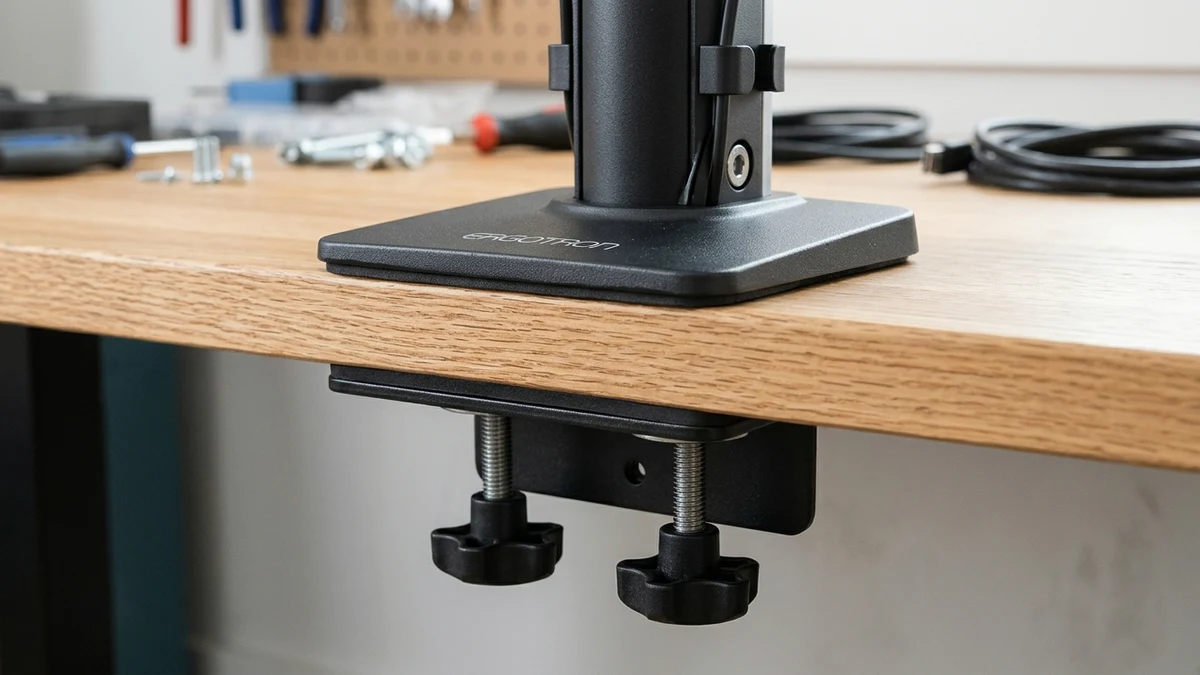
We strongly recommend installing an non slip steel reinforcement plate between the desk clamp and your desktop surface. The top plate disperses downward force across a broad footprint.
The bottom plate shields the desk underside from gouging. For dual display workstations, balance both arms evenly across the back edge or check our guide on standing desks for two monitors.
Three Heavy Duty Monitor Arms Worth Buying
We compared manufacturer load ratings, tilt pivot resistance, and aggregated owner reports for the leading high payload mounts. These three models deliver dependable stability.
Ergotron HX with HD Pivot: The Ultrawide Benchmark
The Ergotron HX stands as the gold standard for oversized curved monitors like the Samsung Odyssey G9. Built from heavy polished aluminum, it supports monitors between twenty and forty two pounds.
The critical advantage lies in Ergotron's heavy duty tilt pivot accessory. The reinforced HD pivot integrates heavy coil springs that halt forward drooping entirely on deep curved profiles.
Full extension reaches twenty five inches with eleven inches of vertical travel. Motion feels smooth and requires zero tightening tools once adjusted.
Cable management channels run internally along the upper and lower arms. The base attaches via an oversized steel C-clamp or through a reinforced grommet hole.
If you switch between standing and sitting routines, pair this mount with our standing desk posture guide. Matching monitor height to eye level protects neck vertebrae at both heights.
What Sucks
The Ergotron HX commands an expensive premium price tag. For 1000R curved screens, you must purchase the specific HD pivot bundle or order the reinforced knuckle bracket separately.
Who Should Skip
Skip the HX if your monitor weighs under twenty pounds. The heavy internal lift spring requires minimum downward mass to balance, causing lightweight displays to pop up to maximum height.
WALI Heavy Duty Single Arm: The Budget Workhorse
The WALI Heavy Duty arm delivers high capacity steel construction at an accessible price. It supports flat and curved displays weighing up to thirty three pounds.
An internal gas spring counterbalance cylinder smooths vertical height travel. Tension adjusts through an easily accessible top hex socket, allowing quick calibration to your display weight.
The base features a sturdy two bolt steel clamp that grips thick desktops securely. An included grommet bracket provides alternative mounting through standard desk cutouts.
The arm articulates across three separate pivot joints. You can swivel screens one hundred and eighty degrees to share work or pull the panel closer for detailed design work.
If screen bounce distracts you while typing, combine this clamp with our proven steps to stop monitor wobble on standing desks.
What Sucks
The tilt knuckle relies on standard friction tightening rather than an internal assist spring. Users with thirty pound curved screens must crank the tilt bolt with heavy leverage to eliminate droop.
Who Should Skip
Skip the WALI if you plan to mount extreme forty nine inch curved displays like the Odyssey Neo G9. Deep curves push mass forward and exceed its knuckle friction capacity.
AVLT Heavy Duty Ultrawide Mount: The High Capacity Contender
The AVLT Heavy Duty mount is engineered specifically for screens up to forty nine inches with weights reaching forty four pounds. It accommodates deep 1000R curved profiles and heavy flat glass screens.
Instead of a pressurized gas strut that can lose nitrogen charge over time, AVLT employs a mechanical coil spring cylinder. Mechanical springs offer consistent tension across warm and cool rooms.
Base passthrough ports provide dual USB connectivity on your desk edge. Protective rubber padding shields wooden finishes from scratches.
The arm delivers nearly twenty four inches of forward reach and fourteen inches of vertical clearance. Tension indicator windows on the elbow joint display your current adjustment setting for easy tuning.
Compare this heavy duty single arm against our broader monitor arm buying guide if your workspace utilizes multiple smaller screens instead of one ultrawide.
What Sucks
The base clamp footprint occupies significant depth behind your desk. Desks placed flush against drywall require at least four inches of clearance for the elbow joints to articulate freely.
Who Should Skip
Skip the AVLT if your desktop has an undermounted bevel frame or rear metal crossbar within four inches of the edge. The deep clamp bracket cannot clear narrow structural obstructions.
Recommended Ergonomic Accessories & Hardware Specs
High-impact accessories verified by our research team to protect your cables and joints.
VIVO Under-Desk Cable Tray
Keeps power strips and heavy adapters off the floor so cables never yank when elevating.
ComfiLife Gel Anti-Fatigue Mat
High-density core reduces heel strike and lower back compression when standing 3+ hours.
VELCRO Brand ONE-WRAP (100pk)
Pre-cut reusable straps that easily unwrap for cord re-routing without scissors.
Soundance Laptop Stand
Elevates laptop screen 6 inches to eye level, preventing forward neck slouch.
Gas Spring vs Mechanical Spring Counterbalance
High-capacity monitor arms rely on either pressurized gas struts or mechanical coil springs to offset display weight. Both mechanisms function effectively, but their long term durability diverges.
Gas struts provide fluid, featherweight movement across travel. Nitrogen gas compressed inside a sealed cylinder counteracts downward gravity smoothly with minimal starting friction.
However, gas seals can weep pressure over three to five years, especially in rooms with temperature swings. If pressure drops, the arm slowly sinks under maximum display load.
Mechanical springs use heavy gauge wound steel to resist gravitational pull. They never lose pressure, operate identically across seasons, and provide reliable lifetime tension.
Mechanical springs require slightly more initial effort to initiate movement. For permanent workstations, mechanical springs offer superior peace of mind.
How to Set Knuckle Tension for Zero Tilt Sag
Eliminating forward screen droop requires methodical calibration. Follow this sequence to prevent accidental slips or damaged desk edges.
First, clamp the arm securely to your desk frame and torque the base bolts. Verify that the clamp bracket sits fully seated against the bottom desktop face.
Second, attach the VESA bracket to your monitor while resting face down on a soft towel. Ensure all four mounting screws engage with even thread depth.
Third, lift the monitor onto the arm receiver with assistance if spanning over thirty four inches. Tighten the tilt tension bolt using your supplied hex key before releasing support.
Fourth, adjust the counterbalance screw until the screen floats weightlessly. Turn toward minus if the screen rises, or toward plus if the monitor drifts downward.
Finally, tune the tilt knuckle screw until you can pivot the screen angle with moderate two handed force without drooping.
Frequently Asked Questions
Can a regular monitor arm hold a 49 inch ultrawide?
Standard monitor arms rated for twenty pounds cannot support forty nine inch ultrawide displays. Curved ultrawide panels push weight far forward, overpowering budget tilt knuckles and causing rapid downward drooping.
Do I need a reinforcement plate for a heavy monitor mount?
You need a steel reinforcement plate when mounting heavy arms on composite or glass desks. Reinforcement plates distribute clamping torque across a wider footprint to prevent desktop puncture.
Why does my curved monitor keep tilting down on its arm?
Curved monitors tilt downward because their center of gravity sits four to six inches in front of the VESA mount plate. This forward lever arm multiplies rotational torque against the tilt knuckle.
Is a gas spring or mechanical spring better for heavy displays?
Mechanical springs provide superior long term durability because wound steel never leaks pressure over time. Gas springs offer smoother motion, but pressurized nitrogen seals can degrade over years of heavy use.
Calculate Your Exact Desk & Chair Height
Slide to your height to see ANSI/BIFMA recommended standing and sitting presets.
Written by M. Haris
✓ References ANSI/BIFMA G1-2017 GuidanceFounder & Lead Workstation Ergonomics Researcher • Spec Auditing & Biomechanical Research
M. Haris leads ergonomic research at The Desk Riser, auditing manufacturer CAD schematics, motor cycle lifespan metrics, BIFMA weight load standards, and long-term user failure patterns across verified owner communities. Every review is editorially independent with zero paid brand placements (we may earn affiliate commissions on qualifying purchases). Have questions or spot a warranty update? Email directly at support@thedeskriser.com, read the Author Dossier, or explore our Editorial Research Methodology.
Share this article:
Workstation Setup & Fit Q&A
Have questions about frame deflection, monitor arm clamp loads, or chair sizing? Consult our research team.
Q:How do I know if this standing desk will wobble on thick carpet?
Standing desk wobble on carpet is caused by uneven carpet pile compression under the rear footpads. Frames with wedge-reinforced leg collars and wide steel footplates (like UPLIFT V3 or FlexiSpot E7 Pro) minimize lateral flex. If placing on plush carpet, use rigid caster cups or a dense underlay to anchor the base directly to the subfloor.
Q:Can I clamp a dual monitor arm onto standard particleboard tops?
Dual monitor arms concentrate 25 to 45 lbs of dynamic torque onto a 4-inch clamp perimeter. Hollow honeycomb tops (such as IKEA Linnmon) will crush. We recommend a minimum 0.75-inch solid core (MDF, solid bamboo, or hardwood), or sandwiching a steel reinforcement bracket plate (min 2.5mm thickness) between the clamp and desktop.
Q:What if my chair cylinder sinks or feels too high for my feet?
Always verify your seated popliteal height (crease behind knee to floor with shoes). If a chair will not drop below 17 inches and your feet dangle, pair it with an angled footrest or switch to a low-range Class 4 cylinder. If a cylinder loses pressure and sinks on its own, the internal nitrogen seal is breached and requires cylinder replacement.
Ask Our Ergonomic Spec Reviewers
Planning an upgrade or unsure if your monitors and stature fit this configuration? Send your dimensions directly to our research desk. No accounts, no trackers, zero marketing spam.