Standing Desk Posture Guide 2026: Correct Ergonomic Setup
Most people stand at their desk wrong. Here's the exact height formula, monitor position, and 5 posture mistakes that cause neck and back pain.
Referenced against OSHA and peer-reviewed biomechanics
Mapped to Cornell 20-8-2 active workday intervals
Targeted for trapezius, cervical, and lumbar disc relief

Ergonomic & Literature Guidance
Synthesizes peer-reviewed postural literature, ANSI/BIFMA G1-2017 dimensional guidance, and physical therapy load principles. Methodology →
Literature & Standard Check
. Referenced against ANSI/BIFMA G1-2017 and clinical ergonomics literature.
Medical Boundary
Consult a licensed physician or physical therapist for acute, radiating, or persistent musculoskeletal symptoms.
Disclosure: We earn a commission if you buy through links on this page. Review our research methodology.
A standing desk does not automatically improve your posture. It merely replaces one set of mechanical risks with another if your body geometry is misaligned.
Most workers raise their motorized desk, lock their knees, and assume the transition is complete.
Within an hour, lower back tightness, aching arches, and rounded shoulders signal that static standing is just as punishing as slouching.
| Posture Parameter | Recommended Biomechanical Setting | Primary Muscle / Joint Action | Common Postural Failure |
|---|---|---|---|
| Work Surface Height | Exact hanging elbow crease height (90°–100°) | Forearms parallel to floor, zero wrist flexion | Desk set too high, shrugging trapezius muscles |
| Monitor Elevation | Top third of active panel level with eyes | 15°–20° downward ocular cone, neutral C1–C7 | Screen flat on desktop, causing cervical shear |
| Lower Extremity Alignment | 5° micro-flexion at knees, feet shoulder-width | Quadriceps and calf pumps active, neutral pelvis | Knee hyperextension, locking joints and jamming lumbar |
| Dynamic Substrate | 3/4" high density polyurethane anti fatigue mat | Continuous micro-shifting, active muscle stimulation | Standing barefoot on rigid concrete or hardwood |
Audit your complete joint angles and desk dimensions using our interactive desk height calculator.
Standing Desk Posture: Step 1: Calibrate Standing Desk Height to the Elbow Crease
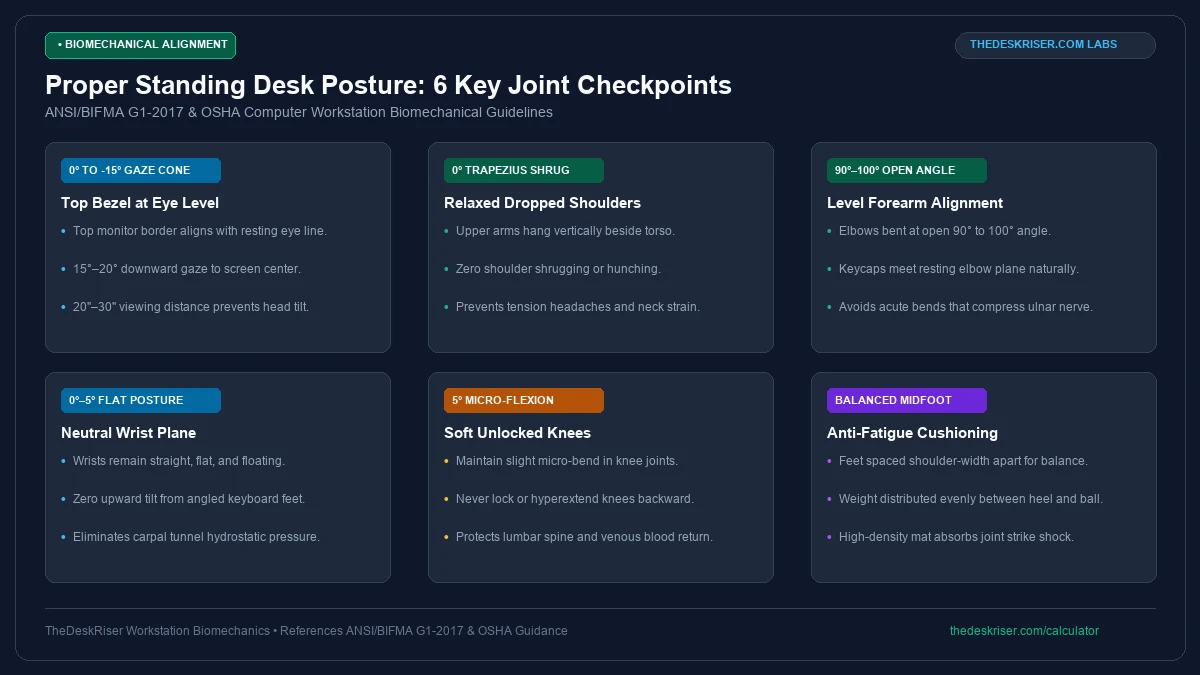
Calibrating standing desk height represents the single most important step in your setup. If your desk height is incorrect, your shoulders, wrists, and lumbar spine will absorb continuous compensatory stress.
Calculate your desk height using the 90-degree elbow formula:
- Stand upright in your regular work footwear or on your anti fatigue mat.
- Let your arms hang loosely at your sides with your shoulders completely relaxed.
- Bend your elbows upward to a 90-degree angle with forearms parallel to the floor.
- Measure the vertical distance from the floor to the underside of your bent forearms.
That exact measurement is your target standing desk surface height. For most adults, this height lands between 38 and 46 inches depending on user stature and sole thickness.
Footwear thickness alters your standing elbow height by up to 1.5 inches. Either maintain consistent footwear while working, or program separate memory presets into your motorized controller.
Remember that desk height dictates your keyboard and mouse plane, not your monitor height. Treating your desk surface as a display stand guarantees that your screen will sit inches too low.
Step 2: Position Your Monitor on an Independent Articulating Arm
Once your desk is calibrated to your elbow height, your computer monitor will sit dramatically below eye level if left on its factory stand.
Looking down at a low display bends your neck forward, stressing your cervical spine.
The top border of your monitor should sit level with or slightly below your horizontal eye gaze.
Because the human eye naturally rests at a 15-degree downward angle, this alignment centers the screen without requiring forward head tilt.
Maintain a viewing distance of 20 to 28 inches between your face and the display. When you extend your arm toward the screen, your fingertips should brush against the glass.
Tilt the monitor backward 10 to 20 degrees from vertical. Backward tilt ensures your line of sight hits the entire panel perpendicularly as your gaze sweeps toward the bottom of the screen.
If your monitor rests on its factory desktop stand, you cannot adjust screen height without simultaneously moving your keyboard.
Mounting the screen on an articulating best monitor arm 2026 allows independent, fluid positioning.
The Five Posture Mistakes That Make Standing Worse Than Sitting
Transitioning between sit stand stations introduces biomechanical traps, which is why rotating with active kneeling chair advantages helps offload lumbar strain during seated blocks.
1. Leaning Forward Into the Desk Surface
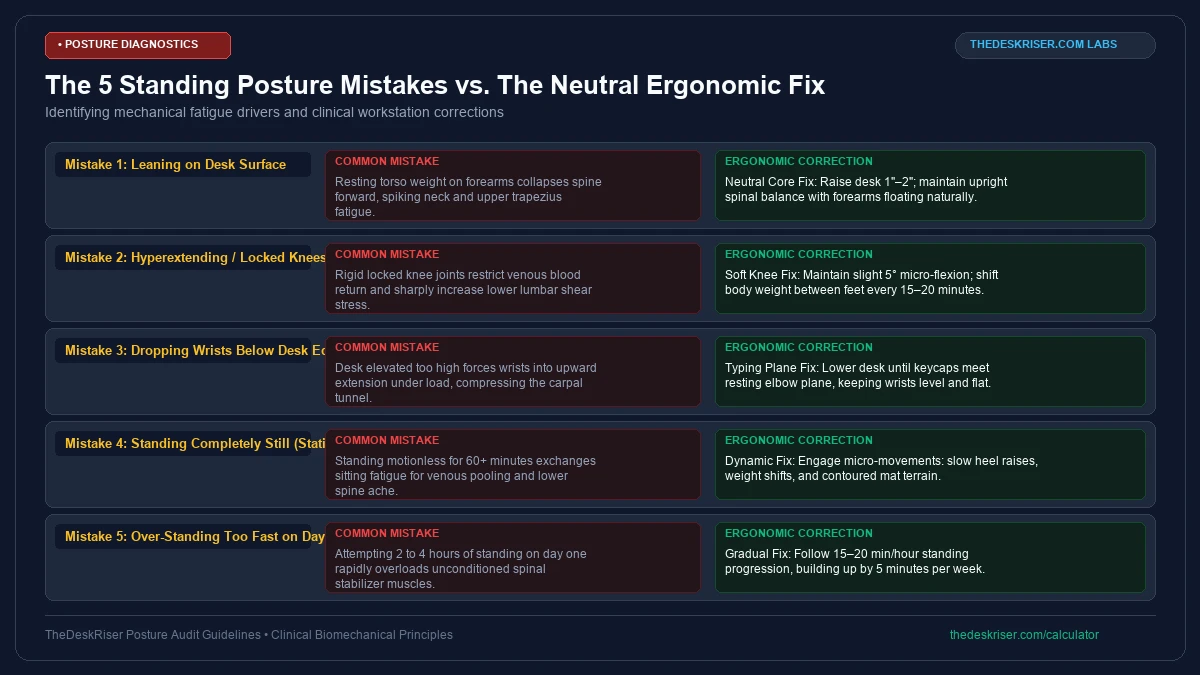
Leaning your torso forward onto the desktop edge is the most prevalent standing desk mistake.
When fatigue sets in, workers unconsciously plant their forearms on the desk and lean their body weight forward.
This habit forces your neck and upper thoracic spine to absorb your torso weight.
If you catch yourself leaning forward, raise your desk one inch and pull your keyboard closer to keep your upper arms vertical.
2. Locking Your Knees into Hyperextension
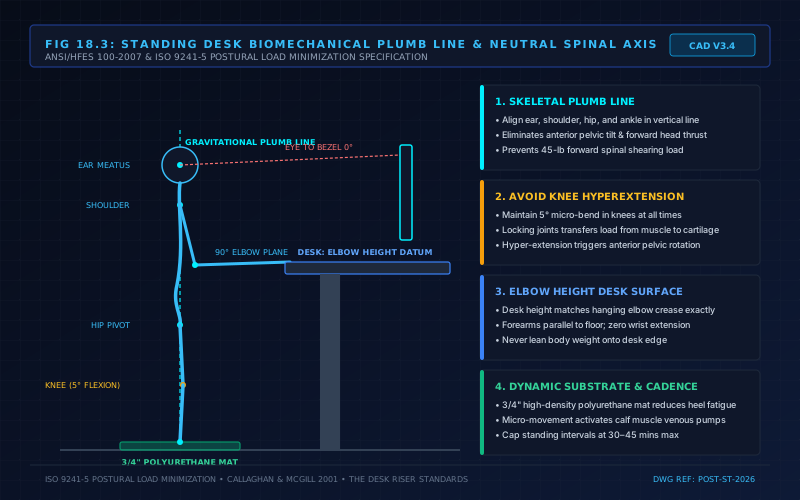
Standing with locked knees transfers your upper body weight directly from your muscles into your joint cartilage.
Hyperextending the knee joints tilts your pelvis forward, creating anterior pelvic tilt and pinching lumbar facet joints.
Keep a continuous 5-degree micro-bend in your knees while standing. This slight flexion engages your quadriceps, hamstrings, and gluteal stabilizers, protecting your lower spine from compression.
3. Dropping Your Wrists Below the Keyboard Plane
When working at a standing desk, users frequently drop their wrists against the desk edge while angling their hands upward to type.
This upward wrist extension increases contact strain across the wrist creases, contributing to forearm tendon fatigue.
Keep your wrists completely flat and floating while typing. If your wrists bend upward, lower your desk surface by one inch until your hands float naturally above the home row.
4. Standing Completely Motionless
The physiological purpose of a standing desk is not to freeze your body in a rigid standing posture. Standing motionless for an hour causes calf muscle fatigue and uncomfortable foot pressure.
Introduce continuous micro movements throughout your standing sessions.
Shift your weight from one foot to the other, perform occasional calf raises, or rest one foot on an raised rail to alternate pelvic tilt.
5. Standing Too Long Too Quickly
To establish sustainable daily intervals, read our guide on how long should you stand at a standing desk rather than attempting four consecutive hours immediately.
Begin by standing for 15 to 20 minutes per hour, then sit for the remaining 40 minutes.
Gradually increase standing duration by 5 minutes each week until you reach a sustainable 30 minute standing block.
Why Mainstream Wellness Advice Promotes Dangerous Standing Habits
Mainstream wellness influencers and corporate ergonomics pamphlets frequently advise workers to stand for eight continuous hours. This advice contradicts clinical occupational health research.
Studies published by Waters and Dick in 2015 demonstrate that prolonged standing exceeding 45 minutes induces severe lower extremity discomfort, peripheral vascular pooling, and plantar fascia inflammation.
Standing statically for long blocks is just as detrimental to cardiovascular and musculoskeletal health as chronic sitting.
Lifestyle blogs also promote standing on bare hardwood floors without support. Standing unassisted on hard flooring creates localized peak pressures exceeding 35 PSI under the calcaneus (heel bone), triggering plantar fasciitis.
Our ergonomic framework mandates structured dynamic rotation. We require high density polyurethane mats, 5-degree knee flexion, and strict 20-8-2 sit to stand transitions to protect remote workers.
Recommended Ergonomic Accessories & Hardware Specs
High-impact accessories verified by our research team to protect your cables and joints.
VIVO Under-Desk Cable Tray
Keeps power strips and heavy adapters off the floor so cables never yank when elevating.
ComfiLife Gel Anti-Fatigue Mat
High-density core reduces heel strike and lower back compression when standing 3+ hours.
VELCRO Brand ONE-WRAP (100pk)
Pre-cut reusable straps that easily unwrap for cord re-routing without scissors.
Soundance Laptop Stand
Elevates laptop screen 6 inches to eye level, preventing forward neck slouch.
The Two Most Effective Standing Posture Accessories
Two hardware accessories directly correct the most persistent standing desk biomechanical flaws.
Articulating gas spring Monitor Arm
An articulating monitor arm eliminates the mechanical trade off between typing height and viewing height. It enables instant, fluid adjustments whenever you switch between sitting and standing.
The Ergotron LX (~$189) represents our top rated monitor mounting solution. Its polished aluminum construction and counterbalanced gas spring maintain rock solid stability without drifting downward over time.
high density anti fatigue Mat
A dedicated anti fatigue mat stimulates the calf muscle venous pump, promoting circulation and delaying lower extremity fatigue.
The Topo Mat by Ergodriven features calculated topographical terrain contours that encourage natural foot movement and weight shifting while standing.
If you experience ongoing lower back stiffness while standing, explore our detailed troubleshooting guide on why does my lower back hurt from a standing desk.
Frequently Asked Questions
What is the correct posture for a standing desk?
Maintain a vertical plumb line through your ear, shoulder, hip, and ankle.
Keep your elbows bent at 90 to 100 degrees with forearms parallel to the floor, keep a slight 5-degree micro-bend in your knees.
Align the top of your monitor with your eye level.
How high should my standing desk be?
Your standing desk should match the height of your bent elbow crease when standing in your normal work footwear.
For most adults, this lands between 38 and 46 inches from the floor to the desk surface.
Why does my lower back hurt when using a standing desk?
Lower back pain usually stems from locked knees or an incorrect desk height.
Locking your knees rotates your pelvis forward, pinching lumbar facet joints, while a desk that sits too low forces forward slouching.
Should my elbows be at 90 degrees at a standing desk?
Yes, your elbows should form an open 90 to 100-degree angle with your forearms resting parallel to the floor. This relaxed geometry prevents shoulder shrugging and keeps wrists completely neutral during typing.
How long should I stand at a standing desk each day?
Ergonomists recommend alternating between sitting and standing rather than standing all day.
Follow the 20-8-2 cadence: sit for 20 minutes, stand for 8 minutes, and move for 2 minutes to maximize circulation and spinal health.
Sources & Scientific Literature
- Callaghan, J. P., & McGill, S. M. (2001). Low back joint loading and kinematics during standing and unsupported sitting. Ergonomics, 44(3), 280-294.
- Waters, T. R., & Dick, R. B. (2015). Evidence of health risks associated with prolonged standing at work and intervention effectiveness. Rehabilitation Nursing, 40(3), 148-165.
- Baker, R., et al. (2018). short term effects of standing desk use on cognitive function and musculoskeletal discomfort. Ergonomics, 61(9), 1252-1263.
- ANSI/HFES 100-2007: Human Factors Engineering of Computer Workstations, Human Factors and Ergonomics Society.
Calculate Your Exact Desk & Chair Height
Slide to your height to see ANSI/BIFMA recommended standing and sitting presets.

Written by M. Haris
✓ References ANSI/BIFMA G1-2017 GuidanceFounder & Lead Workstation Ergonomics Researcher • Spec Auditing & Biomechanical Research
M. Haris leads ergonomic research at The Desk Riser, auditing manufacturer CAD schematics, motor cycle lifespan metrics, BIFMA weight load standards, and long-term user failure patterns across verified owner communities. Every review is editorially independent with zero paid brand placements (we may earn affiliate commissions on qualifying purchases). Have questions or spot a warranty update? Email directly at [email protected], read the Author Dossier, or explore our Editorial Research Methodology.
Share this article:
Workstation Setup & Fit Q&A
Have questions about frame deflection, monitor arm clamp loads, or chair sizing? Consult our research team.
Q:How do I know if this standing desk will wobble on thick carpet?
Standing desk wobble on carpet is caused by uneven carpet pile compression under the rear footpads. Frames with wedge-reinforced leg collars and wide steel footplates (like UPLIFT V3 or FlexiSpot E7 Pro) minimize lateral flex. If placing on plush carpet, use rigid caster cups or a dense underlay to anchor the base directly to the subfloor.
Q:Can I clamp a dual monitor arm onto standard particleboard tops?
Dual monitor arms concentrate 25 to 45 lbs of dynamic torque onto a 4-inch clamp perimeter. Hollow honeycomb tops (such as IKEA Linnmon) will crush. We recommend a minimum 0.75-inch solid core (MDF, solid bamboo, or hardwood), or sandwiching a steel reinforcement bracket plate (min 2.5mm thickness) between the clamp and desktop.
Q:What if my chair cylinder sinks or feels too high for my feet?
Always verify your seated popliteal height (crease behind knee to floor with shoes). If a chair will not drop below 17 inches and your feet dangle, pair it with an angled footrest or switch to a low-range Class 4 cylinder. If a cylinder loses pressure and sinks on its own, the internal nitrogen seal is breached and requires cylinder replacement.
Ask Our Ergonomic Spec Reviewers
Planning an upgrade or unsure if your monitors and stature fit this configuration? Send your dimensions directly to our research desk. No accounts, no trackers, zero marketing spam.
Free Workstation Tools
Related Health & Ergonomics Guides & Reviews
How Long Should You Walk on a Walking Pad: Interval Rule (2026)
Best Chairs for People with Arthritis (2026 Buying Guide)
Best Under Desk Bikes & Pedals (2026 Knee Clearance)
Why Do My Feet Hurt From Standing Desk? (Causes & Fixes)