How Long Should You Walk on a Walking Pad: Interval Rule (2026)

How long should you walk on a walking pad daily? Discover safe session limits, the 30-30 interval ratio, plantar pressure relief, and motor duty cycles.
High-density polyurethane core tested against permanent compression
Anti-trip beveled ramp and non-slip floor grip verified
Calculated plantar pressure and spinal compression relief
Ergonomic & Literature Guidance
Synthesizes peer-reviewed postural literature, ANSI/BIFMA G1-2017 dimensional guidance, and physical therapy load principles. Methodology →
Literature & Standard Check
. Referenced against ANSI/BIFMA G1-2017 and clinical ergonomics literature.
Medical Boundary
Consult a licensed physician or physical therapist for acute, radiating, or persistent musculoskeletal symptoms.
Disclosure: We earn affiliate commissions through qualifying links on this page.
Under desk walking treadmills offer an accessible way to log steps during busy workdays. Moving while working keeps energy steady without requiring dedicated gym time.
However, walking continuously for hours on a flat motorized belt creates unexpected joint fatigue and overheats compact motors. Balanced interval timing protects your joints and hardware.
For our full collection of posture protocols, explore our complete workstation health and ergonomics hub.
How Long Should You Walk on a Walking Pad: The Ergonomic Interval Rule
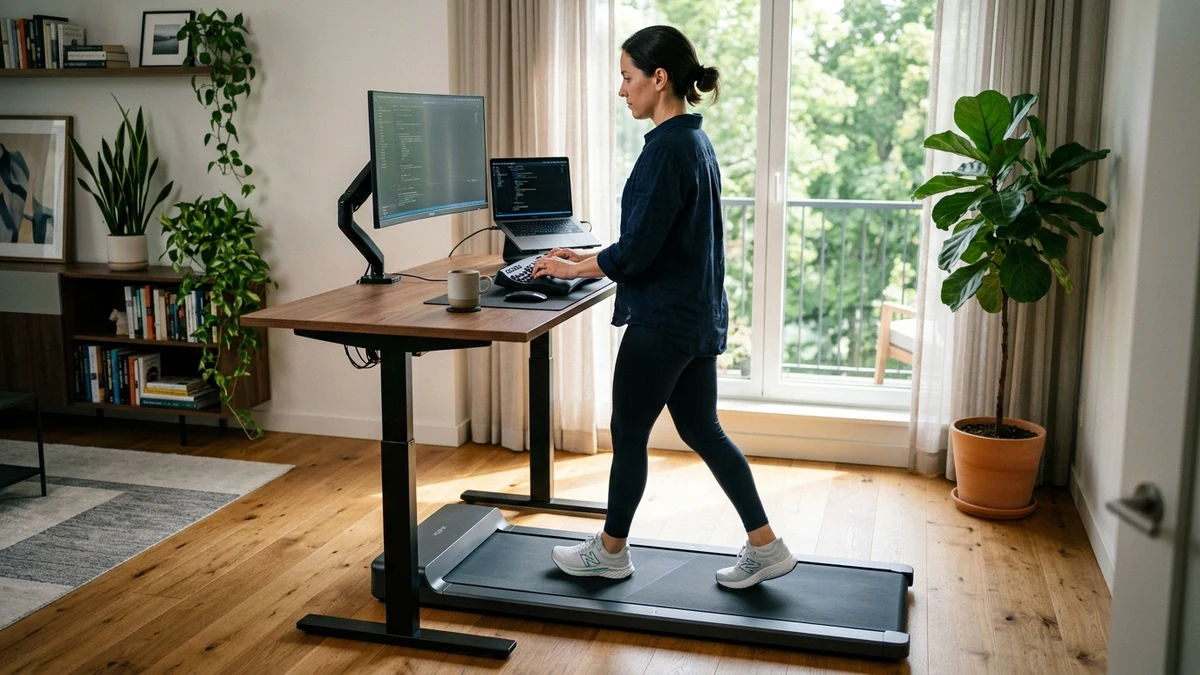
You should walk on a walking pad for 30 to 45 minutes per session, accumulating 90 to 120 minutes daily. Alternating walking with seated work prevents plantar strain and motor overheating.
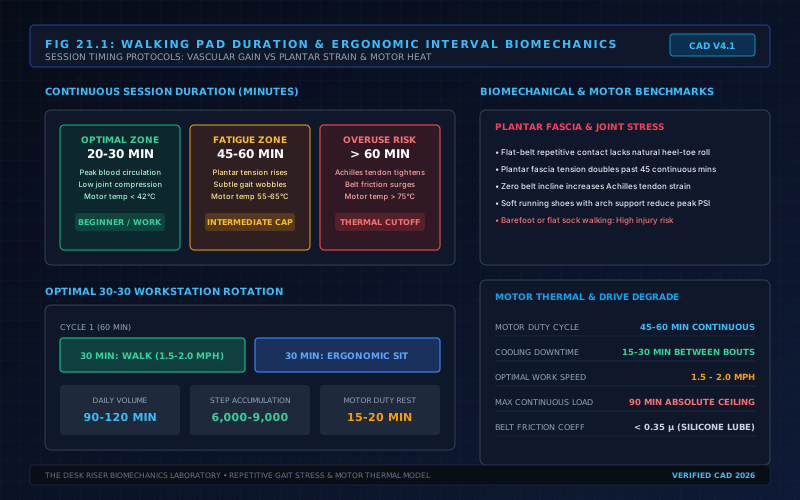
Continuous movement beyond sixty minutes rapidly increases tendon strain on repetitive flat surfaces. Compact treadmill motors also require cooling breaks between operating bouts.
| User Tier & Daily Cap | Target Cadence & Speed | Physiological Benefit | Friction & Overuse Risk | Ergonomic Verdict |
|---|---|---|---|---|
| Beginner (20 to 30 Min Daily) | 1.2 to 1.6 MPH, 2,500 steps | Activates calf pump and relieves static lower back stiffness | Mild arch soreness from unfamiliar flat deck contact | Ideal starter volume for the first two weeks |
| Intermediate (45 to 90 Min Daily) | 1.5 to 2.0 MPH, 6,000 steps | Sustains insulin sensitivity and improves metabolic rate | Calf muscle tightness without supportive footwear | Optimal balance for typing while walking |
| Advanced (90 to 120 Min Daily) | 1.8 to 2.2 MPH, 9,000 steps | Maximizes daily calorie expenditure and venous blood flow | Achilles tendon tension and motor coil heat buildup | Divide volume into three separate daily bouts |
Why Continuous Walking Beyond 60 Minutes Causes Friction
Walking on an under desk treadmill differs fundamentally from strolling outdoors. Outdoor surfaces offer micro elevations, soft dirt, and natural turns that distribute pressure across varied foot muscles.
In contrast, a motorized walking pad confines your feet to a uniform flat track. Your lower limb joints repeat identical kinematic angles continuously.
Continuous flat belt contact increases mechanical stress on the plantar fascia band. Without surface variation, the calcaneal heel pad absorbs repeated impact.
Extended sessions also shift pelvic tilt forward, compressing lumbar vertebrae. When fatigue sets in, users frequently lean on their desktop, creating wrist strain.
Prolonged static standing creates similar lower extremity pooling issues. Compare these fatigue curves in our guide on how long should you stand at a standing desk to balance upright posture.
The 30-30 Workstation Interval Protocol
The most sustainable way to integrate an under desk treadmill is the 30-30 interval protocol. You walk for thirty minutes at a conversational pace, then sit for thirty minutes of focused work.
This rhythm maintains muscular circulation without inducing postural breakdown. Working muscles clear metabolic waste while you tackle intensive keyboard tasks seated.
If your daily workload requires deep programming focus, consider a 20-40 interval instead. Walking for twenty minutes per hour yields nearly five thousand steps across an eight hour workday.
Short walking bouts also prevent cognitive interference. Complex writing and precise mouse manipulation remain substantially easier during seated intervals.
You can calculate your personalized daily movement targets with our workstation calculator.
Motor Thermal Limits and Mechanical Duty Cycles
Under desk treadmills rely on compact DC motors ranging between 550 and 750 watts. These small drive units lack the heavy external cooling blowers found on commercial gym treadmills.
When an adult walks on a moving belt, each heel strike acts as a momentary mechanical brake. This friction forces the motor controller to draw higher amperage to maintain belt velocity.
Operating a walking pad continuously for sixty minutes causes internal motor coil heat to climb past 70 degrees Celsius. In hot rooms, thermal sensors will shut off power abruptly to prevent damage.
Allowing a fifteen to twenty minute rest between sessions lets motor windings dissipate heat naturally. This resting phase extends the life of motor drive belts and internal bearings.
Friction also increases when decks run dry. Review our guide on how to lubricate a walking pad treadmill with pure silicone oil every thirty operating hours.
Proper floor placement is equally critical for cooling intake vents. Learn how to protect bottom vents in our breakdown of putting a walking pad on carpet without suffocating airflow.
Recommended Ergonomic Accessories & Hardware Specs
High-impact accessories verified by our research team to protect your cables and joints.
VIVO Under-Desk Cable Tray
Keeps power strips and heavy adapters off the floor so cables never yank when elevating.
ComfiLife Gel Anti-Fatigue Mat
High-density core reduces heel strike and lower back compression when standing 3+ hours.
VELCRO Brand ONE-WRAP (100pk)
Pre-cut reusable straps that easily unwrap for cord re-routing without scissors.
Soundance Laptop Stand
Elevates laptop screen 6 inches to eye level, preventing forward neck slouch.
The Footwear Factor: Why Barefoot Walking Harms Feet
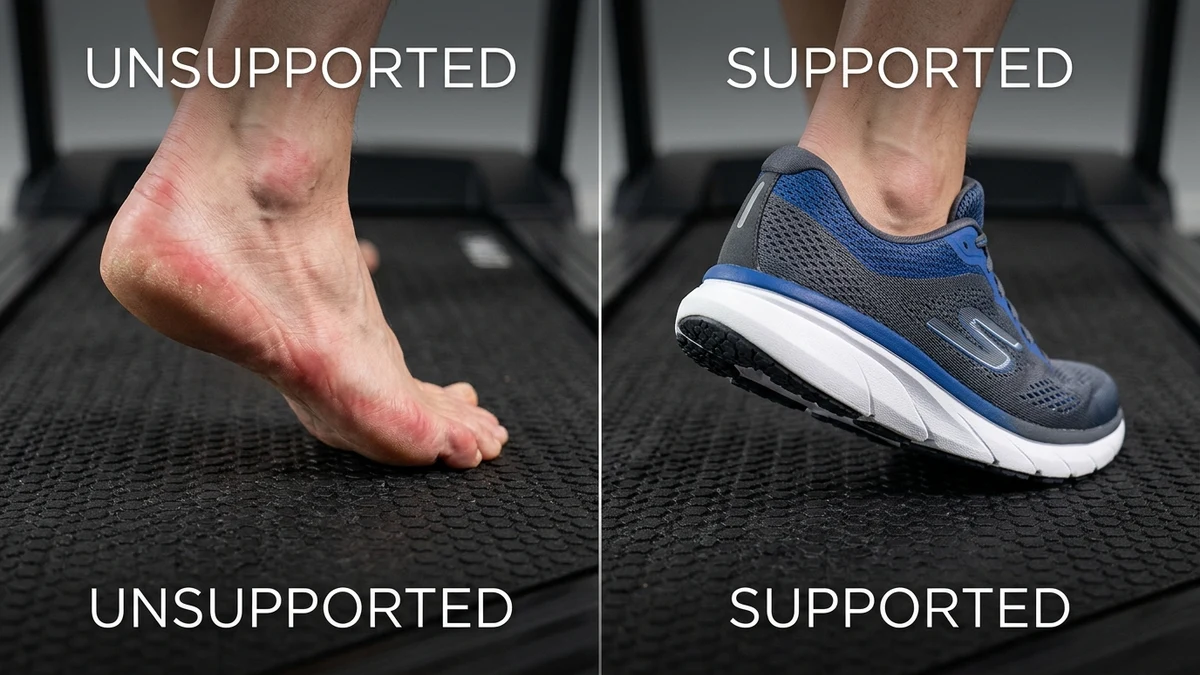
Walking barefoot or in socks on a walking pad is a frequent mistake among remote workers. Standard home treadmills feature a thin PVC belt sliding over a stiff phenolic composite deck.
This rigid deck offers minimal shock absorption compared to outdoor grass. Bare heels strike with intense localized impact exceeding forty pounds per square inch.
Without arch support, the plantar fascia stretches taut with every step. Over several weeks, this unbuffered impact triggers heel spurs and morning stiffness.
Structured running shoes with cushioned midsoles absorb heel strike shock effectively. Dedicated indoor shoes also keep outside gravel off the belt.
For full equipment recommendations and quiet deck designs, check our guide to the best under desk treadmills.
What Sucks About Walking While Working
Typing while walking takes real practice and presents distinct physical drawbacks. High speed typing accuracy drops by ten to twenty percent when your body is in motion.
Fine mouse tasks feel clumsy while walking. Subtle head bobbing also makes reading small spreadsheet numbers frustrating.
Sweat management is another friction point. Walking continuously at two miles per hour generates noticeable warmth, which feels uncomfortable in casual clothing.
Cable clutter demands constant attention. Treadmill power cords and desk wires tangle easily if routed carelessly across moving zones.
Who Should Skip an Under Desk Treadmill
Under desk walking pads are helpful fitness tools, but they are not suitable for every office worker. Certain physical conditions make motorized walking pads unsafe.
Individuals with active plantar fasciitis or Achilles tendinitis should avoid treadmill desks until inflammation resolves. Repetitive belt contact aggravates irritated tissues.
Workers experiencing inner ear balance issues or motion sickness should also skip walking pads. Synchronizing screen reading with belt motion can provoke dizziness.
Finally, professionals on continuous live video calls may find walking distracting for clients. An active standing board or ergonomic chair serves better.
How to Set Your Workstation Height for Walking
Proper desk height changes when you step onto an under desk walking pad. The motor housing and walking deck raise standing height by three to five inches.
If you keep regular standing desk height, you will hunch forward while walking. This forward slump compresses cervical vertebrae and strains neck muscles.
Raise your desk surface until your elbows rest at ninety degrees. Your forearms should glide parallel over the desktop without bearing weight.
Position your monitor so the top third of the screen aligns directly with eye level. This eye level alignment keeps your neck upright as your stride shifts beneath you.
Weekly Ramp-Up Schedule: From Zero to 10,000 Steps
Jumping immediately into hours of daily walking causes shin splints and foot soreness. A structured progression allows connective tissues to adapt smoothly.
Week 1: Initial Neuromuscular Adaptation
Begin with two fifteen minute walking sessions per day spaced morning and afternoon. Set your belt speed to 1.2 or 1.4 MPH while answering emails or reading documents.
Week 2: Interval Expansion
Increase each walking bout to twenty-five minutes twice daily. Raise belt speed slightly to 1.5 or 1.6 MPH as hand eye coordination improves.
Week 3: Target Cadence and Endurance
Advance to three thirty minute sessions distributed across your workday. Maintain a steady pace of 1.8 MPH during meetings and audio calls.
Week 4: Full Workstation Habit
Maintain two forty-five minute bouts or three thirty minute sessions according to your daily calendar. Cap your single session duration at sixty minutes maximum.
Scientific Literature & Clinical References
Occupational research confirms that breaking up sedentary behavior improves metabolic health. Intermittent light activity lowers postprandial glucose spikes and enhances blood flow.
However, clinical studies emphasize that excessive walking on hard surfaces introduces postural strain. Cumulative hydrostatic pressure requires regular alternating postures.
Biomechanical analyses show that speeds between 1.5 and 2.0 MPH optimize cognitive performance. Exceeding two miles per hour increases typing errors substantially.
Peer reviewed findings emphasize supportive footwear during motorized walking. Structured arch support attenuates calcaneal shock and preserves plantar fascia elasticity.
Frequently Asked Questions
Can you walk on a walking pad for 2 hours straight?
Walking for two continuous hours overheats compact treadmill motors and creates excessive plantar fascia strain. Divide your daily walking volume into two or three separate sessions instead.
What is the ideal walking pad speed while typing?
The ideal walking speed for typing is between 1.5 and 1.8 MPH. Speeds above 2.0 MPH cause torso sway, leading to frequent typing mistakes and mouse inaccuracy.
Should you wear shoes on an under desk walking pad?
Yes, you should always wear supportive running or walking shoes. Walking barefoot on a thin treadmill belt transfers harsh shock into heels, increasing the risk of plantar fasciitis.
How many miles or steps should you aim for each day?
Aim for 6,000 to 10,000 steps daily, which equals roughly three to five miles. Spreading this distance across multiple thirty minute bouts prevents joint exhaustion.
Will walking on a walking pad cause lower back or knee pain?
Walking on a walking pad can cause back pain if your desk height is set too low. Ensure your desk rises to match added deck height so your posture remains upright.
Calculate Your Exact Desk & Chair Height
Slide to your height to see ANSI/BIFMA recommended standing and sitting presets.
Written by M. Haris
✓ References ANSI/BIFMA G1-2017 GuidanceFounder & Lead Workstation Ergonomics Researcher • Spec Auditing & Biomechanical Research
M. Haris leads ergonomic research at The Desk Riser, auditing manufacturer CAD schematics, motor cycle lifespan metrics, BIFMA weight load standards, and long-term user failure patterns across verified owner communities. Every review is editorially independent with zero paid brand placements (we may earn affiliate commissions on qualifying purchases). Have questions or spot a warranty update? Email directly at [email protected], read the Author Dossier, or explore our Editorial Research Methodology.
Share this article:
Workstation Setup & Fit Q&A
Have questions about frame deflection, monitor arm clamp loads, or chair sizing? Consult our research team.
Q:How do I know if this standing desk will wobble on thick carpet?
Standing desk wobble on carpet is caused by uneven carpet pile compression under the rear footpads. Frames with wedge-reinforced leg collars and wide steel footplates (like UPLIFT V3 or FlexiSpot E7 Pro) minimize lateral flex. If placing on plush carpet, use rigid caster cups or a dense underlay to anchor the base directly to the subfloor.
Q:Can I clamp a dual monitor arm onto standard particleboard tops?
Dual monitor arms concentrate 25 to 45 lbs of dynamic torque onto a 4-inch clamp perimeter. Hollow honeycomb tops (such as IKEA Linnmon) will crush. We recommend a minimum 0.75-inch solid core (MDF, solid bamboo, or hardwood), or sandwiching a steel reinforcement bracket plate (min 2.5mm thickness) between the clamp and desktop.
Q:What if my chair cylinder sinks or feels too high for my feet?
Always verify your seated popliteal height (crease behind knee to floor with shoes). If a chair will not drop below 17 inches and your feet dangle, pair it with an angled footrest or switch to a low-range Class 4 cylinder. If a cylinder loses pressure and sinks on its own, the internal nitrogen seal is breached and requires cylinder replacement.
Ask Our Ergonomic Spec Reviewers
Planning an upgrade or unsure if your monitors and stature fit this configuration? Send your dimensions directly to our research desk. No accounts, no trackers, zero marketing spam.