How High Should a Standing Desk Be? (Ergonomic Chart & Formula)

How we researched
We compare current specs, warranty terms, buyer complaints, and long-term owner patterns. Read methodology →
Last price/spec check
2026-09-06. Prices move, so use the retailer page as the final source.
Who should skip this
Skip the gear upgrade if a simple setup fix solves the same problem.
Setting up a new sit-stand workstation almost always triggers the exact same question: how high should a standing desk be for your specific body height?
Most people guess by eyeball. They tap the motorized controller until the desktop reaches somewhere around their stomach, place their hands on the keyboard, and begin typing. Within forty-five minutes, their trapezius muscles knot up, their lower back throbs, and their wrists ache from typing on an upward angle.
An incorrectly adjusted standing desk is worse for your musculoskeletal health than sitting down. When a desk sits just two inches too high, your shoulders remain in a state of continuous, isometric contraction to keep your arms elevated. When it sits two inches too low, you unconsciously slump your thoracic spine forward, straining your cervical neck discs.
Here is the exact BIFMA G1-2017 ergonomic framework for calculating your standing desk elevation. Below you will find our comprehensive height reference chart for heights between 5'0" and 6'4", the four-step elbow calibration formula, and how to adjust for shoes and anti-fatigue mats.
The Golden Rule: The 90-Degree Elbow Neutral Stance
Before looking up numbers on a chart, understand the primary anatomical benchmark that dictates all desk ergonomics.
Your desk height should precisely match the height of your forearms when your arms are resting naturally at your sides with elbows bent between 90 and 100 degrees.
When standing in a neutral posture:
- Your upper arms should hang straight down from your shoulders without reaching forward.
- Your elbows should form an angle between 90 degrees and 100 degrees (a slightly open obtuse angle is acceptable; an acute angle under 90 degrees compresses the ulnar nerve).
- Your forearms must remain parallel to the floor or slope gently downward toward your keyboard.
- Your wrists must stay completely flat and neutral, with zero upward extension (dorsiflexion) or downward bending.
- Your shoulders must remain relaxed and dropped, never shrugged upward toward your ears.
If your elbows flare outward or your shoulders lift even half an inch to reach the keys, your desk is set too high. If you find yourself leaning your body weight onto the desktop with your palms, your desk is set too low.
Standing Desk Height Chart by User Height (5'0" to 6'4")
Human proportions vary based on torso-to-leg ratios. However, the BIFMA G1-2017 Ergonomic Standard provides reliable median measurements based on anthropometric population datasets.
The table below provides starting calibrations for barefoot standing desk height, seated desk height, footwear adjustments, and standing eye level.
| User Height | Seated Desk Height | Standing Desk Height (Barefoot) | With Shoes & Mat (+1.5") | Standing Eye Level |
|---|---|---|---|---|
| 5'0" (152 cm) | 22.5" (57 cm) | 35.5" (90 cm) | 37.0" (94 cm) | 53.5" (136 cm) |
| 5'2" (157 cm) | 23.5" (60 cm) | 36.5" (93 cm) | 38.0" (97 cm) | 55.0" (140 cm) |
| 5'4" (163 cm) | 24.5" (62 cm) | 38.0" (97 cm) | 39.5" (100 cm) | 57.0" (145 cm) |
| 5'6" (168 cm) | 25.5" (65 cm) | 39.5" (100 cm) | 41.0" (104 cm) | 59.0" (150 cm) |
| 5'8" (173 cm) | 26.5" (67 cm) | 41.0" (104 cm) | 42.5" (108 cm) | 61.0" (155 cm) |
| 5'10" (178 cm) | 27.5" (70 cm) | 42.5" (108 cm) | 44.0" (112 cm) | 63.0" (160 cm) |
| 6'0" (183 cm) | 28.5" (72 cm) | 44.0" (112 cm) | 45.5" (116 cm) | 65.0" (165 cm) |
| 6'2" (188 cm) | 29.5" (75 cm) | 45.5" (116 cm) | 47.0" (119 cm) | 67.0" (170 cm) |
| 6'4" (193 cm) | 30.5" (77 cm) | 47.0" (119 cm) | 48.5" (123 cm) | 69.0" (175 cm) |
You can also use our interactive BIFMA Standing Desk & Chair Height Calculator to calculate your exact millimeter dimensions including custom desk thickness and heel elevation.
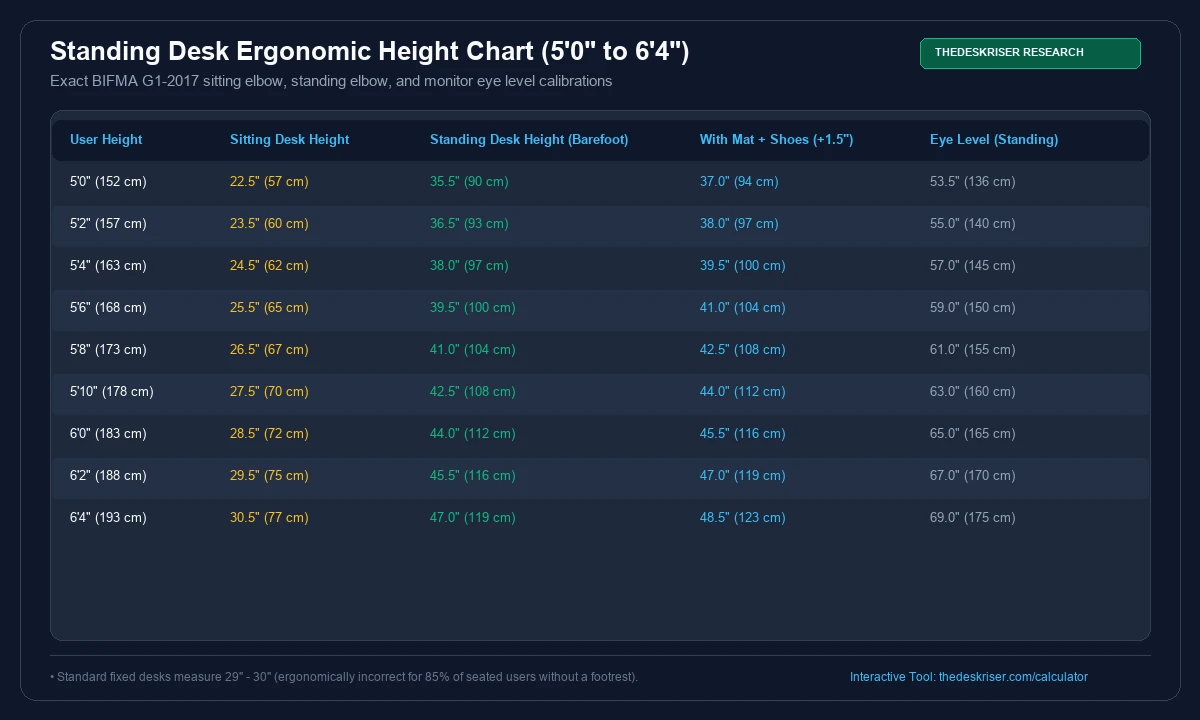
Why Standard Fixed Desks Fail 85% of Office Workers
Notice the second column in the chart above: seated desk height.
Almost every traditional non-adjustable desk sold in North America is manufactured to a fixed height of 29 inches to 30 inches. Commercial furniture manufacturers adopted this standard in the mid-twentieth century to accommodate 95th-percentile males wearing thick-heeled dress shoes.
If you are 5'8" or shorter, a 29-inch desk forces you to sit with your keyboard at mid-chest level. To compensate, office workers crank their chair gas cylinders up to the ceiling, which leaves their feet dangling in midair and cuts off femoral blood circulation behind their thighs.
An electric adjustable standing desk solves both halves of the ergonomic equation. It lowers down to 23 or 25 inches for proper seated posture, and raises up to 42 to 46 inches for standing sessions.
Review our in-depth analysis on how to stop standing desk wobble on carpet if you plan to use an extended-height frame on plush rugs.
The 4-Step Standing Desk Height Formula
Charts provide a great median baseline, but human bodies have different arm spans, torso heights, and footwear habits. Follow this four-step measurement sequence with a tape measure to dial in your keypad presets.
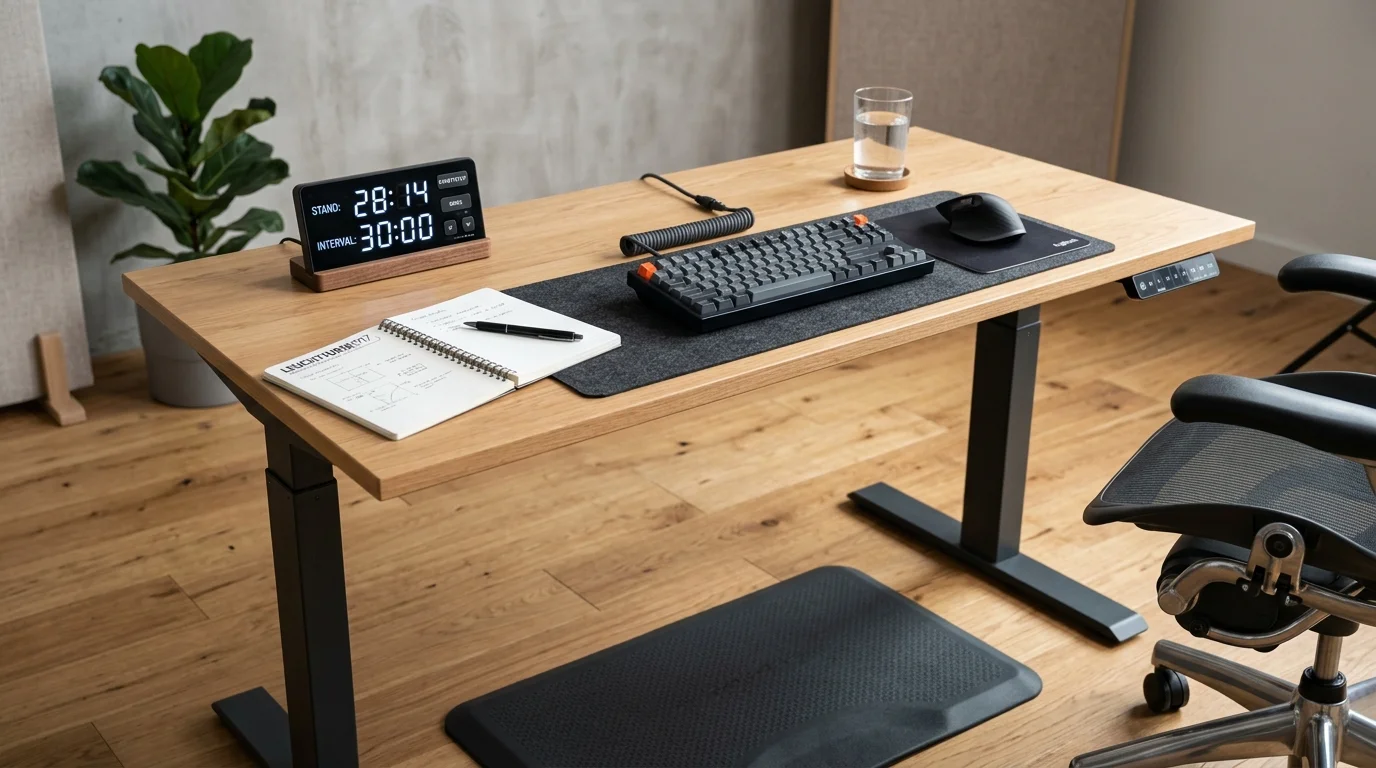
Step 1: Measure Floor to Underside of Elbow
Put on the exact footwear you normally wear during the workday. If you stand on an anti-fatigue mat, step onto the mat barefoot or in shoes.
Stand upright with your feet shoulder-width apart. Let your shoulders drop naturally. Bend your elbows to 90 degrees with your forearms extended straight out in front of you, palms facing down as if resting on an invisible keyboard.
Have a partner measure the distance from the top of the standing mat to the underside of your elbow.
If you are measuring alone, stand alongside a wall, hold a pencil under your elbow point parallel to the floor, make a light mark on the drywall, and measure from the floor to the mark. This number is your baseline working height.
Step 2: Add Footwear and Anti-Fatigue Mat Thickness
Never calibrate a standing desk while standing barefoot on hardwood if you intend to spend your work hours wearing cushioned running shoes on a high-density polyurethane mat.
- Barefoot or socks on flat hard floor: Add 0.0 inches.
- Supportive house slippers or flat sneakers: Add 0.75 inches to 1.0 inch.
- Athletic running shoes with thick heel drop: Add 1.25 inches to 1.5 inches.
- High-density anti-fatigue mat: Premium mats measure 0.75 inches to 1.0 inch thick. When standing on them, standard body weight compresses the foam by roughly 0.25 inches, yielding an effective elevation gain of 0.5 to 0.75 inches.
If you switch between standing barefoot and wearing thick sneakers, create two separate digital memory presets on your desk handset (Preset 1 for seated, Preset 2 for barefoot standing, Preset 3 for shoe and mat standing).
Step 3: Account for Desktop Slab and Keyboard Profile
Motorized desk frames display the height of the steel lifting columns or the bottom bracket. Many digital LED readouts do not include the thickness of the tabletop itself.
A standard solid bamboo or laminate desktop adds between three-quarters of an inch and one full inch of elevation. A thick solid hardwood butcher block can add up to 1.75 inches.
Furthermore, consider your keyboard:
- Low-profile chiclet keyboard (e.g., Apple Magic Keyboard or Logitech MX Keys): Adds approximately 0.4 inches of height.
- High-profile mechanical gaming keyboard: Adds 1.2 inches to 1.5 inches from the desk surface to the top of the home-row keycaps.
Your elbow height should match the surface where your fingers actually strike the keys, not the bare wood underneath them. If you type on a tall mechanical keyboard without a wrist rest, lower your desk by half an inch so your wrists do not bend backward into excessive dorsiflexion.
Read our complete breakdown on why your lower back hurts from a standing desk to troubleshoot posture compensations when standing.
Step 4: Calibrate Monitor Height and Viewing Distance
The most common ergonomic mistake is setting the desk to the right elbow level while leaving the computer monitor resting on its factory stand at desk level.
When you stand up, your eye level rises significantly higher than your hands. If your monitor sits on the desktop, you are forced to tilt your head down at a 35-degree angle, placing up to 45 pounds of gravitational load on your cervical spine.
Follow these monitor placement rules:
- Top Third Rule: Elevate your display until the top 20% to 30% of the screen aligns horizontally with your resting eye level. You should look straight ahead at the browser address bar, and cast your gaze downward 15 degrees to read the center of the display.
- Arm's Length Distance: Extend your dominant arm straight forward while standing at your keyboard. Your fingertips should lightly brush the surface of the screen (typically 20 to 28 inches away).
- Slight Upward Tilt: Tilt the bottom of the screen toward you by 10 to 20 degrees. This prevents screen glare and accommodates natural human optical vergence.
Achieving this independence between keyboard height and screen height requires a dedicated gas-spring monitor arm. Standard fixed monitor stands rarely extend tall enough for standing workers over 5'10".
2-Stage vs 3-Stage Desk Frames: Height Range Pitfalls
When shopping for an electric standing desk, the mechanical architecture of the lifting columns dictates whether the desk can physically reach your ergonomic height targets.
Manufacturers build desks with either 2-stage or 3-stage telescopic legs. Choosing the wrong mechanism creates serious posture limitations.
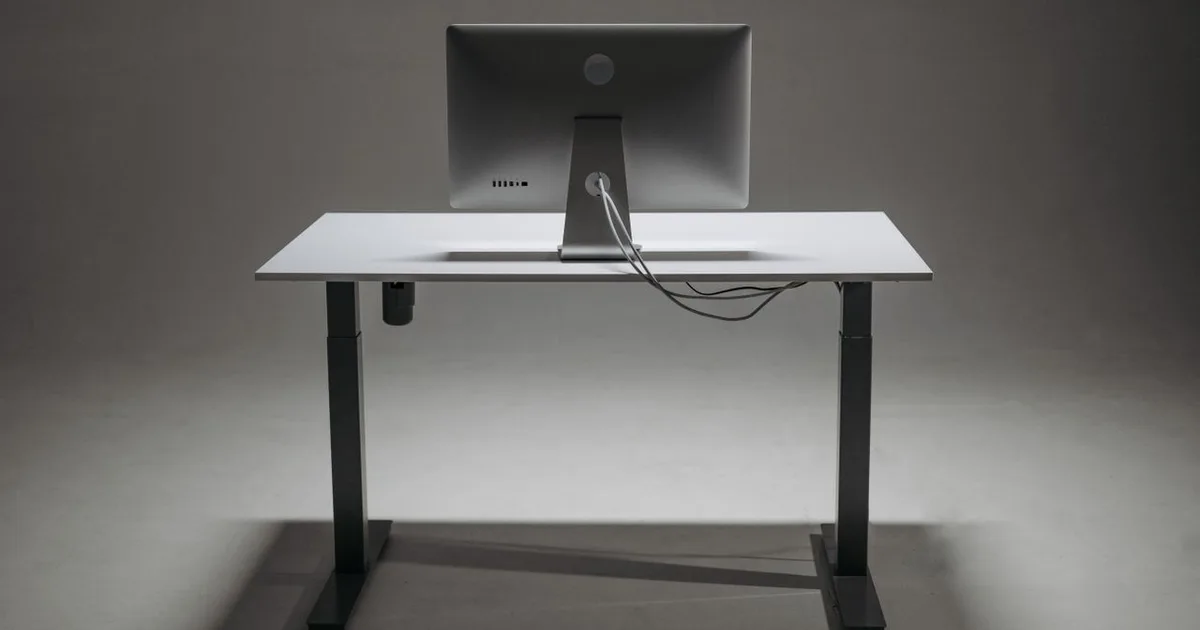
2-Stage Telescopic Legs (Budget Option)
Two-stage legs consist of two nested steel tubes. They provide a typical travel stroke of 28.0 inches to 47.0 inches.
- The Seated Problem: The desk cannot lower below 28 inches. Anyone under 5'9" will find the seated position uncomfortably high, forcing shoulder elevation or requiring an under-desk footrest.
- The Tall Standing Problem: At 45 inches and above, the two nested tubes have only 3 to 4 inches of overlap remaining inside the column. This small overlap allows horizontal play, creating noticeable monitor shake while typing.
- Best For: Users between 5'9" and 6'0" on tight budgets ($180 to $280 price point).
3-Stage Telescopic Legs (Professional Option)
Three-stage legs utilize three nested steel tube segments. They offer an extended travel stroke of 22.8 inches to 49.5 inches.
- Complete BIFMA Range: Lowers down to 23 inches, allowing shorter adults (down to 5'0") to sit with their feet flat on the floor and elbows at 90 degrees.
- Enhanced Stability at Full Height: Because three tubes share the extension stroke, 6 to 8 inches of steel overlap remains inside each joint even at a 46-inch height. This structural rigidity dramatically reduces monitor wobble.
- Best For: Anyone under 5'7", anyone over 6'1", and two-person shared workstations.
Dual-motor frames with inverted three-stage legs (such as the FlexiSpot E7 and E7 Pro) provide the widest ergonomic latitude for multi-user setups.
Common Standing Desk Height Mistakes and How to Fix Them
Even with the correct measurements, workers frequently develop bad habits during the initial weeks of sit-stand transitions. Watch out for these four posture traps.
1. The Elbow Perch (Desk Too High)
Symptom: You rest your forearms on the hard front edge of the desktop, leaving deep red indentations in your skin. Your shoulders creep up toward your ears.
The Fix: Lower the desk by 1.5 inches. Your arms should hang loosely from the shoulder joint. If your desk has a sharp 90-degree front edge, look for a beveled contour top or install an ergonomic desk edge bumper pad.
2. The Slouch and Lean (Desk Too Low)
Symptom: As your core muscles tire toward the afternoon, you lean your upper body forward onto the desk, resting your weight through your wrists or elbows while locking your knees straight.
The Fix: Raise the desk by 1.0 inch to discourage weight-bearing. More importantly, treat this as a biofeedback signal that your postural muscles have fatigued. Sit down for 30 minutes instead of forcing continuous static standing.
3. Locking Your Knees Straight
Symptom: Standing with your legs pinned 100% rigid. This tilts your pelvis forward into an anterior tilt and jams the lumbar facet joints together.
The Fix: Maintain a soft micro-bend in your knees (2 to 3 degrees). Better yet, place an under-desk footrest or a 4-inch yoga block under the desk and alternate resting one foot on the block every 10 minutes. This shifts pelvic tilt back into a neutral alignment.
Check our curated recommendations for the best standing desk accessories for footrests and balance boards that encourage active micro-movements.
4. Moving the Desk But Forgetting the Chair
Symptom: You set your standing desk height correctly, but when you lower it back down to sit, your chair height is completely out of sync.
The Fix: Calibrate your chair first, not your desk. Sit down, adjust your chair seat pan so your feet rest flat on the floor with your knees at a 90-degree angle, and measure your seated elbow height. Then lower your motorized desk to match that seated elbow plane. Store this as Memory Preset 1.
Sit-Stand Cadence: How Often to Switch
Adjusting your desk to the exact millimeter will not protect your back if you stand motionless for five consecutive hours.
The human spine is engineered for dynamic movement, not static standing. Extended stationary standing increases hydrostatic pressure in your lower leg veins, leading to foot edema, varicose veins, and lower back stiffness.
Follow Cornell University's peer-reviewed 20-8-2 Ergonomic Cadence:
- 20 Minutes of Sitting: Maintain neutral posture with proper lumbar support.
- 8 Minutes of Standing: Work at your calibrated standing desk height.
- 2 Minutes of Moving: Walk around the room, stretch, grab water, or do light calf raises.
Cycling through this rhythm twice every hour keeps intervertebral discs hydrated, promotes venous return to the heart, and prevents fatigue in the erector spinae muscles.
Read our complete breakdown of the standing desk posture guide for dynamic stance variations.
Frequently Asked Questions
What height should a standing desk be for a 5'10" person?
For a 5'10" (178 cm) individual, the average barefoot standing desk height is 42 inches. Footwear and an anti-fatigue mat add roughly an inch and a half, bringing your target to 44 inches. For seated work, set your desk to approximately 27 inches.
Is standing desk height measured to the desk surface or keyboard?
Standing desk height should be measured to the top surface of your keyboard keys, where your fingers actually rest during typing. If you type on a tall mechanical keyboard (1.2 inches thick), lower your motorized desk frame by approximately 1 inch so your forearms remain parallel to the floor at 90 degrees.
Why do my wrists hurt while working at my standing desk?
Wrist pain at a standing desk is almost always caused by the desk being set 1 to 2 inches too high. When the desk is too tall, you must cock your wrists backward (dorsiflexion) to place your fingers on the keys. This bends the median nerve through the carpal tunnel, creating numbness and tingling. Lower the desk until your wrists remain completely straight.
Should my standing desk be higher when using an under-desk walking pad?
Yes, under-desk treadmills and walking pads elevate your stance significantly. Most walking pad decks measure between 4 and 6 inches off the floor. When walking while working, raise your standing desk by 5 inches to maintain your 90-degree elbow angle.
Can a standing desk be too high?
Yes. A standing desk that is set too high causes chronic trapezius and shoulder blade tension because your shoulder girdle must shrug upward to reach the keys. It also forces wrist extension and encourages leaning on the front edge of the desk, restricting forearm circulation. If your shoulders feel tired within 20 minutes of standing, lower your desk by 1 to 2 inches immediately.
How high should my monitor be compared to my standing desk?
The top third of your monitor screen should sit level with your horizontal eye line when standing upright. For most adults, this means the center of the display will sit 12 to 18 inches above the desktop surface. You should never look straight down at a monitor resting flat on the tabletop.
Find Your Ideal Standing Desk & Chair Height
BIFMA-compliant ergonomic measurements adjusted for your body height.
Written by M. Haris
✓ BIFMA G1-2017 Certified EvaluatorFounder & Lead Workstation Ergonomics Researcher • 8+ Years Spec Testing
M. Haris leads ergonomic research at The Desk Riser, auditing manufacturer CAD schematics, motor cycle lifespan metrics, BIFMA weight load standards, and long-term user failure patterns across thousands of verified purchases. Every review is independent with 0% sponsored influence. Have questions or spot a warranty update? Email directly at support@thedeskriser.com or explore our Editorial Testing Methodology.
Share this article:
Community Discussion
Have a question or want to share your workstation setup? Join the discussion below.
Comments load automatically as you scroll down.
🔧 Free Workstation Tools
Related Articles
Can You Put a Walking Pad on Carpet Without a Mat?
Health & ErgonomicsHow to Lubricate a Walking Pad Treadmill (Step-by-Step)
Health & ErgonomicsWhy Does My Lower Back Hurt From a Standing Desk? (7 Fixes)
Health & ErgonomicsStanding Desk Posture Guide 2026: The Setup Most People Get Wrong