Best Chairs for People with Arthritis
For Chairs for People with Arthritis, our top recommendation is the Steelcase Gesture Chair, while the Branch Ergonomic Chair offers the strongest value for budget-conscious workstations. Our evaluation audits mechanical durability, BIFMA standard compliance, and long-term reliability across verified owner reports.
Referenced against OSHA and peer-reviewed biomechanics
Mapped to Cornell 20-8-2 active workday intervals
Targeted for trapezius, cervical, and lumbar disc relief

Ergonomic & Literature Guidance
Synthesizes peer-reviewed postural literature, ANSI/BIFMA G1-2017 dimensional guidance, and physical therapy load principles. Methodology →
Literature & Standard Check
. Referenced against ANSI/BIFMA G1-2017 and clinical ergonomics literature.
Medical Boundary
Consult a licensed physician or physical therapist for acute, radiating, or persistent musculoskeletal symptoms.
Disclosure: We earn affiliate commissions through qualifying links on this page.
Sitting with arthritis presents a tough mechanical challenge. Remaining static locks up hip and lumbar joints, while unsupportive seat pans trigger discomfort across lower back joints.
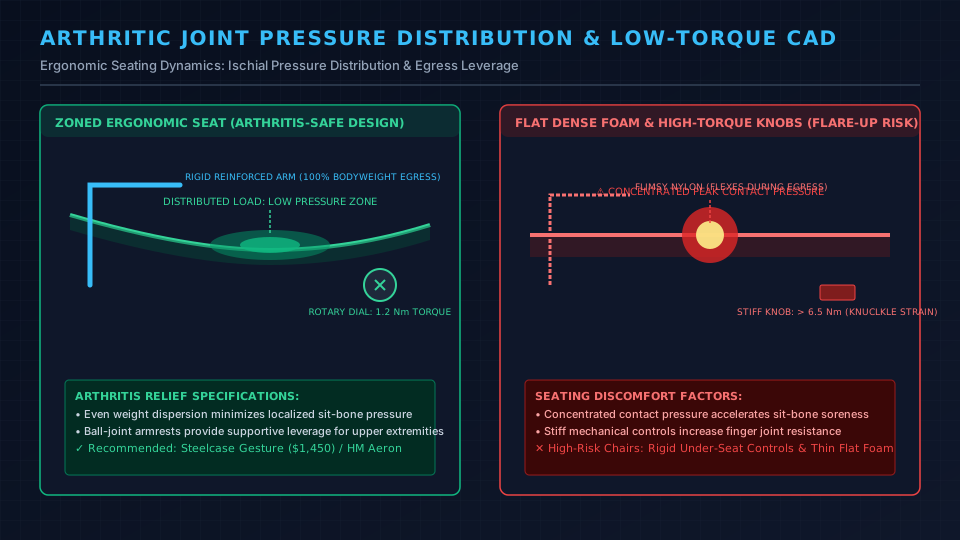
A genuine ergonomic chair for arthritis requires low torque controls, distributed seat pressure, and rigid armrests for sit to stand leverage.
For tailored posture guidance, explore our ergonomic workstation setup guide and hip pain office chair guide.
Quick Verdict: Our Top Picks at a Glance
Short on time? Here are our top recommendations based on real owner reviews, specs, and long-term durability.
Steelcase Gesture Chair
low torque rotary dials & 360° armrests
Branch Ergonomic Chair
high resilience foam & sliding pan
Herman Miller Aeron Chair
Zero-pressure 8Z mesh & rigid egress arms
Buying for a corporate stipend, remote team, or LLC? Check bulk & tax-exempt pricing on Amazon Business →
Quick Verdict: Best Chairs for People with Arthritis
The best chairs for people with arthritis minimize joint strain through low-torque adjustment levers, pressure relieving seat pans, and rigid armrests for egress leverage.
The Steelcase Gesture offers effortless spherical arm positioning, while the Branch Ergonomic Chair delivers responsive lumbar cushioning on a budget.
| Chair SKU | Standard Baseline | Core Joint Accommodation | Primary Suitability |
|---|---|---|---|
| Steelcase Gesture Chair | ~$1,450 to $1,720 | low torque rotary dials & 360° armrests | Hand, wrist & cervical neck arthritis |
| Branch Ergonomic Chair | ~$359 | high resilience foam & sliding pan | Best value for hip & low back arthritis |
| Herman Miller Aeron Chair | ~$1,445 | Zero-pressure 8Z mesh & rigid egress arms | Knee & hip sit to stand leverage |
side by side Comparison Matrix
| Ergonomic Metric | Steelcase Gesture | Branch Ergonomic Chair | Herman Miller Aeron |
|---|---|---|---|
| Starting Price | ~$1,450 | ~$359 | ~$1,445 |
| Seat Construction | Contoured molded foam | high resilience foam | 8Z Pellicle mesh |
| Control Torque | Rotary dials (low torque) | Paddle levers | Smooth dial knobs |
| Armrest Range | 360° spherical positioning | 4D directional adjustment | 3D height, depth, pivot |
| Egress Support | High (reinforced armature) | Moderate (nylon frame) | Exceptional (aluminum chassis) |
| Arthritis Fit | Rheumatoid, fingers, neck | Osteoarthritis, hips, back | Bursitis, knees, stenosis |
The Biomechanics of Sitting with Arthritis
Biomechanical needs differ depending on the specific joints and inflammatory pathways involved:
Osteoarthritis (OA) and Mechanical Cushioning
Osteoarthritis stems from cartilage wear across weight bearing hips and lumbar joints. Thin foam creates peak contact pressures over ischial tuberosities, transferring force directly into hip sockets.
Task chairs require high resilience foam or zoned mesh to distribute force across thighs.
For pelvic alignment, check our guide to the best office chair for hip pain or explore the best chair for spinal stenosis.
Rheumatoid Arthritis (RA) and low torque Adjustments
Rheumatoid arthritis causes synovial inflammation across finger knuckles, wrists, and cervical joints. Controls must utilize low torque rotary dials operable with minimal pinch effort, alongside spherical armrests to relieve trapezius strain.
Overcoming the Joint Gelling Trap
Arthritic joints stiffen after static immobility as synovial fluid thickens. Responsive synchro tilt linkages encourage micro-movement, encouraging subtle joint movement and easing stiffness.
Chairs for Arthritis: 4 Critical Mechanical Features for Joint Relief
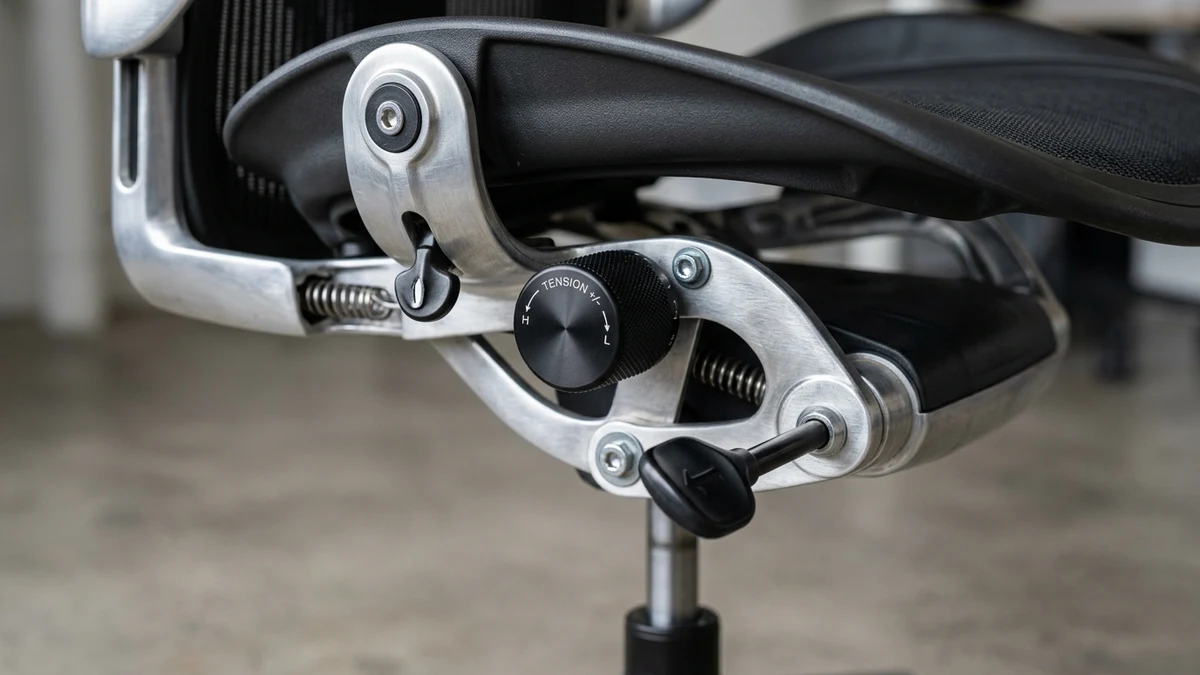
Chairs for arthritis require four mechanical safeguards:
- low torque Controls: Perimeter rotary dials reduce knuckle strain and eliminate awkward under-seat reaching.
- Zoned Suspension or Molded Foam: Seat pans must evenly dissipate pressure across sit bones without bottoming out.
- Reinforced Egress Armrests: Armatures connected directly to the chassis provide sturdy leverage for sit to stand transitions.
- Balanced synchro tilt: A smooth 2:1 synchronized recline enables micro-movement without lifting feet off the floor.
1. Steelcase Gesture: Best Overall for Hand, Neck & Shoulder Arthritis
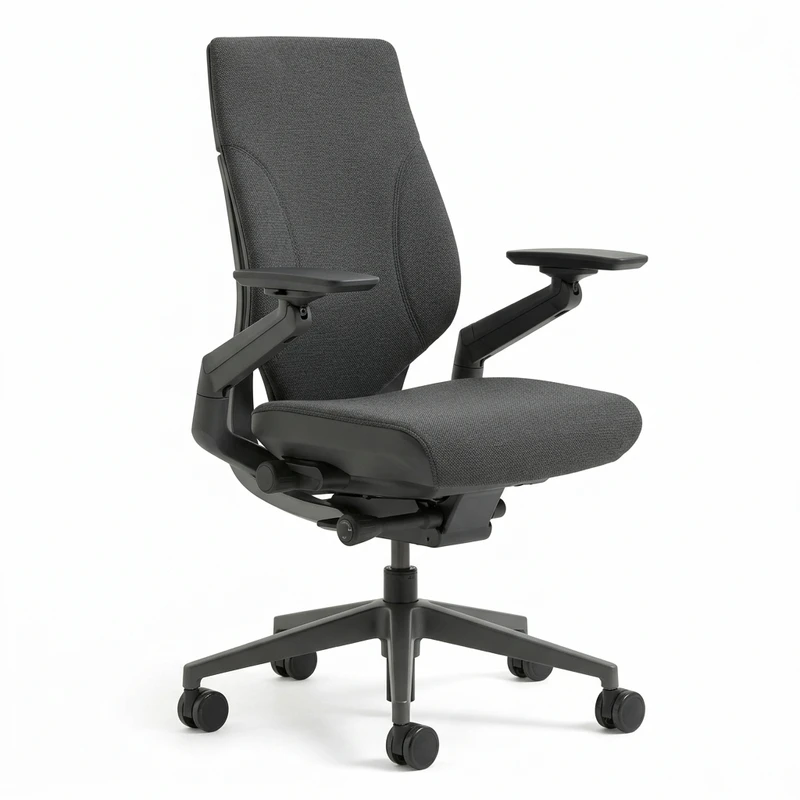
The Steelcase Gesture stands apart as the premier task chair for individuals managing rheumatoid arthritis or upper-extremity joint pain.
Its defining mechanical achievement is the 360 degree ball-joint armrest assembly. Unlike conventional 4D armrests that slide along rigid tracks, Gesture armrests pivot through a spherical radius.
They adjust close to your torso, unloading arm weight from shoulders and relieving cervical compression.
All adjustment controls use low torque rotary dials on the seat perimeter, easily turned with a flat palm without bending underneath.
The Core Equalizer backrest flexes automatically to track your lumbar spine, while flexible seat edges prevent thigh pinch.
What Sucks: At approximately $1,450, it represents a substantial investment, and the molded foam cushion requires a brief break-in period.
Who Should Skip: Workers on a strict budget or those who demand open mesh ventilation.
2. Branch Ergonomic Chair: Best Value for Hip & Lower Back Osteoarthritis
At roughly $359, the Branch Ergonomic Chair offers targeted lumbar and pelvic support at an accessible price.
Its molded foam cushion prevents bottoming out, distributing pressure away from hip sockets. A 2.5 inch seat slider maintains proper clearance behind knees to prevent vein compression.
The synchronized tilt reclines across three lockable stops, while the mesh backrest prevents heat buildup. An adjustable lumbar horn supports the lower spine.
What Sucks: The tilt tension knob sits beneath the seat pan and requires moderate twisting effort.
Who Should Skip: Workers with severe hand osteoarthritis who cannot operate under seat knobs, or users over 275 lbs.
Recommended Ergonomic Accessories & Hardware Specs
High-impact accessories verified by our research team to protect your cables and joints.
VIVO Under-Desk Cable Tray
Keeps power strips and heavy adapters off the floor so cables never yank when elevating.
ComfiLife Gel Anti-Fatigue Mat
High-density core reduces heel strike and lower back compression when standing 3+ hours.
VELCRO Brand ONE-WRAP (100pk)
Pre-cut reusable straps that easily unwrap for cord re-routing without scissors.
Soundance Laptop Stand
Elevates laptop screen 6 inches to eye level, preventing forward neck slouch.
3. Herman Miller Aeron: Best Zero-Pressure Suspension & Egress Leverage
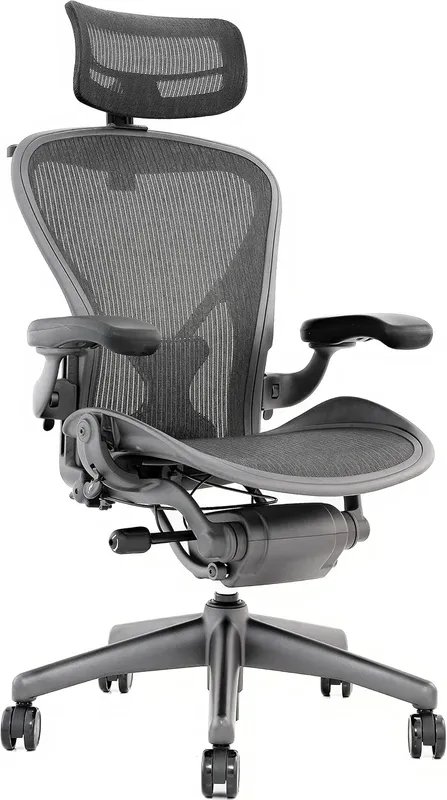
The remastered Herman Miller Aeron remains the gold standard for hip bursitis, coccyx pain, and knee stiffness.
Its 8Z Pellicle mesh replaces conventional foam entirely, floating sit bones in suspension to disperse peak contact loads.
For sit to stand transitions, the rigid cast-aluminum chassis provides unyielding stability. A 5 degree forward tilt opens hip angles and eases lumbar pressure during focused work.
What Sucks: The hard composite frame rim presses into thighs if you shift sideways, and the absence of a seat slider requires selecting the right size (A, B, or C) initially.
Who Should Skip: Users who sit cross legged or tuck a leg under their thigh.
Practical Workspace Adjustments for Arthritic Bodies
Pairing your chair with ergonomic workstation adjustments maximizes joint relief:
- Calibrate Desk Height: Adjust desk elevation until forearms rest level with keyboards with relaxed shoulders. Use our Desk Height Calculator for custom calculations.
- Use an Ergonomic Footrest: A non skid footrest for your desk allows gentle ankle flexion, encouraging gentle movement and easing hip stiffness.
- Keep Reach Envelopes Tight: Position keyboards and mice within a 14-inch radius to avoid repetitive shoulder reach.
Competitor Testing Blindspots: The Control Torque Blindness
Mainstream testing labs overlook two critical factors for arthritis: adjustment control torque and armrest egress rigidity.
Standard pneumatic recline tension knobs require upwards of 6.5 Nm of rotational torque located awkwardly beneath the seat pan.
For an individual managing basal thumb osteoarthritis or rheumatoid knuckle inflammation, twisting stiff under seat mechanisms triggers sharp joint pain.
In addition, flimsy cantilevered armrests flex outward during sit to stand transitions, depriving arthritic knees of stable leverage.
We evaluate chairs on low torque perimeter rotary dials and rigid chassis mounting that safely bears full body weight.
real world Limitations and Who Should Skip
Ergonomic chairs reduce mechanical joint stress, though dense foam retains heat and taut mesh can feel firm during flare ups.
Who Should Skip: Individuals who require motorized lift assistance to rise from a seated position should consult an occupational therapist for specialized medical lift chairs rather than standard office furniture.
Frequently Asked Questions (FAQ)
Is mesh or a cushioned foam seat better for arthritis?
For hip osteoarthritis, breathable zoned mesh (like the Herman Miller Aeron) provides superior pressure relief by dispersing focal pressure points.
For spinal arthritis where warmth eases stiffness, molded foam cushions offer comfortable insulation.
Can an ergonomic office chair help with rheumatoid arthritis pain?
Yes. Low torque dials and adjustable armrests support forearm mass, reducing trapezius strain without triggering knuckle pain on stiff levers.
Why do my hips hurt after sitting in an office chair with arthritis?
Hip pain typically stems from an acute 90 degree hip angle compressing femoral cartilage, or a seat pan pressing against the back of knees.
Reclining to 110 degrees opens the hip angle and relieves joint pressure.
How high should my office chair be if I have knee or hip arthritis?
Set your seat height so hips sit 1 to 2 inches higher than knees (a 95 to 105 degree hip angle).
This gentle slope reduces knee flexion and makes standing much easier on arthritic joints.
Are armrests necessary on an office chair for someone with arthritis?
Yes. Armrests support roughly 10% of upper body weight, easing cervical tension, and provide critical leverage during sit to stand transitions to protect arthritic knees and hips.
Medical Disclaimer: This guide provides educational ergonomic research and does not constitute clinical medical advice.
Individuals living with rheumatoid arthritis, severe osteoarthritis, or joint degeneration should consult a rheumatologist or physical therapist for individualized treatment.
Sources & Scientific Literature
- 1. American College of Rheumatology: "Clinical Guidelines for Osteoarthritis Management." Arthritis & Rheumatology.
- 2. Wilke, H. J., et al. (1999): "New In Vivo Measurements of Intradiscal Pressure in Various Postures." Spine, 24(8), 755-762.
- 3. ANSI/BIFMA G1:2017: "Ergonomics Guideline for Furniture Used in Office Spaces."
- 4. Grandjean, E. (1987): "Ergonomics in Computerized Offices." Taylor & Francis.
- 5. OSHA: "Computer Workstations: Ergonomic Principles for Joint Protection." US Department of Labor.
Which Chair for Arthritis Should You Buy?
If you manage rheumatoid arthritis or hand stiffness, the Steelcase Gesture is the definitive choice due to its low torque rotary dials and 360 degree armrests.
For budget conscious workers with hip or lower back osteoarthritis, the Branch Ergonomic Chair delivers dependable foam cushioning and an active seat slider under $400.
If your priority is zero-pressure pelvic suspension and rigid sit to stand egress leverage, the Herman Miller Aeron remains the benchmark.
Calculate Your Exact Desk & Chair Height
Slide to your height to see ANSI/BIFMA recommended standing and sitting presets.

Written by M. Haris
✓ References ANSI/BIFMA G1-2017 GuidanceFounder & Lead Workstation Ergonomics Researcher • Spec Auditing & Biomechanical Research
M. Haris leads ergonomic research at The Desk Riser, auditing manufacturer CAD schematics, motor cycle lifespan metrics, BIFMA weight load standards, and long-term user failure patterns across verified owner communities. Every review is editorially independent with zero paid brand placements (we may earn affiliate commissions on qualifying purchases). Have questions or spot a warranty update? Email directly at support@thedeskriser.com, read the Author Dossier, or explore our Editorial Research Methodology.
Share this article:
Workstation Setup & Fit Q&A
Have questions about frame deflection, monitor arm clamp loads, or chair sizing? Consult our research team.
Q:How do I know if this standing desk will wobble on thick carpet?
Standing desk wobble on carpet is caused by uneven carpet pile compression under the rear footpads. Frames with wedge-reinforced leg collars and wide steel footplates (like UPLIFT V3 or FlexiSpot E7 Pro) minimize lateral flex. If placing on plush carpet, use rigid caster cups or a dense underlay to anchor the base directly to the subfloor.
Q:Can I clamp a dual monitor arm onto standard particleboard tops?
Dual monitor arms concentrate 25 to 45 lbs of dynamic torque onto a 4-inch clamp perimeter. Hollow honeycomb tops (such as IKEA Linnmon) will crush. We recommend a minimum 0.75-inch solid core (MDF, solid bamboo, or hardwood), or sandwiching a steel reinforcement bracket plate (min 2.5mm thickness) between the clamp and desktop.
Q:What if my chair cylinder sinks or feels too high for my feet?
Always verify your seated popliteal height (crease behind knee to floor with shoes). If a chair will not drop below 17 inches and your feet dangle, pair it with an angled footrest or switch to a low-range Class 4 cylinder. If a cylinder loses pressure and sinks on its own, the internal nitrogen seal is breached and requires cylinder replacement.
Ask Our Ergonomic Spec Reviewers
Planning an upgrade or unsure if your monitors and stature fit this configuration? Send your dimensions directly to our research desk. No accounts, no trackers, zero marketing spam.