Best Upright Mouse: Pronation & Carpal Tunnel Guide

For Upright Mouse: Pronation & Carpal Tunnel Guide, our top recommendation is the Logitech MX Vertical, while the Anker Wireless Vertical offers the strongest value for budget-conscious workstations. Our evaluation audits mechanical durability, BIFMA standard compliance, and long-term reliability across verified owner reports.
20" to 32" ergonomic eye-to-screen viewing distance
Under-desk cable routing & surge protection verified
Neutral 90° elbow and flat-foot alignment enforced
Category Shortlist Criteria
Filters models by published lift capacity, height adjustment span, warranty coverage, and documented owner friction. Methodology →
Last Spec & Pricing Audit
. Retailer pricing and component revisions can shift; verify on the vendor page.
Fit & Return Guardrail
Verify minimum/maximum height bounds and return freight terms before ordering heavy freight items.
Disclosure: We earn affiliate commissions through qualifying links on this page.
A standard computer mouse forces your palm flat against the desk. This posture twists your forearm bones into sustained pronation.
Pronation can encourage compensatory wrist posture and keep flexor muscles under static tension. An upright mouse rotates your hand into a neutral handshake stance instead.
Before changing your pointer, check your seated desk height with our free desk calculator.
| Upright Mouse | Price | Core Specifications | Award |
|---|---|---|---|
| Logitech MX Vertical | $99 | 57 degree angle, 4000 DPI sensor, 4 month USB-C battery, 135g | 🏆 Best Overall |
| Anker Wireless Vertical | $25 | Vertical handshake grip, 1600 DPI sensor, 2x AAA batteries, 95g without batteries | 💰 Best Value |
| Evoluent VerticalMouse D | $110 | Handshake grip, 4 speed settings, 6 buttons, 3 hand sizes | ⭐ Runner Up |
Quick Verdict: Our Top Picks at a Glance
Short on time? Here are our top recommendations based on real owner reviews, specs, and long-term durability.
Logitech MX Vertical
57 degree angle, 4000 DPI sensor, 4 month USB-C battery, 135g
Anker Wireless Vertical
Vertical handshake grip, 1600 DPI sensor, 2x AAA batteries, 95g without batteries
Evoluent VerticalMouse D
Handshake grip, 4 speed settings, 6 buttons, 3 hand sizes
Buying for a corporate stipend, remote team, or LLC? Check bulk & tax-exempt pricing on Amazon Business →
Upright Mouse: How 57 Degree Vertical Posture Relieves Forearm Pronation
An upright mouse tilts your hand to a 57 degree handshake angle. This keeps the radius and ulna parallel, which reduces forearm pronation and the static muscle load behind wrist strain.
A flat mouse crosses the radius over the ulna. That crossover keeps the pronator teres muscle contracted for hours.
Vertical shells raise the thumb side of your palm. Your wrist sits in an upright plane, and the forearm muscles can relax.
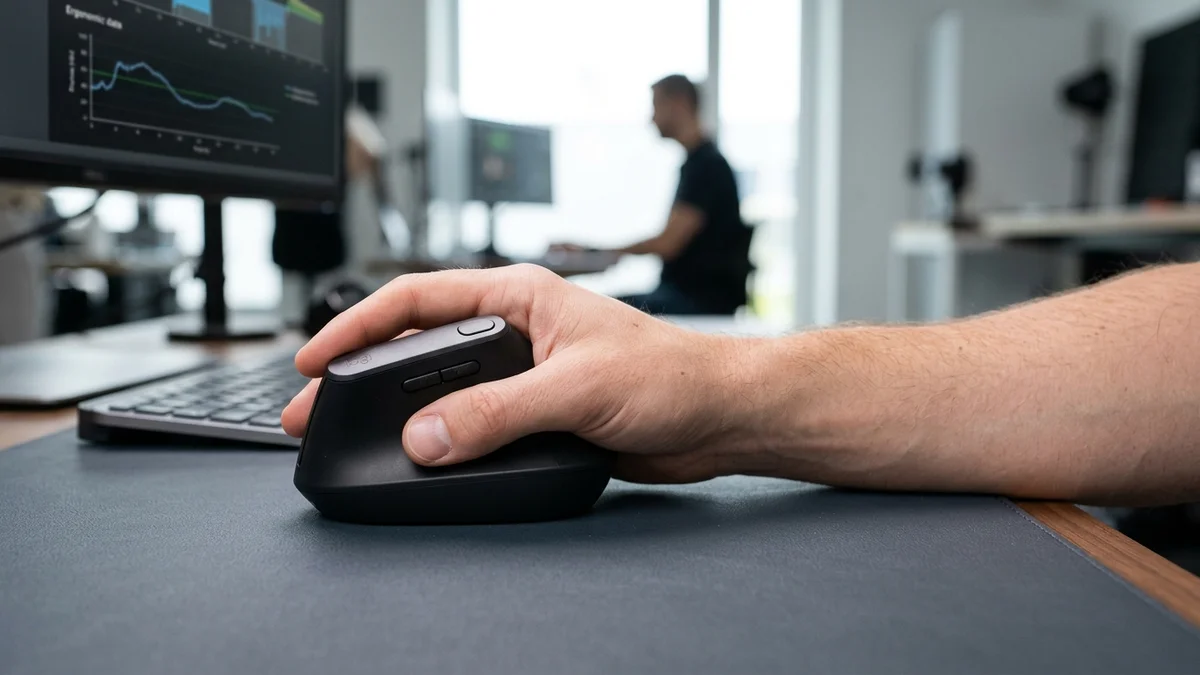
Flat mice also press the underside of your wrist against the desk, adding shear as you drag. An upright shell moves that contact to the outer edge of your hand.
Why Flat Mice Strain Wrists and Tendons
A horizontal mouse demands two unnatural adaptations. You pronate the forearm, then pivot the cursor from your wrist crease.
That pivot forces sideways ulnar and radial deviation. Repeated thousands of times daily, it loads the flexor tendons.
Your desk setup compounds the problem. Check our guide to proper keyboard height for arm alignment.
Three Upright Mice Worth Buying
We compared manufacturer specifications and aggregated owner feedback for the leading models. These three cover the main budgets and hand sizes.
Logitech MX Vertical: The Precision Standard
The MX Vertical tilts your hand at a 57 degree handshake angle. Most flat mouse users adapt within a few days.
Textured rubber wraps the thumb shelf and palm rest. The grip stays secure without heavy pinch force.
Its 4,000 DPI sensor tracks across wood, laminate, and composite desks. A top button toggles cursor speed instantly.
The rechargeable battery runs about four months per USB-C charge. You can pair it with three computers through Bluetooth or the USB receiver.
The primary switches click lightly and do not push the chassis sideways. Pair it with a supportive keyboard wrist rest for full arm support.
What Sucks
The tall chassis feels awkward on hands under 17.5 centimeters. It also demands whole arm movement rather than small wrist flicks.
Who Should Skip
Skip the MX Vertical if you have small hands or a tight budget. The forward scroll wheel is a stretch, and the price exceeds basic office allowances.
Anker Wireless Vertical: The Budget Handshake Pointer
The Anker proves wrist relief does not need high spending. Its vertical shell rotates your wrist into an upright posture.
A thumb trough runs along the inner flank. Two thumb buttons handle browser back and forward.
The contoured body suits spreadsheets, browsing, and general office work. Forearm flexors relax the moment your palm settles against the frame.
A DPI toggle cycles between 800, 1200, and 1600. Lower settings reduce frantic wrist movement.
A 2.4 GHz USB receiver gives roughly thirty feet of range. Two AAA batteries power it, and the body weighs about 95 grams before batteries.
What Sucks
The smooth plastic shell lacks rubber grips. Sweaty hands can slide down the curved facade, and the clicks sound loud in quiet offices.
Who Should Skip
Skip the Anker if your laptop has only USB-C ports. It uses a USB-A receiver and offers no Bluetooth pairing.
Evoluent VerticalMouse D: The Sized Handshake Pick
The Evoluent holds your hand in a near vertical handshake posture. Evoluent pioneered vertical geometry over two decades ago.
A dedicated middle finger button handles clicks without stressing the index finger. An extended base lip stops your pinky dragging on the desk pad.
Removing that drag eliminates a source of lateral wrist braking. The whole hand glides as one supported unit.
The tilted face rests your fingers along a downward slope. Gravity assists your grip instead of fighting it.
Small, medium, and large sizes fit nearly any hand. For severe wrist symptoms, compare it against our ergonomic mouse for carpal tunnel picks.
What Sucks
The button layout has a learning curve. Many users hit the middle button while aiming for a right click.
Who Should Skip
Skip the Evoluent if you want zero adjustment period. Frequent travelers should skip it too, because the flared base eats laptop bag space.
Sensor Tracking and Glide Friction on Vertical Shells
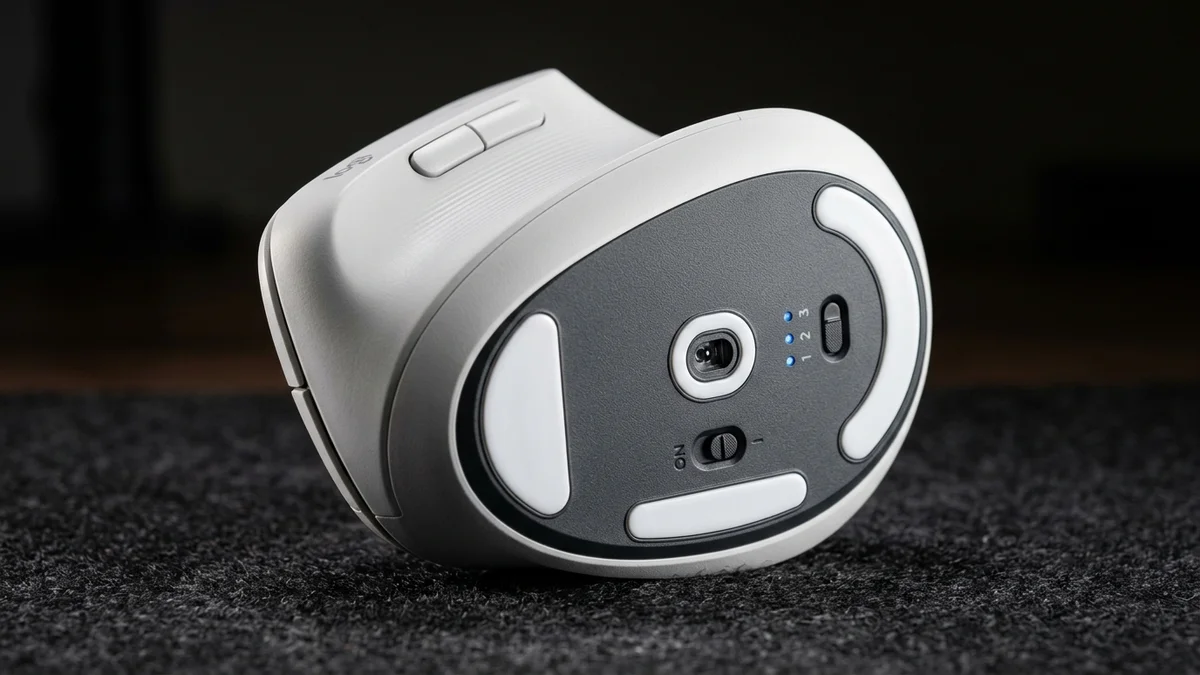
A vertical shell changes how the base meets the desk. Your hand rests on the outer edge, so pressure concentrates on the glide pads rather than spreading across a flat sole.
Cheap PTFE pads drag on textured desk pads and force extra grip pressure. Extra grip pressure brings back the forearm tension you bought the mouse to remove.
Optical sensors also sit forward on most upright designs. That placement shifts the cursor pivot point, so expect a few days of overshooting before aim settles.
Use a smooth, low friction mouse pad and keep the base clean. Dust under the pads is the most common cause of sticky tracking on vertical mice.
Recommended Ergonomic Accessories & Hardware Specs
High-impact accessories verified by our research team to protect your cables and joints.
VIVO Under-Desk Cable Tray
Keeps power strips and heavy adapters off the floor so cables never yank when elevating.
ComfiLife Gel Anti-Fatigue Mat
High-density core reduces heel strike and lower back compression when standing 3+ hours.
VELCRO Brand ONE-WRAP (100pk)
Pre-cut reusable straps that easily unwrap for cord re-routing without scissors.
Soundance Laptop Stand
Elevates laptop screen 6 inches to eye level, preventing forward neck slouch.
Your First Week With an Upright Mouse
Switch gradually rather than all at once. Use the new mouse for email and browsing on day one, then add spreadsheets on day three.
Keep your elbow near your side and your forearm level with the desk. Let the mouse come to your hand instead of reaching for it.
Drop sensitivity one step below your usual setting at first. Slower cursor speed encourages shoulder movement instead of wrist flicks.
Stop and reassess if you feel tingling or numbness. Persistent symptoms deserve a clinician, not a gadget.
Upright Mouse vs Trackball: Which Suits Wrist Strain?
An upright mouse still glides across a pad. That motion recruits shoulder and elbow muscles and spreads load away from small wrist tendons.
A trackball stays still while you spin a ball with your thumb or fingers. Thumb trackballs can concentrate load on the thumb base, so de Quervain's sufferers should choose a vertical mouse.
If shoulder or arm mobility is limited, a trackball offers better stationary relief. Combine either with other ergonomic standing desk accessories.
How to Choose Your Vertical Angle
Match the shell to your anatomy before buying. Angles between 55 and 60 degrees ease the transition from flat mice.
Steeper angles near 70 degrees maximize pronation relief. They also demand more deliberate grip during precise tasks.
Measure your hand from the wrist crease to the middle fingertip. Under 17.5 centimeters, pick a compact shell.
Check for adjustable DPI, since vertical mice rely on gross forearm motion. A weight near 110 to 140 grams keeps movement stable.
Which Upright Mouse Saves You Money
Start with the $25 Anker if you have never used a vertical shell. It delivers the core pronation relief for a fraction of the price.
Upgrade to the MX Vertical only if you mouse eight hours a day. Its rubber grip and long battery justify the extra $74 for heavy users.
Pick the Evoluent if sizing is your problem. Three shell sizes beat a one size design when hands run unusually small or large.
Buying the wrong shape costs more than buying cheap. A shell that forces your fingers to curl just trades one strain for another.
Sources
- Keir PJ, Bach JM, Rempel D. Effects of computer mouse design and task on carpal tunnel pressure. Ergonomics, 1999.
- ANSI/BIFMA G1-2017. Ergonomics Guideline for Furniture Used in Office Spaces.
Frequently Asked Questions
What is an upright mouse?
An upright mouse is an ergonomic pointing device with a vertical chassis. It rotates your hand into a handshake posture between roughly 55 and 70 degrees.
Does an upright mouse help carpal tunnel symptoms?
It can reduce forearm pronation and lift wrist tissue off the desk. That lowers static muscle load across the forearm.
It is not a medical treatment, so see a clinician for persistent numbness or tingling.
How long does it take to adapt to an upright mouse?
Most people adapt within three to five days. Simple browsing feels natural almost immediately.
Pixel precise clicking may need about a week of recalibration. Hand fatigue usually drops after the first few afternoons.
Can you use an upright mouse for gaming?
It works for casual and strategy games. Ergonomic hand angles keep wrists relaxed during long sessions.
Competitive shooter players may find fast flick shots slower than on a lightweight gaming mouse. Gross forearm movement trades twitch speed for comfort.
Calculate Your Exact Desk & Chair Height
Slide to your height to see ANSI/BIFMA recommended standing and sitting presets.
Written by M. Haris
✓ References ANSI/BIFMA G1-2017 GuidanceFounder & Lead Workstation Ergonomics Researcher • Spec Auditing & Biomechanical Research
M. Haris leads ergonomic research at The Desk Riser, auditing manufacturer CAD schematics, motor cycle lifespan metrics, BIFMA weight load standards, and long-term user failure patterns across verified owner communities. Every review is editorially independent with zero paid brand placements (we may earn affiliate commissions on qualifying purchases). Have questions or spot a warranty update? Email directly at support@thedeskriser.com, read the Author Dossier, or explore our Editorial Research Methodology.
Share this article:
Workstation Setup & Fit Q&A
Have questions about frame deflection, monitor arm clamp loads, or chair sizing? Consult our research team.
Q:How do I know if this standing desk will wobble on thick carpet?
Standing desk wobble on carpet is caused by uneven carpet pile compression under the rear footpads. Frames with wedge-reinforced leg collars and wide steel footplates (like UPLIFT V3 or FlexiSpot E7 Pro) minimize lateral flex. If placing on plush carpet, use rigid caster cups or a dense underlay to anchor the base directly to the subfloor.
Q:Can I clamp a dual monitor arm onto standard particleboard tops?
Dual monitor arms concentrate 25 to 45 lbs of dynamic torque onto a 4-inch clamp perimeter. Hollow honeycomb tops (such as IKEA Linnmon) will crush. We recommend a minimum 0.75-inch solid core (MDF, solid bamboo, or hardwood), or sandwiching a steel reinforcement bracket plate (min 2.5mm thickness) between the clamp and desktop.
Q:What if my chair cylinder sinks or feels too high for my feet?
Always verify your seated popliteal height (crease behind knee to floor with shoes). If a chair will not drop below 17 inches and your feet dangle, pair it with an angled footrest or switch to a low-range Class 4 cylinder. If a cylinder loses pressure and sinks on its own, the internal nitrogen seal is breached and requires cylinder replacement.
Ask Our Ergonomic Spec Reviewers
Planning an upgrade or unsure if your monitors and stature fit this configuration? Send your dimensions directly to our research desk. No accounts, no trackers, zero marketing spam.