How to Wash a Desk Mat (2026): Machine & Hand Wash Guide

Step-by-step guide to washing a desk mat or desk pad safely. Temperature limits, detergent rules, and methods for neoprene, leather, and wool felt.
High-density polyurethane core tested against permanent compression
Anti-trip beveled ramp and non-slip floor grip verified
Calculated plantar pressure and spinal compression relief
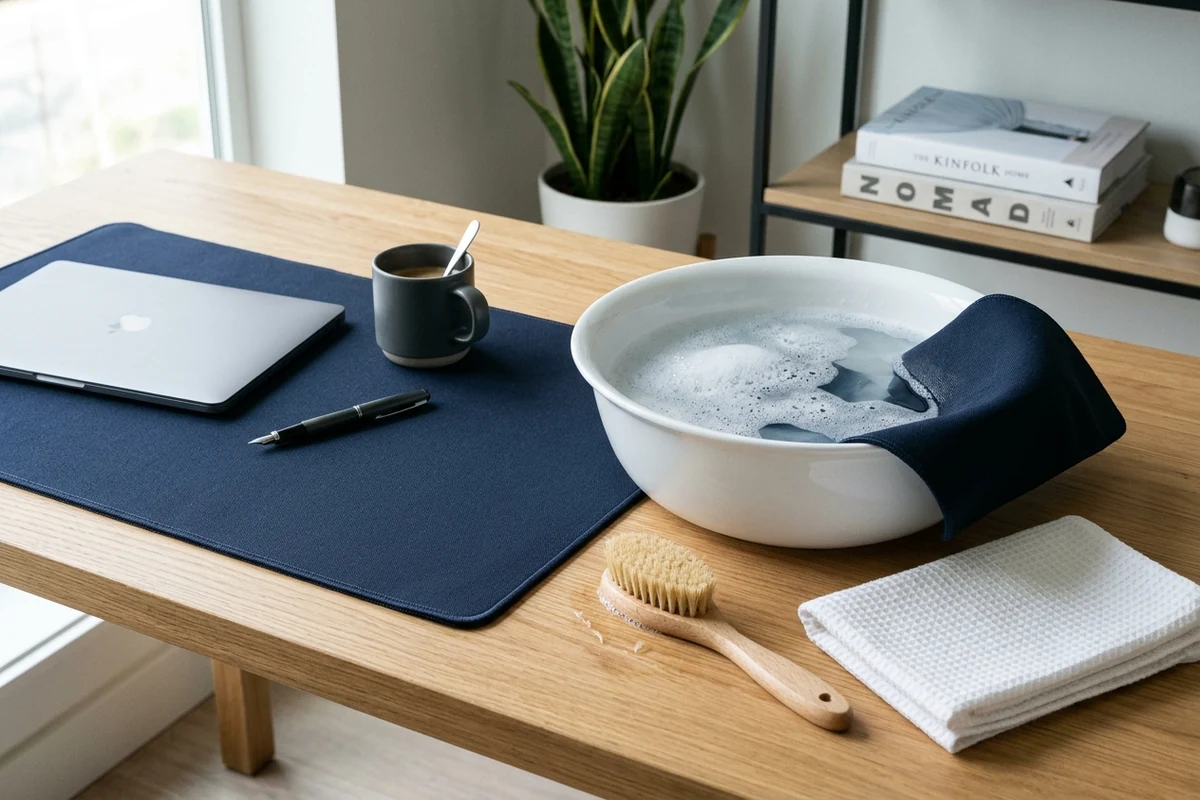
Workstation Geometry Scope
Applies standard ergonomic reach zones, surface clearance measurements, and eye-level monitor height geometry. Methodology →
Last Spec & Pricing Audit
. Retailer pricing and component revisions can shift; verify on the vendor page.
Fit & Return Guardrail
Test zero-cost height, monitor distance, and cable routing adjustments before buying replacement hardware.
Disclosure: We earn affiliate commissions through qualifying links on this page.
Daily typing sessions deposit skin cells, wrist sweat, and oils onto your desk pad. Over time, this organic residue binds tightly with airborne dust.
This grime increases friction under mouse skates. Optical sensors drop tracking frames as sensor light refracts unevenly through oil saturated fabric.
Washing your mat restores glide speed and removes bacteria along forearm contact zones. Clean surfaces also prevent trapped grit from scratching desk finishes.
Most people ruin mats during their first wash attempt. Boiling water melts base glue, while wringing tears edge stitching out of square.
How to Wash a Desk Mat: Complete Step-by-Step Cleaning Guide
Wash a cloth desk mat by submerging it in warm water with mild dish soap and scrubbing gently. Press flat inside a clean towel and air dry away from heat.
Cleaning protocols depend on pad materials. Methods that refresh polyester cloth destroy vegetable tanned leather or natural wool felt.
Before adding moisture, inspect perimeter stitching and core rubber backing. Prepare a shallow basin, cool water, mild dish soap, and two clean bath towels away from harsh solvents.
Material Identification: Neoprene, PU Leather, and Wool Felt Rules
Modern workstations utilize three primary desk pad materials. Each substrate requires a distinct approach to moisture, mechanical friction, and cleaning agents.
Neoprene polyester hybrids pair synthetic cloth with rubber backing, while polyurethane leather provides nonporous spill resistance over foam.
Pressed wool felt delivers acoustic dampening and natural warmth. Its natural fibers feature directional microscopic scales that lock together and shrink under wet agitation.
| Desk Mat Material | Core Structure | Water Immersion | Temperature Limit | Safe Cleaning Agent |
|---|---|---|---|---|
| Polyester Cloth | Neoprene Rubber | Safe | 30 C / 86 F | Mild Liquid Dish Soap |
| PU Synthetic Leather | High Density Foam | Surface Wipe Only | 25 C / 77 F | Dilute pH Neutral Soap |
| Pressed Wool Felt | Compressed Wool Fibers | Spot Clean Only | 20 C / 68 F | Dilute Wool Detergent |
| Coated Hybrid Fabric | Textured Polymer Blend | Safe | 30 C / 86 F | Anionic Dish Soap |
Inspect outer borders before starting your wash routine. Heavy overlock edge stitching protects bonded fabrics from peeling away from the rubber base.
Raw unstitched edges rely entirely on thermal adhesive film. These delicate borders require gentle hand washing to prevent perimeter delamination and fabric fraying.
Hand Washing a Cloth Desk Mat: The 5-Step Deep Clean Protocol
Hand washing provides the safest cleaning method for fabric desk pads. It delivers thorough soil removal without subjecting rubber backing to intense machine shear.
Follow this five step decontamination procedure to dissolve stubborn skin oils while safeguarding laminated foam layers.
Step 1: Dry Surface Preparation
Sweep loose debris from the fabric before introducing water. Run a sticky lint roller or soft bristle brush across the surface to lift hair, pet fur, and crumbs.
Step 2: Lukewarm Water Basin Immersion
Submerge the pad flat in a bathtub or wide utility sink. Fill the basin with cool water kept strictly below 30 degrees Celsius.
Water exceeding 40 degrees Celsius breaks down thermoset adhesive bonds. High heat causes rubber bases to delaminate, producing permanent surface bubbles across your tracking zone.
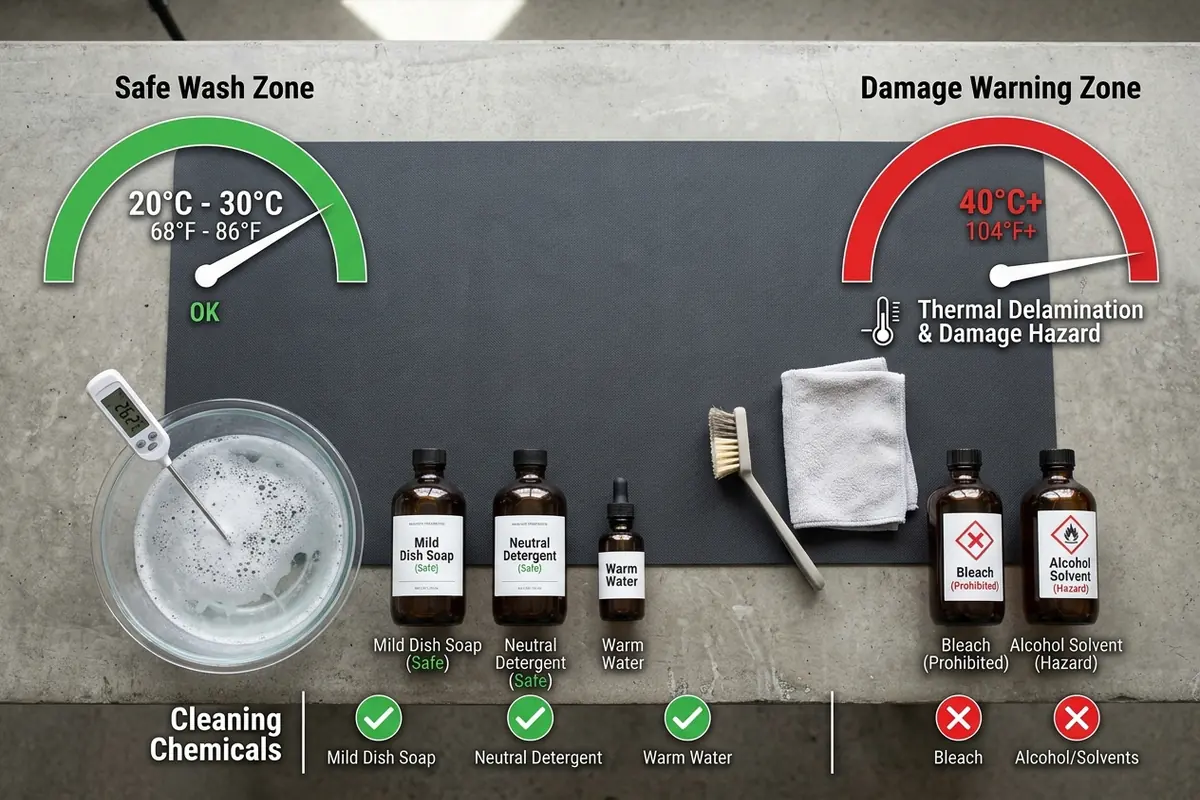
Step 3: Gentle Surfactant Cleaning
Apply two drops of mild liquid dish soap directly onto wet fabric. Standard dish soap dissolves oils without leaving greasy conditioning agents behind.
Work the soap into a light lather using a damp microfiber washcloth. Massage in broad circular strokes, avoiding stiff bristle brushes that abrade delicate polyester filaments.
Step 4: High Volume Clean Water Flush
Drain dirty suds and rinse both sides under clean cool water until runoff flows crystal clear. Removing all surfactant prevents sticky residues and optical tracking jitter.
Step 5: Transfer Without Wringing
Lift the wet pad supporting both ends evenly without twisting or wringing. Torsional twisting tears cell walls within the rubber core, so let water drip freely.
Can You Wash a Desk Mat in a Washing Machine? Safe Machine Protocol
Machine washing is possible for select cloth desk mats, but carries real physical hazards. Violent agitation can detach unstitched edges and shred cellular rubber backing.
Only place your mat in a washing machine if it features heavy overlock perimeter stitching. Plain unstitched edges fray rapidly against rotating drum walls.
Enclose the pad inside a zippered mesh laundry wash bag to protect outer seams. The mesh prevents edges from snagging on drum baffles or door seals.
Use a front loading washer or top loader without a center agitator spindle. Select the delicate cycle with cold water kept below 25 degrees Celsius.
Add one tablespoon of gentle liquid laundry detergent. Never add fabric softeners, as residual silicone films destroy surface glide uniformity and cause optical mouse tracking skips.
Adjust spin speed settings to low or turn spinning off completely. High centrifugal speeds stretch wet rubber bases, causing perimeter ripples and fabric distortion.
Remove the desk pad immediately once the cycle completes. Allowing a damp neoprene mat to sit bunched inside a closed drum creates stubborn structural creases.
Recommended Ergonomic Accessories & Hardware Specs
High-impact accessories verified by our research team to protect your cables and joints.
VIVO Under-Desk Cable Tray
Keeps power strips and heavy adapters off the floor so cables never yank when elevating.
ComfiLife Gel Anti-Fatigue Mat
High-density core reduces heel strike and lower back compression when standing 3+ hours.
VELCRO Brand ONE-WRAP (100pk)
Pre-cut reusable straps that easily unwrap for cord re-routing without scissors.
Soundance Laptop Stand
Elevates laptop screen 6 inches to eye level, preventing forward neck slouch.
Cleaning PU Leather and Pressed Wool Desk Pads Safely
Alternative desktop surfaces demand dedicated cleaning routines. Applying standard water submersion methods to synthetic leather or pressed wool felt causes immediate, permanent damage.
Caring for Polyurethane and Vegan Leather Pads
Polyurethane synthetic leather bonds an impermeable polymer face over a compressed foam core. Submerging leather pads in water causes internal foam cores to swell and warp.
Dip a clean microfiber towel into dilute soapy water and wring until barely damp. Wipe the leather in straight strokes, then buff dry immediately with a fresh microfiber cloth.
Never apply isopropyl alcohol, acetone, or disinfectant wipes to synthetic leather. Alcohol extracts plasticizers from polyurethane resin, causing premature surface embrittlement, peeling, and cracking.
Maintaining Pressed Wool Felt Desk Mats
Pressed wool felt demands an entirely dry or localized moisture strategy. Natural wool fibers feature microscopic directional scales that interlock tightly when exposed to moisture and agitation.
Machine washing wool triggers aggressive felting that shrinks the mat by up to thirty percent. Perimeter edges will curl upward into wavy ripples that never flatten.
Vacuum wool felt weekly using a soft upholstery brush attachment. For spills, blot immediately with dry towels and dab cold water with dilute wool wash gently.
The Towel Sandwich Method: Drying Without Warping or Delamination
Drying your desk pad correctly is just as vital as washing it cleanly. Trapped moisture inside thick rubber cores breeds mildew and causes foul damp odors.
The towel sandwich technique extracts seventy percent of absorbed water in under two minutes without subjecting materials to heat or torsional stress.
Spread a dry bath towel flat and lay the damp desk pad face up. Place a second bath towel over the pad to create an absorbent sandwich.
Roll the three layer assembly tightly like a sleeping bag, pressing firmly along the roll with open palms. Unroll the assembly and remove the damp towels.
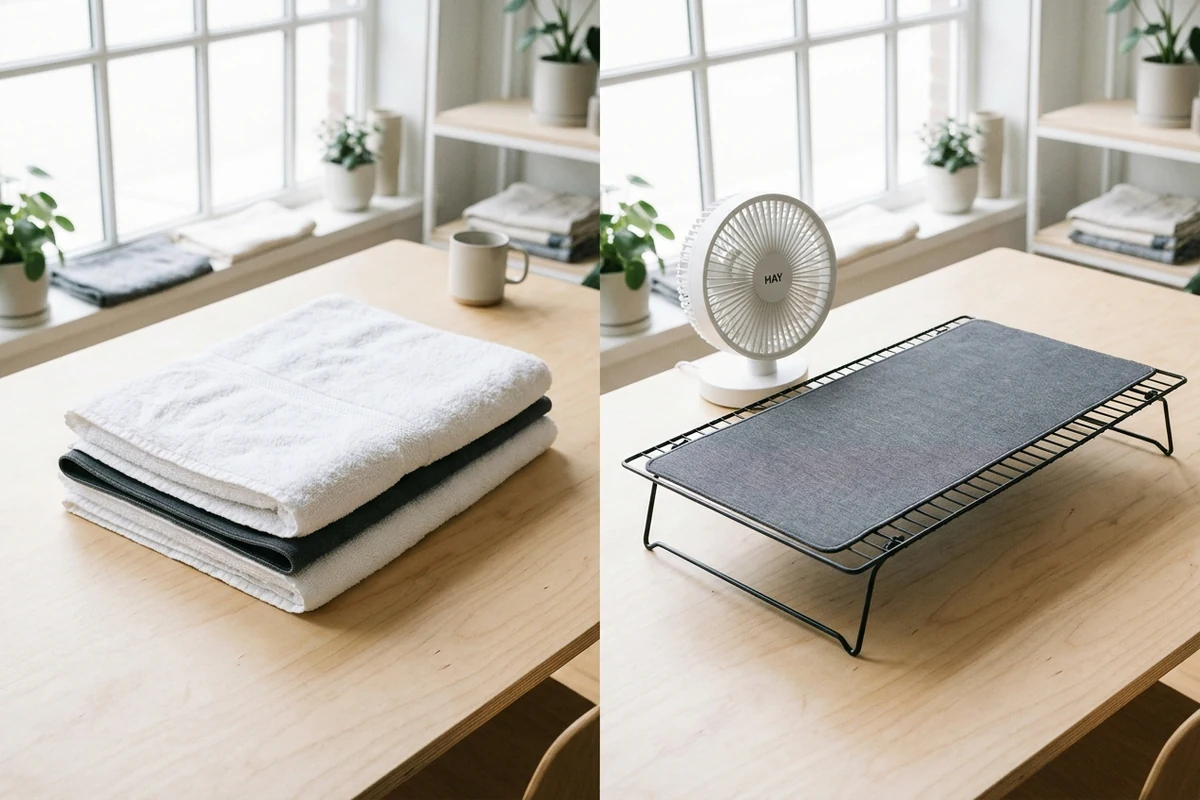
Lay the desk pad completely flat across an elevated wire drying rack so ambient air circulates freely. Allow 24 to 36 hours of drying time with a gentle room fan.
Never place a desk mat inside a clothes dryer or against a radiator. Avoid hanging wet pads with clothespins, as saturated rubber sags and leaves permanent clamp marks.
Frequently Asked Questions (FAQ)
Can you wash a desk mat in the washing machine?
You can machine wash stitched cloth desk mats on a cold delicate cycle with mild detergent. Always enclose the mat in a mesh bag and disable high speed spinning.
How long does a desk mat take to dry completely?
A standard cloth desk mat takes 24 to 36 hours to air dry completely on a rack. Using the towel sandwich method cuts initial water volume and shortens drying time.
Can you clean a desk pad with isopropyl alcohol wipes?
Never use isopropyl alcohol wipes on printed fabric, rubber backing, or polyurethane leather. Alcohol breaks down resins, causes surface cracking, and dissolves thermal adhesives holding edge seams together.
How often should you wash a fabric desk mat?
Perform a full hand wash every two to three months based on workstation usage. Dust your desk mat weekly with a soft lint roller to prevent dirt from grinding into fibers.
How do you eliminate rubber smell from a newly washed mat?
Rubber odor stems from trapped core moisture rather than cleaning soap. Dry the mat flat in a shaded room with active fan airflow for an extra twelve hours before use.
Workspace Hygiene: Protecting Your Desk Setup Investment
Maintaining a clean desk pad prolongs peripheral lifespan and protects fine desktop wood from abrasive dust. Routine maintenance preserves responsive mouse control across demanding daily tasks.
Coordinate your clean surface with proper peripheral placement across your workspace. Pair your desktop with our setup wizard to establish healthy elbow angles and neutral wrist posture.
If your workspace features natural hardwood, review our recommendations for a protective desk pad for wood desk to prevent finish chemical migration.
Equip your typing zone with ergonomic standing desk accessories and a supportive keyboard wrist rest for comfortable forearm alignment.
Enhance desktop organization by exploring our buying guide for the best desk shelf to raise monitors. Clean desk accessories build an inviting and productive computing environment.
Calculate Your Exact Desk & Chair Height
Slide to your height to see ANSI/BIFMA recommended standing and sitting presets.
Written by M. Haris
✓ References ANSI/BIFMA G1-2017 GuidanceFounder & Lead Workstation Ergonomics Researcher • Spec Auditing & Biomechanical Research
M. Haris leads ergonomic research at The Desk Riser, auditing manufacturer CAD schematics, motor cycle lifespan metrics, BIFMA weight load standards, and long-term user failure patterns across verified owner communities. Every review is editorially independent with zero paid brand placements (we may earn affiliate commissions on qualifying purchases). Have questions or spot a warranty update? Email directly at [email protected], read the Author Dossier, or explore our Editorial Research Methodology.
Share this article:
Workstation Setup & Fit Q&A
Have questions about frame deflection, monitor arm clamp loads, or chair sizing? Consult our research team.
Q:How do I know if this standing desk will wobble on thick carpet?
Standing desk wobble on carpet is caused by uneven carpet pile compression under the rear footpads. Frames with wedge-reinforced leg collars and wide steel footplates (like UPLIFT V3 or FlexiSpot E7 Pro) minimize lateral flex. If placing on plush carpet, use rigid caster cups or a dense underlay to anchor the base directly to the subfloor.
Q:Can I clamp a dual monitor arm onto standard particleboard tops?
Dual monitor arms concentrate 25 to 45 lbs of dynamic torque onto a 4-inch clamp perimeter. Hollow honeycomb tops (such as IKEA Linnmon) will crush. We recommend a minimum 0.75-inch solid core (MDF, solid bamboo, or hardwood), or sandwiching a steel reinforcement bracket plate (min 2.5mm thickness) between the clamp and desktop.
Q:What if my chair cylinder sinks or feels too high for my feet?
Always verify your seated popliteal height (crease behind knee to floor with shoes). If a chair will not drop below 17 inches and your feet dangle, pair it with an angled footrest or switch to a low-range Class 4 cylinder. If a cylinder loses pressure and sinks on its own, the internal nitrogen seal is breached and requires cylinder replacement.
Ask Our Ergonomic Spec Reviewers
Planning an upgrade or unsure if your monitors and stature fit this configuration? Send your dimensions directly to our research desk. No accounts, no trackers, zero marketing spam.
Free Workstation Tools
Related Home Office Setup Guides & Reviews
Best Folding Office Desk (2026): Top Collapsible Workstations
Feng Shui Office Desk: 4 Architectural Layout Rules
Best Plant for Desk Office Workstations (2026): Low Light Guide
Best Office Desk Christmas Decorations 2026: Holiday Guide