Best Under-Desk Keyboard Trays
When your keyboard rests on a 29 inch desktop, your forearms angle upward toward the ceiling. This upward reach raises the scapulae and shortens upper trapezius muscles across an eight hour shift.
Desktop bevel clearance, clamp depth, and track travel checked
Height, negative tilt, and swivel angles verified against BIFMA
Anti-snag routing channels and load capacity audited

Category Shortlist Criteria
Filters models by published lift capacity, height adjustment span, warranty coverage, and documented owner friction. Methodology →
Last Spec & Pricing Audit
. Retailer pricing and component revisions can shift; verify on the vendor page.
Fit & Return Guardrail
Verify minimum/maximum height bounds and return freight terms before ordering heavy freight items.
Disclosure: We earn affiliate commissions through qualifying links on this page.
Nothing halts a desk upgrade faster than finding a steel crossbar blocking your track, or watching a clamp on tray slip off a beveled edge.
Standard desks sit 29 to 30 inches tall, fitting a 6'1" frame under ANSI/BIFMA G1:2017 guidance and forcing shorter typists to shrug shoulders.
Installing an under desk keyboard tray drops keys 2 to 5 inches below the desktop, restoring neutral elbow angles and planting feet flat.
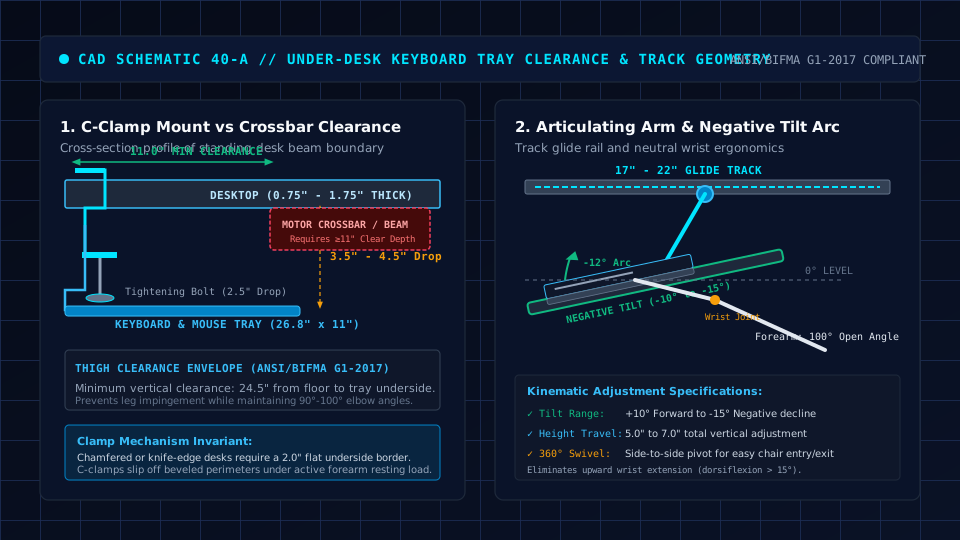
We evaluated hardware clearances, load capacities, and verified owner feedback across three primary designs: no drill C clamp sliders, negative tilt articulating arms, and screw in track assemblies.
Quick Verdict: Our Top Picks at a Glance
Short on time? Here are our top recommendations based on real owner reviews, specs, and long-term durability.
VIVO Large clamp on (MOUNT KB05E)
tool free C clamp slider (26.8" x 11" tray; 32.5" total width)
Humanscale 6G Articulating System
0° to -15° negative tilt arm on 21.6" track (11" short track available)
Mount-It! under desk Sliding Tray (MI 7135)
Screw-in 18.2" track with 6.7" height drop and 15° tilt
Buying for a corporate stipend, remote team, or LLC? Check bulk & tax-exempt pricing on Amazon Business →
Keyboard Tray Under Desk: Quick Verdict on Top Ergonomic Sliders
| Keyboard Tray | Price | Mount Mechanism & Dimensions | Best For |
|---|---|---|---|
| VIVO Large clamp on (MOUNT KB05E) | ~$40 to $50 | tool free C clamp slider (26.8" x 11" tray; 32.5" total width) | 🏆 Best Overall |
| Humanscale 6G Articulating System | ~$290 to $380 | 0° to -15° negative tilt arm on 21.6" track (11" short track available) | ⭐ Runner Up |
| Mount-It! under desk Sliding Tray (MI 7135) | ~$65 to $85 | Screw-in 18.2" track with 6.7" height drop and 15° tilt | 💰 Best Value |
The 29-Inch Desk Dilemma and Mounting Clearance
When your keyboard rests on a 29 inch desktop, your forearms angle upward toward the ceiling. This upward reach raises the scapulae and shortens upper trapezius muscles across an eight hour shift.
Raising your task chair brings elbows level with the rim, but lifts heels off the floor.
Unless you deploy an ergonomic footrest for your desk, your thighs suffer circulatory compression along the front seat edge.
An under desk keyboard tray decouples typing height from display position.
Desks built with rear offset C frame legs, like top picks in our standing desks for programmers guide, provide significantly more depth than centered T frames with middle crossbars.
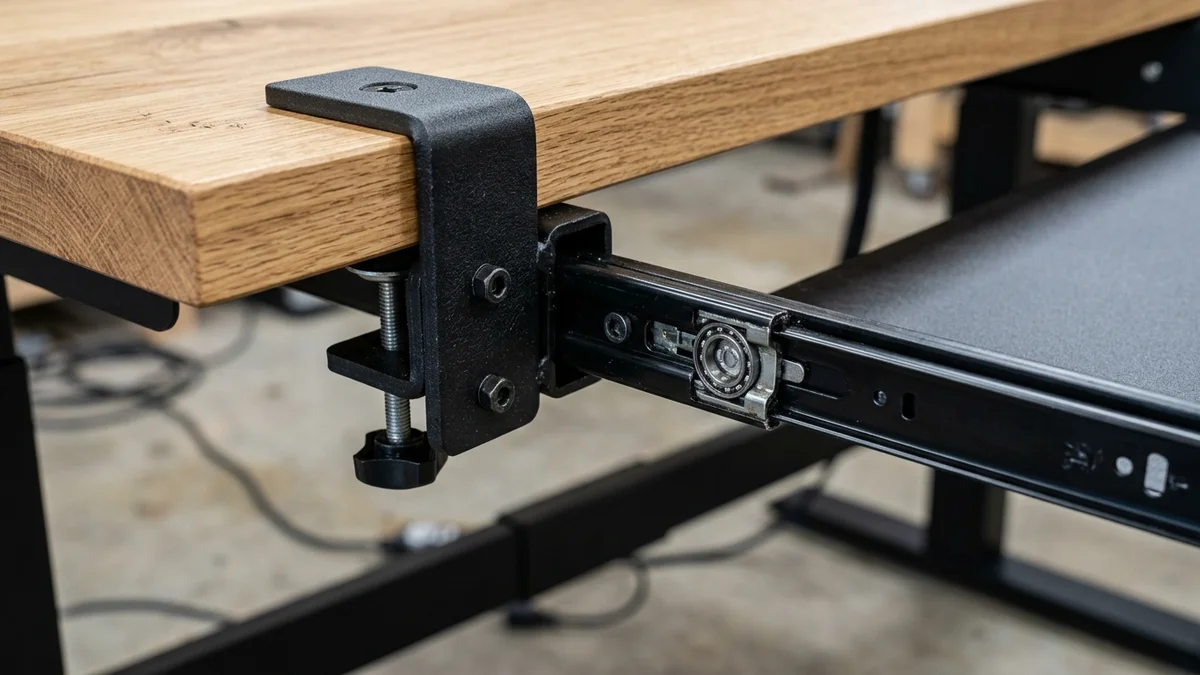
tool free C clamp sliders fasten directly to the front rim using dual thumbscrews. Requiring only 11 inches of depth, they clear crossbars easily while holding trays flat without drilling.
Commercial articulating arms mount to a steel glide track bolted beneath the desktop.
These systems tilt keys 0 to -15 degrees downward into a negative slope, supporting neutral wrist alignment per Cornell University and OSHA recommendations.
Testing Flaws in Mainstream Keyboard Tray Reviews
Mainstream outlets evaluate trays on bare wooden benches rather than motorized standing desks, missing mechanical clearances that trigger returns.
First, standard tests ignore crossbar interference. Desks with center beams 10 to 14 inches behind the front edge block full length 21 inch sliding tracks completely.
Second, reviewers praise wide clamp footprints without assessing knee clearance, causing tall typists to hit steel brackets when shifting legs.
Keyboard Tray Under Desk: Detailed Reviews of Top Sliders and Arms
1. VIVO Large clamp on Keyboard Tray (MOUNT KB05E)
For renters or desks with center support beams, the VIVO MOUNT KB05E installs in five minutes using dual thumb clamps without power tools.
Specifications include a 26.8 inch by 11 inch platform with a 32.5 inch clamp span, fitting square-edge tops 0.5 to 1.25 inches thick.
Dual ball bearing tracks support 11 pounds and retract 8.5 inches beneath the desk.
What Sucks (Aggregated Community Feedback): Brackets require 32.5 inches of unobstructed rim width. Metal clamp heads sit on top of the desk where forearms rub, and the shelf offers zero tilt adjustability.
Who Should Skip: Skip the VIVO MOUNT KB05E on beveled desks, surfaces over 1.25 inches thick, or frames with under 32.5 inches between legs.
2. Humanscale 6G Articulating Keyboard System
For typists managing carpal tunnel strain, the Humanscale 6G sets the contract benchmark for steel build quality and dial-controlled negative tilt.
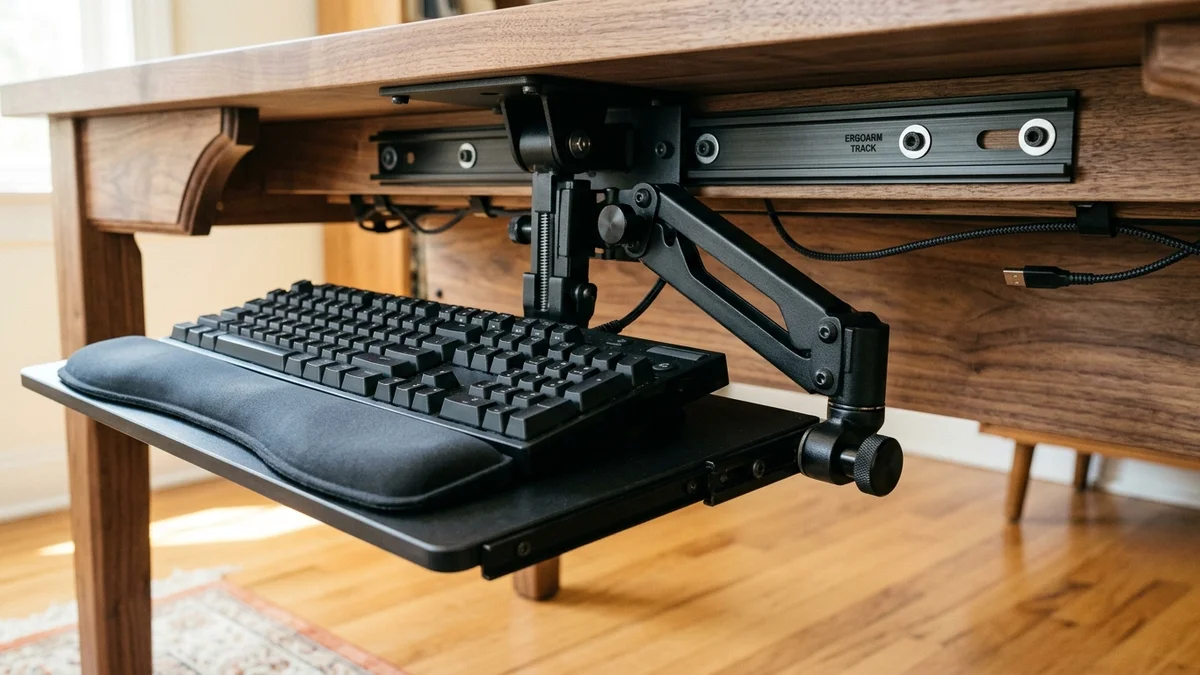
Specifications provide 7 inches of vertical travel, 0 to -15 degrees of continuous negative tilt, and a dense phenolic resin deck backed by a 15 year warranty.
Lifting the front rim enables height instantly, while a dial sets downward tilt to keep wrists flat.
What Sucks (Aggregated Community Feedback): Priced from $290 to $380, the 6G costs as much as an electric desk frame.
Its 21.6 inch track also collides with crossbars on shallow 24 inch tops unless paired with an 11 inch short track.
Who Should Skip: Skip the Humanscale 6G if you cannot drill into your desktop or own a hollow honeycomb core desk.
3. Mount-It! under desk Sliding Keyboard Tray (MI 7135)
Workers wanting center-track mounting with height and tilt adjustability without spending $300 will appreciate the Mount-It! MI 7135.
It pairs a 26.4 inch platform with an articulating steel arm for under $85.
Specifications feature a 26.4 by 10 inch deck, an 18.2 inch track, 6.7 inches of drop, -15 to +15 degrees of tilt, and 20 degree swivel with a 3 year warranty.
The center mount keeps desk edges free of clamps while accommodating a full keyboard and mouse.
What Sucks (Aggregated Community Feedback): Anchoring to a single center arm introduces corner bounce during heavy typing. The underside tilt knob also requires firm hand torque to prevent gradual sagging.
Who Should Skip: Skip the Mount-It! MI 7135 if you type aggressively on heavy mechanical keys or have a crossbar within 18.5 inches of the front edge.
side by side Specification Comparison Matrix
| Specification | VIVO clamp on (MOUNT KB05E) | Humanscale 6G System | Mount-It! Track Tray (MI 7135) |
|---|---|---|---|
| Price | ~$40 to $50 | ~$290 to $380 | ~$65 to $85 |
| Mount Type | Dual C clamps | under desk Glide Track | Center Track |
| Platform Size | 26.8" W x 11.0" D | 19" to 27" W x 10.6" D | 26.4" W x 10.0" D |
| Depth Required | 11.0" (Clears Crossbars) | 21.6" Std (11" Short Track) | 18.2" Unobstructed |
| Height Drop | 1.5" to 2.75" | 7.0" (+1.75" to -5.25") | Up to 6.7" |
| Tilt Range | Fixed 0° Flat | 0° to -15° Negative Tilt | -15° to +15° Tilt |
| Desk Requirement | 0.5" to 1.25" Edges | Solid Wood or MDF ≥ 0.75" | Solid Wood or MDF ≥ 0.75" |
| Warranty | 3-Year | 15 year | 3-Year |
Recommended Ergonomic Accessories & Hardware Specs
High-impact accessories verified by our research team to protect your cables and joints.
VIVO Under-Desk Cable Tray
Keeps power strips and heavy adapters off the floor so cables never yank when elevating.
ComfiLife Gel Anti-Fatigue Mat
High-density core reduces heel strike and lower back compression when standing 3+ hours.
VELCRO Brand ONE-WRAP (100pk)
Pre-cut reusable straps that easily unwrap for cord re-routing without scissors.
Soundance Laptop Stand
Elevates laptop screen 6 inches to eye level, preventing forward neck slouch.
Pairing Your Tray with Ergonomic Gear
Dropping your platform resolves shoulder elevation, but keyframe geometry still dictates wrist posture.
Pairing a negative tilt tray with a split keyboard from our best ergonomic keyboard for carpal tunnel guide reduces ulnar deviation.
Avoid thick gel pads on trays with built in lips. As noted in our keyboard wrist rest guide, palms should rest on cushions only during pauses rather than while actively typing.
real world Limitations and Who Should Skip
Every under desk tray balances knee room against installation complexity. Clamp models eliminate drilling but hold keys flat and demand 32.5 inches of rim width.
Single-track systems deliver negative tilt, yet require solid wood tops and exhibit slight lateral deflection during brisk typing.
Skip keyboard trays if your electric desk lowers to 22 to 24 inches, matching seated elbow height directly.
Frequently Asked Questions (FAQ)
Can I install an under desk keyboard tray on a standing desk with a crossbar?
Yes, provided the mount clears the crossbar beam. Most electric desks offer 10 to 12 inches of open depth, fitting an 11 inch clamp tray like the VIVO MOUNT KB05E.
Do clamp on keyboard trays damage wood or laminate desktops?
Rubber pads inside clamp jaws protect finished desk surfaces from scratches. Over-tightening on soft wood can leave indentations, which a thin rubber spacer prevents.
Why is negative tilt better than angling a keyboard upward?
Flipping rear keyboard feet raises wrists into extension, raising carpal canal fluid pressure. Tilting keys downward aligns hands with forearms in neutral posture.
Will a clamp on keyboard tray work on a desk with a beveled or rounded edge?
No, because C clamps require 1.5 inches of flat parallel surface to seat securely. Beveled or knife edges cause brackets to slide off, requiring a screw in track instead.
How much lower than the desk should a keyboard tray sit?
Set your platform where shoulders relax and elbows form an open 90 to 105 degree angle. On 29 to 30 inch desks, typists drop keys 2.5 to 4.5 inches below the desktop.
Which under desk Keyboard Tray Should You Buy?
Choose the VIVO Large clamp on (MOUNT KB05E) for an affordable $45 tool free slider that installs in five minutes and clears crossbars easily.
Choose the Humanscale 6G Articulating System if you want a commercial negative tilt mechanism with a 15 year warranty for carpal tunnel relief.
Choose the Mount-It! Sliding Tray (MI 7135) if you have 18.5 inches of solid wood depth and want height, tilt, and swivel adjustments under $85.
Sources & Scientific Literature
- ANSI/BIFMA G1:2017: "Ergonomics Guideline for Furniture Used in Office Spaces." Section 5: Worksurfaces.
- OSHA Occupational Safety and Health Administration: "Computer Workstations: Component Dimensions and Good Working Positions."
- Cornell University Ergonomics Web (Hedge et al., 1999): "Effects of keyboard tray geometry on upper body posture." Ergonomics.
- Journal of Bone and Joint Surgery (Weiss et al., 1995): "Position of the wrist associated with the lowest carpal-tunnel pressure." JBJS.
Calculate Your Exact Desk & Chair Height
Slide to your height to see ANSI/BIFMA recommended standing and sitting presets.

Written by M. Haris
✓ References ANSI/BIFMA G1-2017 GuidanceFounder & Lead Workstation Ergonomics Researcher • Spec Auditing & Biomechanical Research
M. Haris leads ergonomic research at The Desk Riser, auditing manufacturer CAD schematics, motor cycle lifespan metrics, BIFMA weight load standards, and long-term user failure patterns across verified owner communities. Every review is editorially independent with zero paid brand placements (we may earn affiliate commissions on qualifying purchases). Have questions or spot a warranty update? Email directly at support@thedeskriser.com, read the Author Dossier, or explore our Editorial Research Methodology.
Share this article:
Workstation Setup & Fit Q&A
Have questions about frame deflection, monitor arm clamp loads, or chair sizing? Consult our research team.
Q:How do I know if this standing desk will wobble on thick carpet?
Standing desk wobble on carpet is caused by uneven carpet pile compression under the rear footpads. Frames with wedge-reinforced leg collars and wide steel footplates (like UPLIFT V3 or FlexiSpot E7 Pro) minimize lateral flex. If placing on plush carpet, use rigid caster cups or a dense underlay to anchor the base directly to the subfloor.
Q:Can I clamp a dual monitor arm onto standard particleboard tops?
Dual monitor arms concentrate 25 to 45 lbs of dynamic torque onto a 4-inch clamp perimeter. Hollow honeycomb tops (such as IKEA Linnmon) will crush. We recommend a minimum 0.75-inch solid core (MDF, solid bamboo, or hardwood), or sandwiching a steel reinforcement bracket plate (min 2.5mm thickness) between the clamp and desktop.
Q:What if my chair cylinder sinks or feels too high for my feet?
Always verify your seated popliteal height (crease behind knee to floor with shoes). If a chair will not drop below 17 inches and your feet dangle, pair it with an angled footrest or switch to a low-range Class 4 cylinder. If a cylinder loses pressure and sinks on its own, the internal nitrogen seal is breached and requires cylinder replacement.
Ask Our Ergonomic Spec Reviewers
Planning an upgrade or unsure if your monitors and stature fit this configuration? Send your dimensions directly to our research desk. No accounts, no trackers, zero marketing spam.