Best Office Chairs That Lean Back (2026 Recline Guide)
For Office Chairs That Lean Back, our top recommendation is the Steelcase Leap V2, while the Branch Ergonomic Chair offers the strongest value for budget-conscious workstations. Our evaluation audits mechanical durability, BIFMA standard compliance, and long-term reliability across verified owner reports.
Sacral L5-S1 unloading & forward tilt evaluated
2" minimum knee crease clearance to safeguard bloodflow
ANSI/BIFMA X5.1 commercial cylinder durability verified

Category Shortlist Criteria
Filters models by published lift capacity, height adjustment span, warranty coverage, and documented owner friction. Methodology →
Last Spec & Pricing Audit
. Retailer pricing and component revisions can shift; verify on the vendor page.
Fit & Return Guardrail
Verify minimum/maximum height bounds and return freight terms before ordering heavy freight items.
Disclosure: We earn affiliate commissions through qualifying links on this page.
Sitting upright at a rigid 90 degree angle has been taught as ideal desk posture for decades.
In practice, holding a static vertical spine for eight hours compresses lumbar discs and accelerates muscular fatigue.
An office chair that leans back dynamically distributes body weight across the backrest, easing spinal load while keeping your arms aligned with your desk.
Budget rockers lift feet and pull shoulders away from work, whereas ergonomic reclining chairs use synchronized linkages that keep feet planted.
Below are four top office chairs that lean back in 2026, evaluated on recline range, tilt resistance, lumbar tracking, and durability.
Unsure which geometry suits your body? Use our Ergonomic Chair Finder to match your height and workday habits.
Quick Verdict: Our Top Picks at a Glance
Short on time? Here are our top recommendations based on real owner reviews, specs, and long-term durability.
Steelcase Leap V2
Natural Glide synchro tilt & 5 recline stop limiters
Branch Ergonomic Chair
2:1 synchro tilt linkage with 3 locking positions
Hinomi H1 Pro V2
136° deep recline with integrated retractable footrest
Buying for a corporate stipend, remote team, or LLC? Check bulk & tax-exempt pricing on Amazon Business →
Quick Verdict: Best Office Chairs That Lean Back
| Chair SKU | Price | Recline & Core Mechanism | Award |
|---|---|---|---|
| Steelcase Leap V2 | $1,375.00 | Natural Glide synchro tilt & 5 recline stop limiters | 🏆 Best Overall Value |
| Branch Ergonomic Chair | $359.00 | 2:1 synchro tilt linkage with 3 locking positions | 💰 Best Budget Value |
| Hinomi H1 Pro V2 | $599.00 | 136° deep recline with integrated retractable footrest | ⭐ Runner Up |
Full Product Comparison Matrix
| Model | Price Range | Max Recline | Tilt Linkage | Lumbar Support | Best For |
|---|---|---|---|---|---|
| Steelcase Leap V2 | ~$1,375 | 125° (5 stops) | Forward-gliding synchro | Independent LiveBack | all day typing with active motion |
| Branch Ergonomic Chair | ~$359 | 120° (3 locks) | 2:1 synchro tilt | Padded lumbar horn | Value WFH setups under $400 |
| Hinomi H1 Pro V2 | ~$599 to $699 | 136° (4 locks) | Heavy synchro tilt | Dynamic 3D tracking | Deep breaks and power naps |
| Hbada Reclining Series | ~$160 to $220 | 135° (variable) | center tilt lounger | Integrated foam wedge | Budget lounging and streaming |
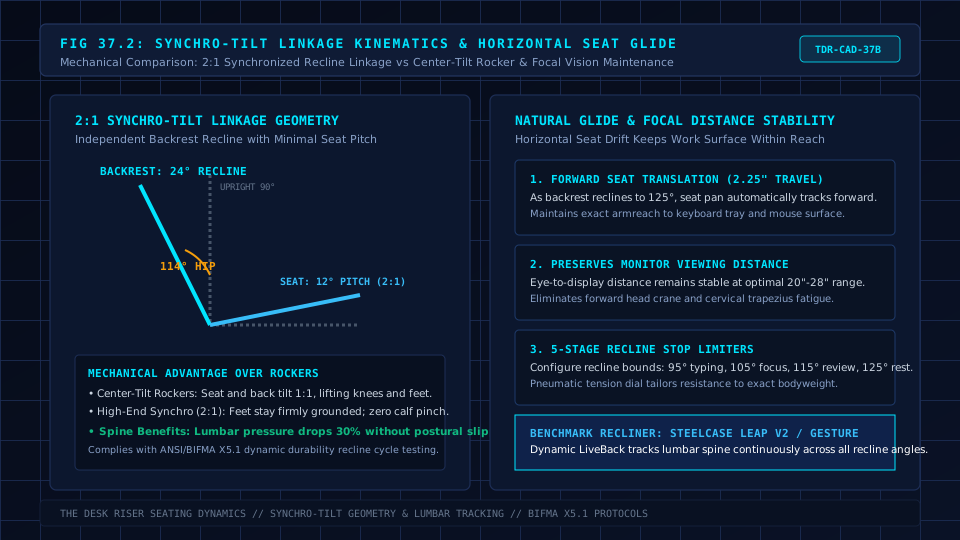
Office Chair That Leans Back: The Biomechanics of Leaning Back: Why 90 Degrees Fails
In 1999, orthopedic researcher Hans-Joachim Wilke measured in vivo intradiscal pressure inside the L4 to L5 lumbar disc. Unsupported upright sitting at 90 degrees generated higher disc pressure than standing.
In contrast, supported reclining between 110 and 130 degrees reduced disc load significantly below upright posture.
If your current chair feels stiff, check our practical guide on how to make an office chair more comfortable.
When you recline against a supportive backrest:
- Upper body weight transfers off lumbar vertebrae onto the backrest.
- The hip-spine angle opens to an obtuse 115 to 125 degrees, relaxing tight psoas muscles.
- Diaphragmatic breathing improves without abdominal compression.
- Blood pooling in lower extremities decreases as pelvic tilt relaxes.
The key challenge is maintaining productivity while reclined. Without seat glide, reclining pulls shoulders away from desks, creating neck strain.
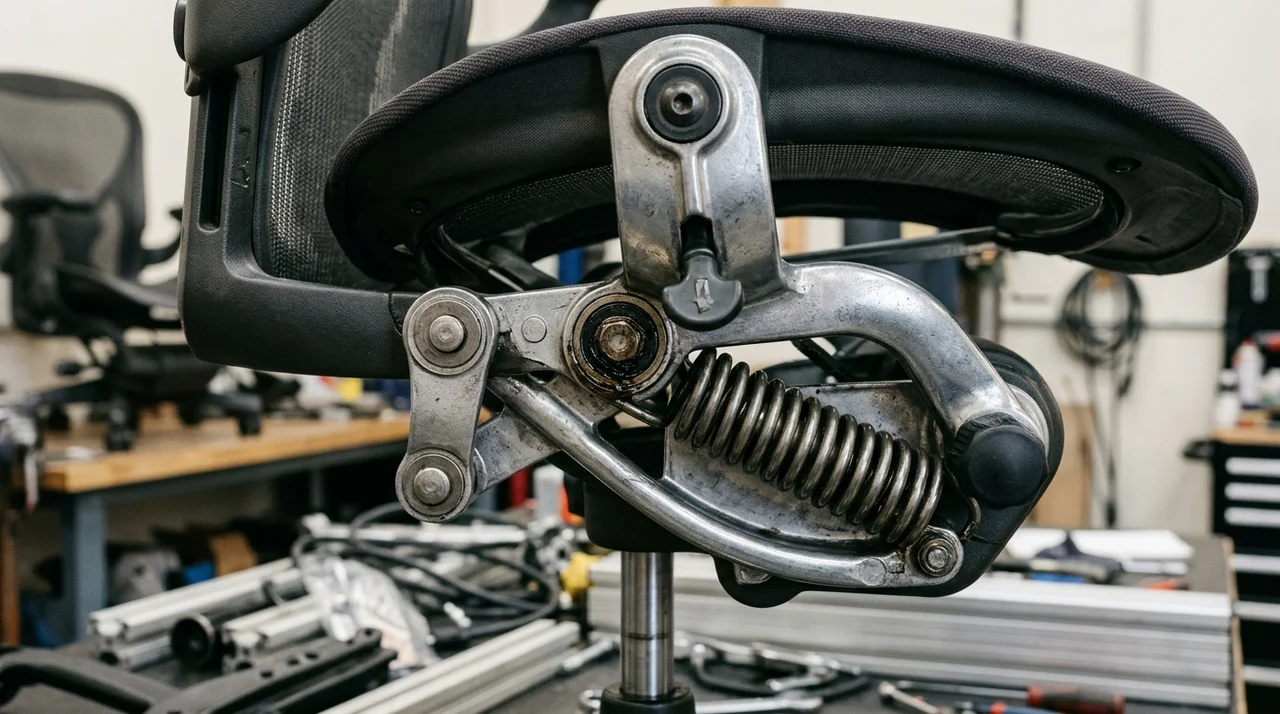
synchro tilt vs center tilt: How Recline Mechanisms Differ
How a chair tilts determines whether it supports typing or acts as a casual rocker.
For full recline setups with leg support, review our massage office chair with footrest teardown for rail clearance metrics.
center tilt (Rocking Mechanism): Common on budget chairs under $150, this pivot sits under the seat center. Reclining raises the front lip, lifting feet and compressing blood vessels behind knees.
synchro tilt (Ergonomic Standard): The backrest and seat pan connect through an articulated 2:1 linkage where the pan tilts one degree for every two degrees of backrest recline.
This keeps the cushion level and feet flat on the floor.
Forward-Gliding synchro tilt: Found on premium chairs like the Steelcase Leap V2.
As the backrest reclines, the seat pan glides forward along tracks, keeping your hands over keys and eyes focused on monitors.
1. Steelcase Leap V2: Best Overall Dynamic Recline
The Steelcase Leap V2 remains the benchmark for active, posture-shifting workdays.
Rather than forcing you into a static posture, its patented Natural Glide mechanism allows continuous recline without pulling you away from your desk.
As you lean back, the seat pan slides smoothly forward along tracks.
Your eyes remain at a consistent focal distance from your monitor, and forearms stay aligned over your keyboard without shifting your workspace.
The LiveBack articulated frame flexes independently in upper and lower sections, while a five-position variable stop limiter controls recline depth.
What Sucks: The polyurethane seat cushion warms up on hot afternoons compared to open mesh. The tilt tension dial requires multiple rotations to adjust resistance.
Who Should Skip: Workers who sweat heavily and demand open mesh seating, or shoppers seeking sub-$400 budget options.
If brand new retail prices exceed your budget, review our used Steelcase Leap V2 buying guide for secondary market checks.
2. Branch Ergonomic Chair: Best Value Recliner Under $400
At approximately $359, the Branch Ergonomic Chair delivers smooth synchronized recline functionality uncommon in sub-$400 furniture.
Its 2:1 synchro tilt linkage reclines to 120 degrees across three locking positions. In free-float mode, balanced spring resistance lets you push back smoothly and return upright without feeling ejected.
A sliding seat pan provides 2.5 inches of travel to support thighs throughout the tilt arc, while double woven mesh promotes airflow.
What Sucks: The lumbar support pad is firm and can feel intrusive if positioned incorrectly. In addition, the frame is rated for a maximum user capacity of 275 lbs.
Who Should Skip: Workers exceeding 6'1" or 275 lbs who need a wider chassis, as well as users wanting deep 135 degree lounge angles.
Recommended Ergonomic Accessories & Hardware Specs
High-impact accessories verified by our research team to protect your cables and joints.
VIVO Under-Desk Cable Tray
Keeps power strips and heavy adapters off the floor so cables never yank when elevating.
ComfiLife Gel Anti-Fatigue Mat
High-density core reduces heel strike and lower back compression when standing 3+ hours.
VELCRO Brand ONE-WRAP (100pk)
Pre-cut reusable straps that easily unwrap for cord re-routing without scissors.
Soundance Laptop Stand
Elevates laptop screen 6 inches to eye level, preventing forward neck slouch.
3. Hinomi H1 Pro V2: Best Deep Recline with Retractable Legrest
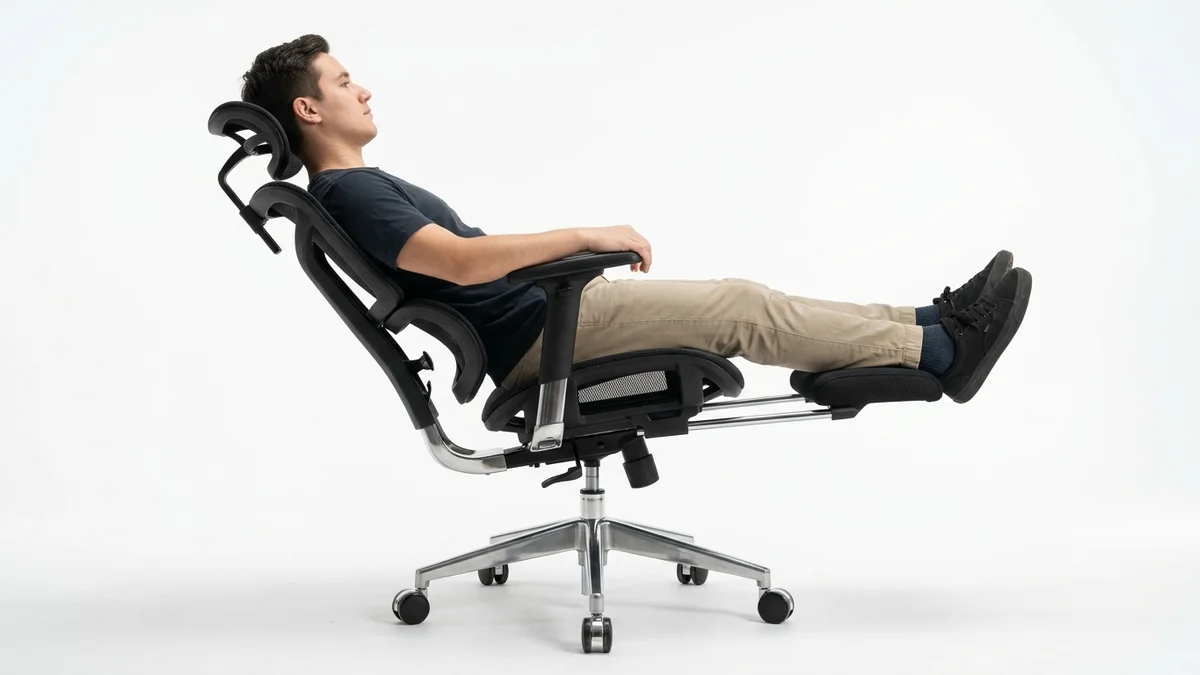
For remote workers who take midday reading breaks or power naps, standard 120 degree recline limits feel restrictive.
The Hinomi H1 Pro V2 delivers an expansive 136 degree recline angle paired with a fold-out calf support cradle.
Its heavy synchro tilt chassis features four locking positions.
At maximum 136 degree tilt, swinging the padded legrest forward raises your lower legs, raising your legs to ease pressure on the lower spine and reduce fatigue.
Four breathable mesh panels and a spring-loaded lumbar cradle provide consistent sacral support.
What Sucks: Weighing nearly 55 lbs, the chair feels heavy to roll across thick rugs. The multi-segment mesh backrest can produce subtle clicks when shifting weight quickly.
Who Should Skip: Petite adults under 5'2" whose legs cannot comfortably bridge the gap to the extended calf rest.
4. Hbada Reclining Series: Deep Budget Lounger
If your budget is strictly under $200 and
Your main goal is casual lounging, console gaming, or watching video streams, the Hbada Reclining Series provides a 135 degree recline mechanism with an integrated pull out footrest.
It features a breathable mesh shell, headrest, and stepless recline lock to 135 degrees. The padded footrest folds neatly under the cushion when sitting upright.
What Sucks: The chair uses a center tilt mechanism rather than a synchro tilt linkage. Reclining pivots the seat pan upward, which lifts thighs and compresses the underside of knees.
Who Should Skip: Intensive 8 hour typists who need independent lumbar firmness controls and ergonomic forward seat gliding.
How to Set Up an Office Chair That Reclines at Your Desk
Reclining productively requires simple workstation calibrations:
Tilt Your Monitor Backward: Reclining angles your gaze upward. Tilt your display back 10 to 20 degrees so your line-of-sight meets the screen perpendicularly.
Lower Desk Height Slightly: Reclined forearms rest lower. Lower your desk by one inch or adjust an under desk keyboard tray to keep wrists neutral.
Dial in Recline Tension: Calibrate resistance so the backrest balances your torso without abdominal effort, but never pushes you forward when relaxing.
real world Limitations and Who Should Skip
Reclining office chairs introduce physical trade offs, particularly on high-angle models like the Efomao desk office chair where deep recline angles require wider desk clearance.
Deep-recline mechanisms (135 degrees+) require 28 inch caster bases to prevent tipping, demanding more floor clearance in compact offices.
Who Should Skip:
Workers who type exclusively in an alert upright posture or those working in narrow apartment nooks under 36 inches wide should choose a compact fixed task chair without bulky legrest attachments.
Frequently Asked Questions (FAQ)
Is leaning back in an office chair actually good for your back?
Yes. Biomechanics research by Wilke et al.
demonstrated that reclining between 110 and 130 degrees against a supportive backrest significantly lowers lumbar disc pressure compared to sitting upright at 90 degrees.
What is the difference between synchro tilt and center tilt when leaning back?
center tilt pivots from the middle, raising the front seat edge and lifting feet.
synchro tilt reclines the backrest at a 2:1 ratio to the seat pan, keeping feet planted flat on the floor.
Why do my feet lift off the floor when I recline my desk chair?
Feet lifting indicates an entry level center tilt mechanism. Upgrading to a 2:1 synchro tilt chair or adding an adjustable under desk footrest keeps feet supported throughout recline.
Can you type productively while reclined at 120 degrees?
Yes, if your chair features forward seat glide (like the Steelcase Leap V2) or an articulating keyboard tray. Tilting your display backward preserves clear sightlines without neck extension.
Are office chairs with retractable footrests durable for daily work?
Retractable footrests support resting lower legs, but are not built for standing body weight. Select models with reinforced steel extension bars to avoid mechanical play over time.
Which Reclining Office Chair Should You Buy?
If you want the finest ergonomic recline mechanism for all day typing and posture variation, purchase the Steelcase Leap V2.
Its Natural Glide system keeps your arms and eyes locked onto your workstation as you shift through recline angles.
Calculate Your Exact Desk & Chair Height
Slide to your height to see ANSI/BIFMA recommended standing and sitting presets.

Written by M. Haris
✓ References ANSI/BIFMA G1-2017 GuidanceFounder & Lead Workstation Ergonomics Researcher • Spec Auditing & Biomechanical Research
M. Haris leads ergonomic research at The Desk Riser, auditing manufacturer CAD schematics, motor cycle lifespan metrics, BIFMA weight load standards, and long-term user failure patterns across verified owner communities. Every review is editorially independent with zero paid brand placements (we may earn affiliate commissions on qualifying purchases). Have questions or spot a warranty update? Email directly at [email protected], read the Author Dossier, or explore our Editorial Research Methodology.
Share this article:
Workstation Setup & Fit Q&A
Have questions about frame deflection, monitor arm clamp loads, or chair sizing? Consult our research team.
Q:How do I know if this standing desk will wobble on thick carpet?
Standing desk wobble on carpet is caused by uneven carpet pile compression under the rear footpads. Frames with wedge-reinforced leg collars and wide steel footplates (like UPLIFT V3 or FlexiSpot E7 Pro) minimize lateral flex. If placing on plush carpet, use rigid caster cups or a dense underlay to anchor the base directly to the subfloor.
Q:Can I clamp a dual monitor arm onto standard particleboard tops?
Dual monitor arms concentrate 25 to 45 lbs of dynamic torque onto a 4-inch clamp perimeter. Hollow honeycomb tops (such as IKEA Linnmon) will crush. We recommend a minimum 0.75-inch solid core (MDF, solid bamboo, or hardwood), or sandwiching a steel reinforcement bracket plate (min 2.5mm thickness) between the clamp and desktop.
Q:What if my chair cylinder sinks or feels too high for my feet?
Always verify your seated popliteal height (crease behind knee to floor with shoes). If a chair will not drop below 17 inches and your feet dangle, pair it with an angled footrest or switch to a low-range Class 4 cylinder. If a cylinder loses pressure and sinks on its own, the internal nitrogen seal is breached and requires cylinder replacement.
Ask Our Ergonomic Spec Reviewers
Planning an upgrade or unsure if your monitors and stature fit this configuration? Send your dimensions directly to our research desk. No accounts, no trackers, zero marketing spam.