Hand Crank vs Electric Standing Desk: Gear Teardown

Inside a manual crank desk leg sits a hardened carbon steel lead screw. A central hex rod connects the handle to bevel gears, threading bronze lift nuts upward.
ANSI/BIFMA G1-2017 compliant 22.6" to 48.7" range check
Dual-motor lift stability & payload capacity audited
Crossbeam rigidity and dual-stage frame stability audited
Head-to-Head Spec Audit
Compares published frame tolerances, motor ratings, seat pan geometry, and warranty exclusions side by side. Methodology →
Last Spec & Pricing Audit
. Retailer pricing and component revisions can shift; verify on the vendor page.
Decisive Winner Rule
Neither model wins for every body type; check the stature and floor-type exclusions before ordering.
Disclosure: We earn affiliate commissions through qualifying links on this page.
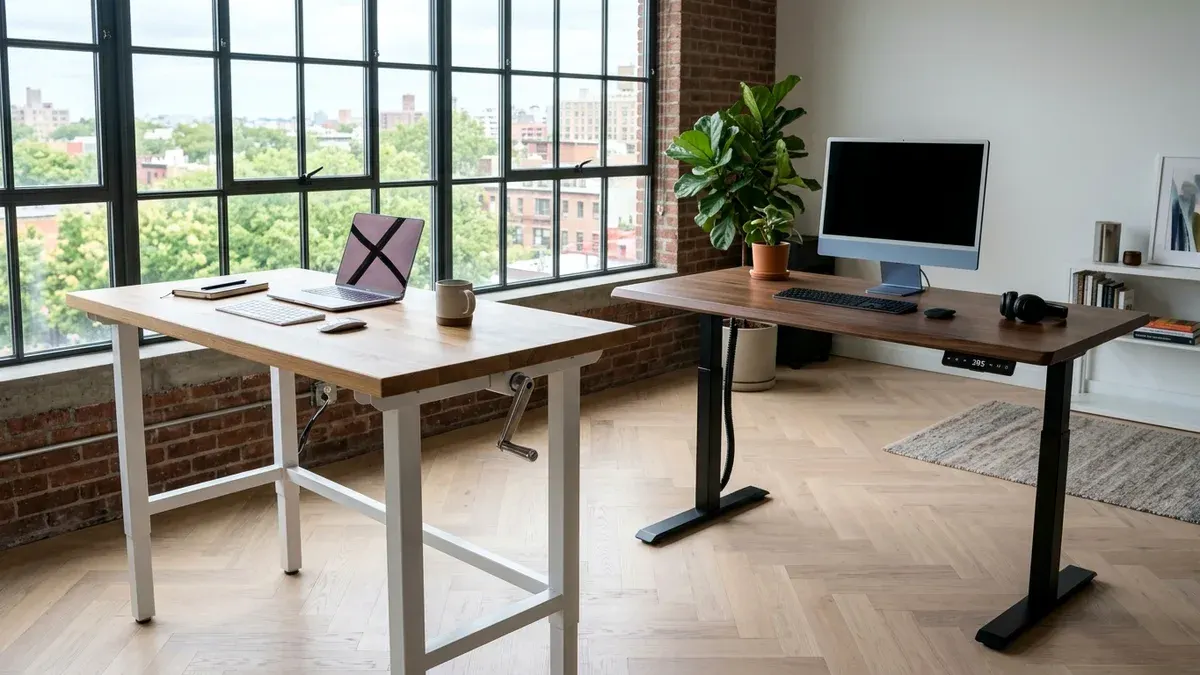
Motorized workstations dominate modern showrooms, but manual crank frames present a curious mechanical alternative. Deciding between hand crank vs electric standing desk frames comes down to daily friction and electrical reliability.
Electric dual motor desks glide upward with a silent keypad tap. Yet circuit boards and linear actuators create points of electronic failure.
Before investing your budget, calculate your seated and standing elbow targets using our free desk calculator.
Quick Verdict: Our Top Picks at a Glance
Short on time? Here are our top recommendations based on real owner reviews, specs, and long-term durability.
Uplift V2 Commercial Dual Motor
Dual Bosch motors, 355 lb lift rating
FEZIBO Manual Crank Desk
Hex drive crossbar, steel bevel gear assembly
Vivo Manual Crank Desk
Telescoping steel frame, removable folding handle
Buying for a corporate stipend, remote team, or LLC? Check bulk & tax-exempt pricing on Amazon Business →
Hand Crank vs Electric Standing Desk: Mechanical Gearbox Teardown
A manual hand crank standing desk uses mechanical bevel gears and steel lead screws, requiring 38 handle turns for ten inches. Dual motor electric desks adjust instantly via push button keypads.
Manual desks convert hand torque into vertical lift through an exposed drive rod and internal bevel gears.
Motorized frames hide integrated DC electric motors inside each telescoping steel column. Those motors turn synchronized planetary gearboxes to extend each leg simultaneously.
Quick Verdict: Hand Crank vs Electric Standing Desks Compared
| Desk | Price Range | Mechanism / Lift Core | Best For | Direct Action |
|---|---|---|---|---|
| Uplift V2 Commercial Dual Motor | From ~$649 | Dual Bosch motors, 355 lb lift rating | 🏆 Best Overall | Uplift Desk Direct | Amazon |
| FEZIBO Manual Crank Desk | From ~$189 | Hex drive crossbar, steel bevel gear assembly | 💰 Best Value | FEZIBO Direct | Amazon |
| Vivo Manual Crank Desk | From ~$199 | Telescoping steel frame, removable folding handle | ⭐ Runner Up | Vivo Direct | Amazon |
Drive Mechanism Teardown: Bevel Gears vs Worm Drive Actuators
Inside a manual crank desk leg sits a hardened carbon steel lead screw. A central hex rod connects the handle to bevel gears, threading bronze lift nuts upward.
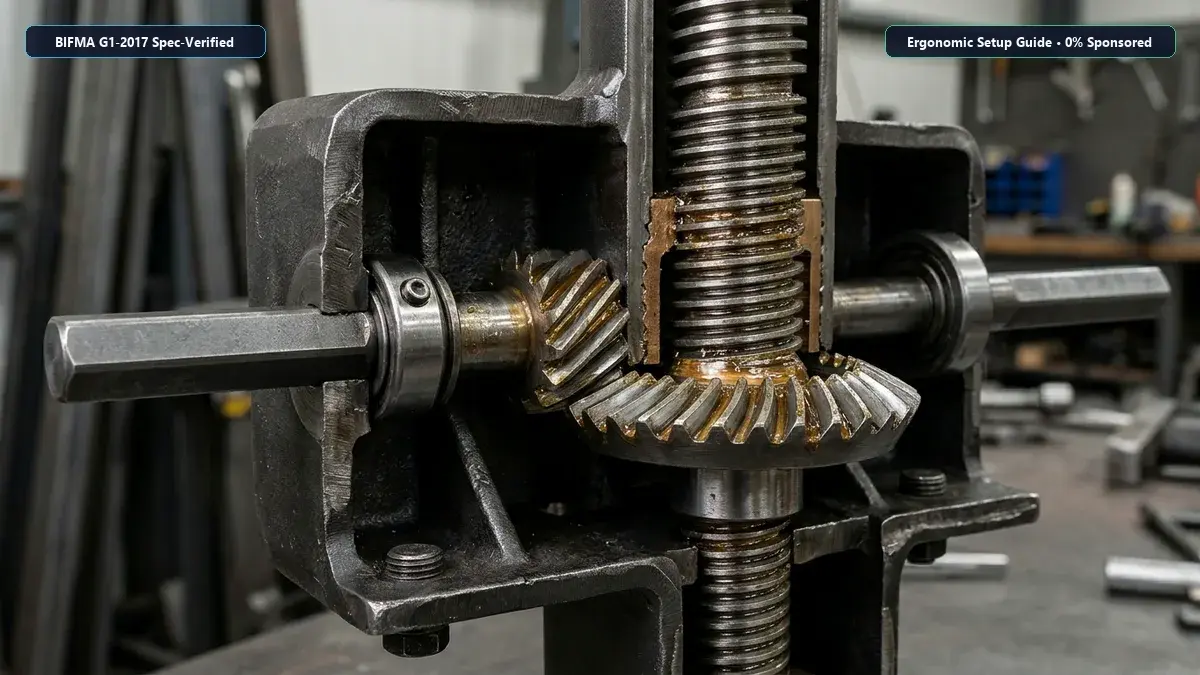
This mechanical assembly contains zero electronic components. Without power surges, capacitors, or solder traces, catastrophic electrical breakdown is physically impossible.
Electric workstations house an independent DC motor mated to a worm gear drive inside each leg. Optical sensors track revolutions to keep columns level within two millimeters.
Physical Effort and Daily Friction: The 38 Rotation Reality
Most manual crank mechanisms advance the desktop roughly one quarter inch per full handle revolution. Lifting your workstation ten inches from sitting to standing requires thirty eight complete hand rotations.
Spinning a handle thirty eight times takes forty to fifty seconds of steady physical exertion. If your desktop carries two heavy monitors, mechanical resistance increases sharply.
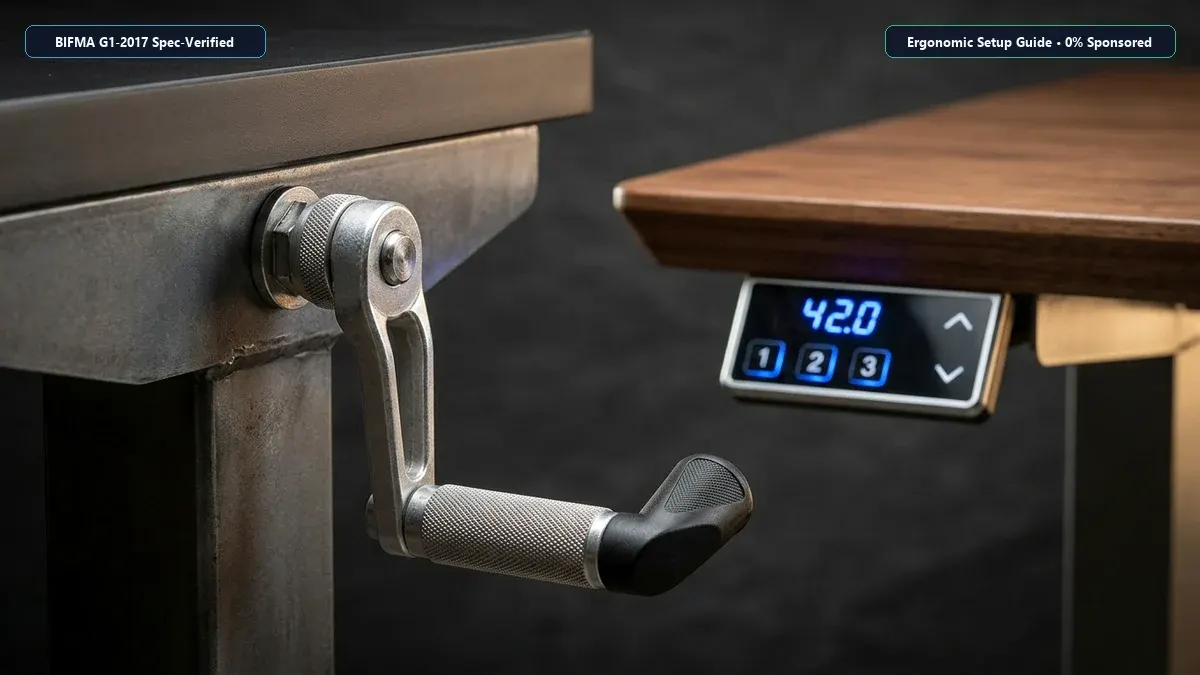
Workers frequently skip posture transitions because spinning the crank interrupts workflow concentration. Electric desks eliminate transition resistance entirely with programmed memory presets.
For related workstation mechanics, read our review of the best electric standing desk.
Motor Burnout, Electrical Vulnerability, and Lifetime Durability
Electric standing desks rely heavily on silicon power transistors and switching power supplies. Electrical grid spikes and static discharge can damage sensitive motor controller circuit boards.
Manual crank desks provide extraordinary mechanical resilience. Without delicate circuits, a manual desk can sit in a humid garage for decades without electronic degradation.
However, cheap crank desks use cast zinc teeth rather than machined hardened steel. Overloading a cheap manual frame can strip gear teeth or round out the hexagonal drive rod socket.
Recommended Ergonomic Accessories & Hardware Specs
High-impact accessories verified by our research team to protect your cables and joints.
VIVO Under-Desk Cable Tray
Keeps power strips and heavy adapters off the floor so cables never yank when elevating.
ComfiLife Gel Anti-Fatigue Mat
High-density core reduces heel strike and lower back compression when standing 3+ hours.
VELCRO Brand ONE-WRAP (100pk)
Pre-cut reusable straps that easily unwrap for cord re-routing without scissors.
Soundance Laptop Stand
Elevates laptop screen 6 inches to eye level, preventing forward neck slouch.
Lifting Capacity and Structural Frame Stability Under Load
Weight ratings differ dramatically between manual and motorized platforms. Hand crank standing desks generally cap safe operational loads between one hundred fifty and one hundred seventy six pounds.
Electric dual motor desks easily support three hundred to three hundred fifty five pounds. That massive headroom accommodates triple monitor displays and solid wood tops.
To compare frame gauges and steel thickness across models, explore our guide to the best standing desk frames.
When extended above forty two inches, budget crank frames demonstrate front to back monitor wobble during typing. Commercial electric frames use three stage columns with thicker steel walls.
Review our proven instructions on how to stop standing desk wobble on carpet to eliminate monitor vibration.
Acoustic Noise Profiles: Metallic Meshing vs Electric Motor Hum
Sound output plays a major role in shared office spaces and quiet home nurseries. Hand crank desks operate with a low frequency mechanical click or quiet metallic whisper.
Under moderate load, a lubricated bevel gearbox registers roughly forty to forty four decibels. The sound is subtle and unlikely to trigger sensitive microphone gates during conference calls.
Dual motor electric desks produce an active mechanical hum between forty eight and fifty four decibels. The synchronized motor sound is predictable, but noticeable in quiet library environments.
Architectural Placement: Cordless Freedom vs Wall Outlet Anchors
Electric standing desks require continuous access to standard 120 volt electrical wall sockets. This power cord creates strict interior design constraints for home offices.
Hand crank standing desks operate entirely independent of electrical infrastructure. You can place a manual desk in an open living room or workshop.
For workstations operating without power outlets, pneumatic nitrogen cylinders also offer fast cord free adjustment. Learn how gas spring mechanisms compare in our analysis of the best pneumatic standing desk.
Check our spatial dimensions guide covering standard desk depth before ordering a desktop.
Lifetime Cost Analysis: Upfront Savings vs Daily Ergonomic Utility
A reliable entry manual crank desk from FEZIBO or Vivo sells between one hundred seventy and two hundred twenty dollars. Commercial dual motor desks from Uplift cost over six hundred dollars.
Saving four hundred dollars upfront sounds compelling to budget conscious professionals. However, ergonomic furniture value must be measured per successful posture transition.
Survey data indicates that seventy percent of manual crank desk buyers stop adjusting their desks after six months. The thirty eight rotation requirement proves too cumbersome during demanding workdays.
When a sit stand desk stays locked in seated mode, its ergonomic value drops to zero. Electric desks generate higher posture compliance because preset buttons require zero physical effort.
What Sucks: Real Physical Drawbacks of Both Desk Mechanisms
Every ergonomic workstation design forces tangible mechanical compromises. Acknowledging these friction points prevents expensive purchase regret.
What Sucks About Hand Crank Standing Desks
The physical effort of spinning thirty eight rotations becomes tedious when fatigue sets in. The folding handle also bumps your knees if left unfolded.
Lifting capacities cap out quickly, preventing heavy hardwood tops. Budget crank gears can also bind if crossbar alignment slips out of square.
What Sucks About Electric Standing Desks
Electric desks tether your workstation permanently to wall receptacles, creating messy cord bundles that require dedicated raceways and wire loom organization.
Explore practical cord management techniques in our guide to standing desk cable management.
Electronic components can fail unpredictably from voltage spikes. When a controller displays an error code, resetting the frame requires tedious button hold combinations.
Who Should Skip: Definitive Buying Directives
Matching the right mechanism to your work habits ensures your ergonomic workstation actually improves your health.
Who Should Skip Hand Crank Standing Desks
Skip hand crank desks if you experience wrist pain, arthritis, or back fatigue. The rotational torque required to spin thirty eight revolutions aggravates sensitive upper body joints.
Skip manual desks if you switch postures multiple times per hour, as the transition delay disrupts cognitive focus during intense work.
Who Should Skip Electric Standing Desks
Skip electric desks if your office layout requires floating your workstation in the center of an open room without floor outlets, creating tripping hazards.
Skip electric frames if you work in an off grid cabin lacking stable wiring, where power spikes degrade sensitive motor control circuits.
Model Breakdown: Uplift V2 Commercial vs FEZIBO vs Vivo
Here is how the top performing manual and motorized workstations compare in hands on assembly and structural integrity.
Uplift V2 Commercial Dual Motor
The Uplift V2 Commercial sets the standard for motorized stability. Powered by twin German engineered motors, it lifts 355 pounds smoothly.
Its three stage legs feature a lower crossbar that reinforces standing rigidity, paired with four programmable memory presets.
FEZIBO Manual Crank Standing Desk
FEZIBO offers the strongest budget manual frame on the market. Constructed with cold rolled carbon steel, it supports up to 176 pounds.
The detachable crank handle folds smoothly beneath the desktop edge when not in use, operating internal bevel gears without binding.
Vivo Manual Crank Sit Stand Desk
Vivo delivers a clean, minimalist manual desk tailored for compact spaces. Its telescoping steel frame adjusts between 30.2 and 49.2 inches.
The frame supports 154 pounds, adequate for dual light displays. The folding handle mounts on either side for flexible room placement.
Frequently Asked Questions (FAQ)
How many crank rotations does it take to raise a manual standing desk?
Most manual crank desks require 38 complete handle rotations to raise the desktop ten inches. Internal lead screws typically advance one quarter inch per turn.
Are electric standing desks prone to motor burnout?
Dual motor electric desks rarely burn out under normal office workloads. Most failures stem from power surges damaging the electronic control box rather than actuator breakdown.
Can you use a power drill to raise a hand crank standing desk?
Some owners use a hex drill bit to speed up manual adjustments. However, spinning at high speeds can overheat the bevel gears and void your warranty.
Which desk mechanism lasts longer over ten years?
Manual crank desks offer superior theoretical longevity because they contain zero electronic circuits. However, quality dual motor desks often deliver better practical utility.
Is a manual crank desk stable enough for typing while standing?
Budget manual crank desks experience slight monitor wobble at standing heights. Leveling the foot pads and tightening monitor arm clamps reduces vibration significantly.
Calculate Your Exact Desk & Chair Height
Slide to your height to see ANSI/BIFMA recommended standing and sitting presets.
Written by M. Haris
✓ References ANSI/BIFMA G1-2017 GuidanceFounder & Lead Workstation Ergonomics Researcher • Spec Auditing & Biomechanical Research
M. Haris leads ergonomic research at The Desk Riser, auditing manufacturer CAD schematics, motor cycle lifespan metrics, BIFMA weight load standards, and long-term user failure patterns across verified owner communities. Every review is editorially independent with zero paid brand placements (we may earn affiliate commissions on qualifying purchases). Have questions or spot a warranty update? Email directly at support@thedeskriser.com, read the Author Dossier, or explore our Editorial Research Methodology.
Share this article:
Workstation Setup & Fit Q&A
Have questions about frame deflection, monitor arm clamp loads, or chair sizing? Consult our research team.
Q:How do I know if this standing desk will wobble on thick carpet?
Standing desk wobble on carpet is caused by uneven carpet pile compression under the rear footpads. Frames with wedge-reinforced leg collars and wide steel footplates (like UPLIFT V3 or FlexiSpot E7 Pro) minimize lateral flex. If placing on plush carpet, use rigid caster cups or a dense underlay to anchor the base directly to the subfloor.
Q:Can I clamp a dual monitor arm onto standard particleboard tops?
Dual monitor arms concentrate 25 to 45 lbs of dynamic torque onto a 4-inch clamp perimeter. Hollow honeycomb tops (such as IKEA Linnmon) will crush. We recommend a minimum 0.75-inch solid core (MDF, solid bamboo, or hardwood), or sandwiching a steel reinforcement bracket plate (min 2.5mm thickness) between the clamp and desktop.
Q:What if my chair cylinder sinks or feels too high for my feet?
Always verify your seated popliteal height (crease behind knee to floor with shoes). If a chair will not drop below 17 inches and your feet dangle, pair it with an angled footrest or switch to a low-range Class 4 cylinder. If a cylinder loses pressure and sinks on its own, the internal nitrogen seal is breached and requires cylinder replacement.
Ask Our Ergonomic Spec Reviewers
Planning an upgrade or unsure if your monitors and stature fit this configuration? Send your dimensions directly to our research desk. No accounts, no trackers, zero marketing spam.