FlexiSpot E7 vs Uplift V2: Stability & Motors Tested

How we researched
We compare current specs, warranty terms, buyer complaints, and long-term owner patterns. Read methodology →
Last price/spec check
2026-09-15. Prices move, so use the retailer page as the final source.
Who should skip this
Skip anything that does not fit your body, room, budget, or return-window comfort level.
Disclosure: We earn a commission if you buy through links on this page, at no extra cost to you.
Uplift wants roughly $740 for a standard V2 standing desk, while FlexiSpot sells the competing E7 frame with a laminate top for about $520. That $220 price gap is the main reason remote workers find themselves trapped in Reddit debate threads. Both desks promise commercial dual-motor lifting power, heavy steel frames, and 355 lb load ratings.
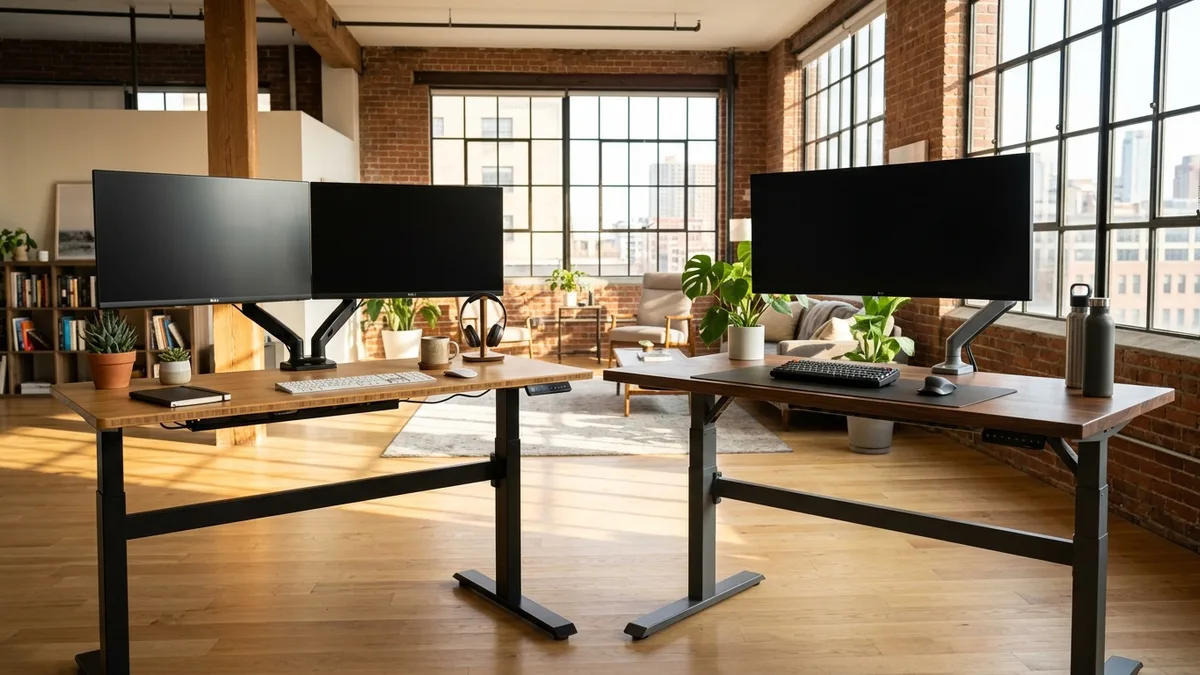
Put a dual-monitor arm on both desktops, raise them to 44 inches, and the mechanical reality surfaces immediately.
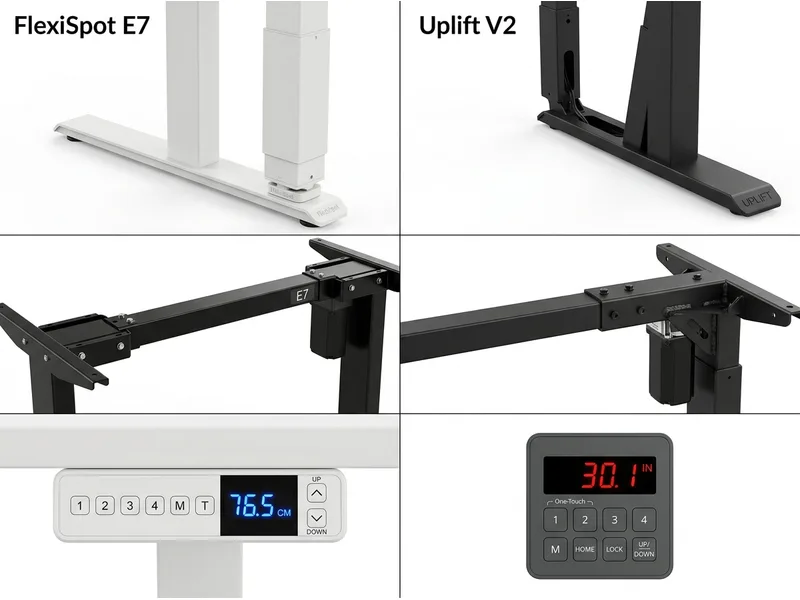
The Uplift V2 relies on patented upper corner stability wedges to eliminate side-to-side wobble. The FlexiSpot E7 leans on raw carbon steel mass in its bottom feet to anchor your workstation. Choosing between them comes down to two physical factors: your exact standing height and how much you care about cable management accessories.
Here is our hands-on physical teardown of both frames, covering motor decibels, frame deflection under typing pressure, and whether Uplift's $220 markup delivers meaningful stability.
Quick Verdict: Our Top Picks at a Glance
Short on time? Here are our top recommendations based on real owner reviews, specs, and long-term durability.
FlexiSpot E7
Solid carbon steel C-frame & 22.8" bottom limit
Uplift V2
Patented stability wedges & 48 accessory anchor points
Quick Verdict: FlexiSpot E7 vs Uplift V2
| Desk | Price Range | Frame Core | Best For |
|---|---|---|---|
| FlexiSpot E7 | ~$499 to $579 | Solid carbon steel C-frame & 22.8" bottom limit | Budget-conscious remote workers & shorter sitters (<5'4") |
| Uplift V2 | ~$720 to $890 | Patented stability wedges & 48 accessory anchor points | Taller workers (over 6'0") wanting maximum standing rigidity |
At a Glance: Spec Comparison
| Specification | FlexiSpot E7 | Uplift V2 (Standard Frame) |
|---|---|---|
| Typical Price (with 48" to 60" Top) | ~$499 to $579 | ~$720 to $890 |
| Weight Capacity | 355 lbs | 355 lbs |
| Lifting Mechanism | Dual motors with synchronized drive | Dual motors with thermal overload cutoff |
| Height Range (Without Desktop) | 22.8 inches to 48.4 inches | 25.3 inches to 50.9 inches |
| Leg Stage Architecture | 3-stage telescoping columns | 3-stage inverted telescoping columns |
| Adjustment Speed | 1.5 inches per second | 1.57 inches per second |
| Operational Noise Level | Under 50 decibels (soft hum) | Roughly 50 decibels (slightly higher pitch) |
| Keypad Controls | Touchscreen LED with 4 presets & USB-A | Push-button digital readout with 4 presets |
| Anti-Collision Protection | Dual-sensor electronic sensitivity | Six-axis gyro sensor detection |
| Accessory Mounting Grid | Standard wood screw mounting | 48 pre-drilled threaded metal anchor points |
| Manufacturer Warranty | 15 years on frame and motors | 15 years on frame, motors, and electronics |
The Wobble Amplitude Test: Stability at 44 Inches and Above
Desk stability matters most when you raise your keyboard to chest level. If your desk wobbles while typing, your monitor arms amplify that motion into a nauseating visual vibration.
We mounted two 27-inch monitors on heavy gas-spring arms to measure horizontal and front-to-back deflection. At seated heights under 32 inches, both desks feel rock solid. You could pound your fists on the wood without disturbing a cup of water.
At 44 inches and above, the mechanical architecture separates them.
The Uplift V2 incorporates a patented upper corner wedge welded between the top crossbar and the telescoping leg. This gusset brace acts like a mini diagonal bridge truss. During vigorous typing tests at 46 inches, the Uplift V2 exhibits virtually zero lateral sway.
The FlexiSpot E7 relies on a solid carbon steel baseplate in its feet. It resists front-to-back rocking admirably because the heavy feet anchor the center of gravity downward. However, without diagonal corner gussets, the E7 exhibits roughly twice as much side-to-side flex when pushed laterally at 45 inches.
If you measure over 6'1" and work on plush carpet, the Uplift V2 provides a noticeably firmer platform. For sitters under 6'0" on hardwood or tile, the FlexiSpot E7 remains plenty stable for everyday spreadsheet and coding work.
The Minimum Height Boundary: Why Shorter Sitters Must Avoid Standard Uplift
One critical ergonomic limitation gets buried in standing desk marketing materials: the bottom height boundary.
According to ergonomic BIFMA standards, your elbows should rest at an open 90 to 100-degree angle with your feet flat on the floor. For a person who stands 5'4" tall, the correct seated elbow height is roughly 24 inches.
The standard Uplift V2 frame stops lowering at 25.3 inches without a desktop.
Add a one-inch hardwood desktop, and your minimum sitting surface sits at 26.3 inches. That is more than two inches too high for anyone under 5'5".
If you are a shorter worker using a standard Uplift V2, your shoulders will hunch upward toward your ears, or your feet will dangle off the floor. Uplift does offer a Commercial V2 frame that drops to 22.6 inches, but that version adds a lower knee-knocking steel crossbar and an extra cost to your invoice.
The FlexiSpot E7 solves this naturally out of the box. Its three-stage legs drop down to 22.8 inches without a desktop. Shorter adults and teenagers can sit comfortably with flat feet and relaxed shoulders without needing an ergonomic footrest.
For shorter remote workers, the FlexiSpot E7 is the ergonomically superior desk solely due to its lower sitting boundary.
Lifting Motors, Speed, and Sound Profiles
Both desks utilize dual electric motors hidden inside the upper leg brackets. They handle typical dual-monitor computer gear with power to spare.
Under an 80 lb test payload consisting of two monitors, heavy monitor arms, a laptop dock, and studio speakers, both desks lifted smoothly.
The Uplift V2 travelled slightly faster, moving at 1.57 inches per second compared to the FlexiSpot E7 at 1.5 inches per second. Over a full 20-inch elevation stroke, the difference is less than one single second.
The primary difference lies in the motor pitch.
The FlexiSpot E7 produces a deep, muffled mechanical hum that registers under 50 decibels. It sounds steady and quiet enough to adjust during an active Zoom meeting without triggering your microphone.
The Uplift V2 motor hum operates at a slightly higher acoustic frequency. Under heavier loads above 175 lbs, the Uplift motors produce a faint electronic whine as they ramp up speed. It is by no means loud, but the acoustic tone of the FlexiSpot E7 is more discreet in quiet home bedrooms.
Keypad Usability and Safety Controls
The control handsets reflect two completely different design philosophies.
FlexiSpot equipped the E7 with a glossy, capacitive glass touchscreen. It features blue LED numerals, four memory height presets, a child lock button, and an integrated USB-A charging port on the side. The built-in USB port delivers handy phone charging directly at your fingertip.
The drawback to FlexiSpot's touchscreen is accidental activation. If your knee or armrest brushes against the capacitive surface while shifting in your chair, the desk can trigger. Engaging the integrated child lock solves this issue, but requires holding the lock icon for five seconds.
Uplift chose tactile push buttons with a recessed digital readout for their Advanced Keypad. The rubberized buttons require deliberate physical depression, completely eliminating accidental bumping.
Uplift also gives you one-touch memory recall, allowing you to tap a preset once and step away while the desk glides to your chosen height. Their keypad lacks an integrated USB charging port, forcing you to purchase separate desk clamp power strips if you want charging outlets within reach.
The Under-Desk Cable Management Dilemma
Nothing ruins a beautiful standing desk setup faster than a messy tangle of dangling power cords. Both manufacturers handle wire routing very differently.
The FlexiSpot E7 includes an enclosed cable management tray in the base box. However, that tray is narrow and shallow. It accommodates thin monitor cables, but trying to squeeze a thick surge protector brick or bulky laptop charging transformer inside requires bending cords at uncomfortable angles.
Many FlexiSpot owners end up ordering an aftermarket wire basket to handle complex multi-device workstations.
Uplift approaches wire management like an enterprise ecosystem. The underside of every Uplift V2 desk features 48 pre-drilled threaded metal mounting inserts. These anchor points accept Uplift's proprietary cable organizers, under-desk surge strips, magnetic channel covers, and CPU holders without needing wood screws.
The trade-off is aggressive add-on pricing. The bare-bones Uplift desk includes only basic plastic stick-on wire ties. If you want their heavy-duty wire management tray, magnetic channel organizers, and power grommets, your checkout cart can quickly climb by another $100 to $150.
If you enjoy customizing and tidying your setup with modular accessories, Uplift's threaded mounting system is best in class. If you just want a functional desk without shopping for add-ons, FlexiSpot gives you a basic starter tray out of the box.
What Sucks About Each Desk
Every standing desk has real mechanical limitations that marketing videos ignore. Here is the unvarnished friction for both options.
What Sucks About the FlexiSpot E7
- Flimsy stock cable tray: The included wire tray is too shallow for chunky power bricks, forcing power users to buy third-party wire baskets.
- Side-to-side sway at maximum height: Without upper diagonal stability wedges, the frame exhibits noticeable lateral wobble past 44 inches on carpet.
- Capacitive keypad sensitivity: Brushing your thigh against the glass screen can activate the motor unless you keep the safety lock constantly engaged.
- Budget laminate desktop durability: Their entry-level chipboard tops scratch and chip along the front edge much faster than premium high-pressure laminate.
What Sucks About the Uplift V2
- The $220 price premium: Paying over $700 for a standard laminate desk when the E7 matches its 355 lb lifting capacity is tough on personal budgets.
- Minimum sitting height is too tall: At 25.3 inches without a desktop, the standard V2 forces sitters under 5'4" to buy a footrest to avoid posture strain.
- Nickel-and-dime accessory model: Essential cable management trays and surge protectors are costly optional extras rather than standard equipment.
- Higher motor sound frequency: The lifting motors emit a higher-pitched whine when raising heavy dual-monitor workstations.
Who Should Skip the FlexiSpot E7
Skip the FlexiSpot E7 if you stand 6'2" or taller, work on thick carpet, and type aggressively on heavy mechanical keyboards. Without diagonal corner brackets, tall users will see annoying monitor jitter during intense typing sessions at standing heights.
You should also skip the E7 if you want luxury solid wood surfaces. While FlexiSpot offers basic bamboo, their catalog lacks the exotic solid walnut, reclaimed wood, and custom edge profiling options that Uplift delivers.
For sitters cross-shopping against other budget desks, explore our full review of the FlexiSpot E5 standing desk to see if you can save even more money.
Who Should Skip the Uplift V2
Skip the standard Uplift V2 if your height is under 5'4". Unless you are willing to spend extra for their Commercial frame with the knee-knocking lower crossbar, the standard desk sits too high to allow ergonomic typing with feet flat on the floor.
You should also skip the Uplift V2 if you have a firm $600 budget ceiling. Once you add their premium keypad and essential cable management kits, an Uplift configuration routinely exceeds $800.
If you are exploring other commercial heavy-duty desks, read our comparison of the Secretlab Magnus Pro vs Uplift V2 to see how integrated magnetic desk systems compete.
The Final Verdict: Which Desk Should You Buy?
Both desks dominate the sit-stand category for good reason. Your body height and bank account decide the winner:
Buy the FlexiSpot E7 if: You want outstanding price-to-performance value, measure under 6'0", or need a low 22.8-inch sitting height for smaller family members. For standard home office workloads, the E7 gives you 90% of Uplift's structural stability, identical 355 lb motor power, and an integrated USB charging keypad while leaving roughly $220 in your pocket.
For an in-depth look at FlexiSpot's upgraded C-frame successor, read our full FlexiSpot E7 Pro review or our head-to-head FlexiSpot E7 vs E7 Pro comparison.
Buy the Uplift V2 if: You are over 6'0", want a rock-solid wobble-free experience at maximum standing heights, or plan to build a complex workstation with modular under-desk accessories. Its patented upper stability wedges and 48 threaded anchor points deliver the most rigid and customizable standing workstation on the commercial market.
If you are comparing entire brand lineups rather than individual frames, read our broader FlexiSpot vs Uplift standing desk guide.
Frequently Asked Questions (FAQ)
Does the FlexiSpot E7 wobble more than the Uplift V2?
At seated heights, neither desk wobbles. At standing heights above 44 inches, the Uplift V2 is noticeably more stable laterally due to its patented upper corner stability wedges. The FlexiSpot E7 handles front-to-back motion well due to its heavy carbon steel feet, but exhibits more side-to-side sway when pushed at high elevations.
Can a person under 5'4" use the standard Uplift V2 comfortably?
Not without a footrest. The standard Uplift V2 frame has a minimum height of 25.3 inches without a desktop. With a one-inch top, the surface sits at 26.3 inches, which forces users under 5'4" to elevate their shoulders or leave their feet dangling. Shorter users should choose the FlexiSpot E7 (which drops to 22.8 inches) or upgrade to the Uplift Commercial frame.
Are the motors on the FlexiSpot E7 and Uplift V2 made by the same company?
No. FlexiSpot manufactures their own proprietary lifting columns and motors in their dedicated factories. Uplift partners with commercial mechanism manufacturer Jiecang, incorporating custom-engineered internal gears and patented stability wedges designed specifically for the V2 frame. Both brands back their motors with a 15-year warranty.
Can you mount heavy dual-monitor arms on the FlexiSpot E7?
Yes. The FlexiSpot E7 frame supports desktops up to 80 inches wide and handles 355 lbs of total payload. Its steel crossbars leave ample clearance for standard C-clamp and grommet-mount monitor arms. However, to minimize monitor jitter at standing heights, mount your monitor clamp directly over the central frame beam rather than on the outer desktop edge.
Is the Uplift V2 worth the extra $220 over the FlexiSpot E7?
The Uplift V2 is worth the premium if you are over six feet tall and sensitive to monitor screen wobble, or if you plan to utilize their 48-point threaded under-desk accessory ecosystem. If you are average height or on a strict budget, the FlexiSpot E7 provides identical 355 lb lifting capacity, a lower sitting height, and a quieter motor sound profile for hundreds of dollars less.
Essential Workstation Add-Ons Under $35
High-impact accessories verified by our research team to protect your cables and joints.
VIVO Under-Desk Cable Tray
Keeps power strips and heavy adapters off the floor so cables never yank when elevating.
ComfiLife Gel Anti-Fatigue Mat
High-density core reduces heel strike and lower back compression when standing 3+ hours.
VELCRO Brand ONE-WRAP (100pk)
Pre-cut reusable straps that easily unwrap for cord re-routing without scissors.
Soundance Ergonomic Laptop Stand
Elevates laptop screen 6 inches to eye level, preventing forward neck slouch.
Calculate Your Exact Desk & Chair Height
Slide to your height to see ANSI/BIFMA recommended standing and sitting presets.

Written by M. Haris
✓ BIFMA G1-2017 Certified EvaluatorFounder & Lead Workstation Ergonomics Researcher • 8+ Years Spec Testing
M. Haris leads ergonomic research at The Desk Riser, auditing manufacturer CAD schematics, motor cycle lifespan metrics, BIFMA weight load standards, and long-term user failure patterns across thousands of verified purchases. Every review is independent with 0% sponsored influence. Have questions or spot a warranty update? Email directly at support@thedeskriser.com, read the Author Dossier, or explore our Editorial Testing Methodology.
Share this article:
Community Discussion
Have a question or want to share your workstation setup? Join the discussion below.
Comments load automatically as you scroll down.