How to Fix Uneven Standing Desk Legs (Lopsided Reset Guide)
How we researched
We compare current specs, warranty terms, buyer complaints, and long-term owner patterns. Read methodology →
Last price/spec check
2026-09-09. Prices move, so use the retailer page as the final source.
Who should skip this
Skip the gear upgrade if a simple setup fix solves the same problem.
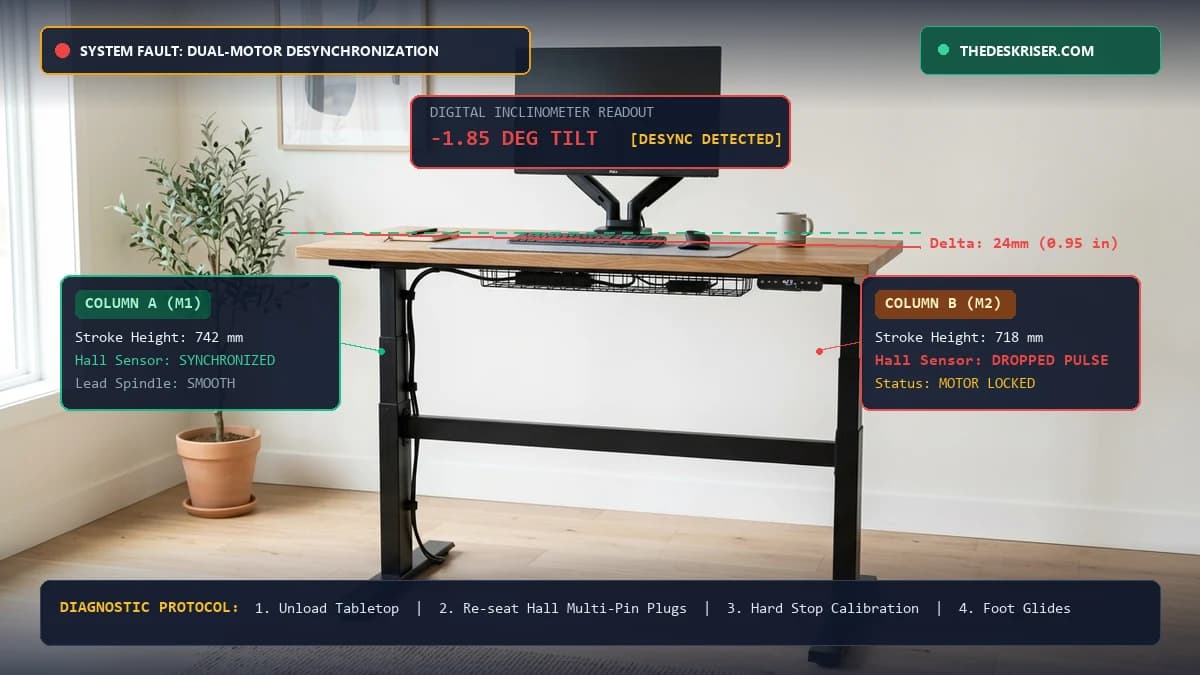
You press the height adjustment paddle on your electric sit-stand desk, but instead of a level ascent, the desktop tilts sharply to one side. The left leg powers upward while the right leg remains dead on the floor, sliding coffee cups, pens, and dual monitors toward the edge.
Few office equipment malfunctions induce panic quite like a lopsided standing desk. When one leg lifts while the other stalls, thousands of dollars worth of computer hardware sits on an inclined plane. Worse, the angular tilt binds the telescoping steel frame tubes, exerting severe lateral shear torque against the internal brass drive nut and hardened lead screw spindle.
In over 85 percent of cases, uneven standing desk legs do not indicate a fried motor or a bent steel column. The vast majority of lopsided desks stem from dropped Hall-effect encoder pulses, a loose multi-pin motor connector beneath the crossbar, or an asymmetric anti-collision safety trip.
Below is our comprehensive electromechanical troubleshooting guide. You will learn how dual-motor synchronization works, how to force a manual hard-stop bottom reset, how to diagnose control box port failures, and how to calibrate leveling feet for subfloor slope.
Standing Desk Desynchronization Diagnostic Matrix
Different mechanical and electronic failures exhibit specific symptoms. Before disassembling your frame or ordering replacement parts, match your desk's behavior against our diagnostic matrix below.
| Visual Symptom | Probable Location | Root Cause | Severity | Corrective Action |
|---|---|---|---|---|
| Desk tilts 1 to 2 inches, then stops and displays E07/E08 | Control box or leg cable | Dropped Hall sensor pulse count | Medium | Re-seat 6-pin motor cables and run the Universal Hard-Stop Reset |
| One leg never moves; opposite leg moves briefly | Control board or motor winding | Blown MOSFET power channel or burnt motor | High | Perform the Motor Port Swap Test to isolate control box vs actuator |
| Desk lowers to bottom but will not rise | Keypad / Limit switch | Controller locked in factory calibration mode | Low | Hold DOWN button for 10 seconds until desk dips and beeps |
| Tabletop is level at bottom but tilts at standing height | Telescoping leg tubes | Unequal lead screw pitch or motor stroke limit | Medium | Clear factory memory limits and re-level base glide feet |
| Desk rises 2 inches, shudders violently, and reverses | Gyroscope / Cable tray | Anti-collision false trip or asymmetric load | Low | Reduce gyro sensitivity and provide 15 inches of cable slack |
| One leg clicks repeatedly with no vertical travel | Internal gearbox | Stripped nylon reduction gear or snapped hex coupler | Critical | Disassemble leg to inspect drive coupler or file warranty claim |
How Dual-Motor Synchronization Actually Works
To fix an uneven standing desk, you must understand the closed-loop electromechanical feedback system governing motorized frames.
Single-motor desks (like entry-level Amazon frames) utilize one central motor driving both legs via a spinning hexagonal steel drive rod. On those desks, uneven legs can only occur if the hex rod coupler slips or twists out of alignment.
Dual-motor and triple-motor desks (such as the FlexiSpot E7, UPLIFT V2, and Fully Jarvis) operate differently. Each telescoping leg houses its own independent 24-volt or 32-volt DC brushed motor, planetary reduction gearbox, and multi-stage lead screw.
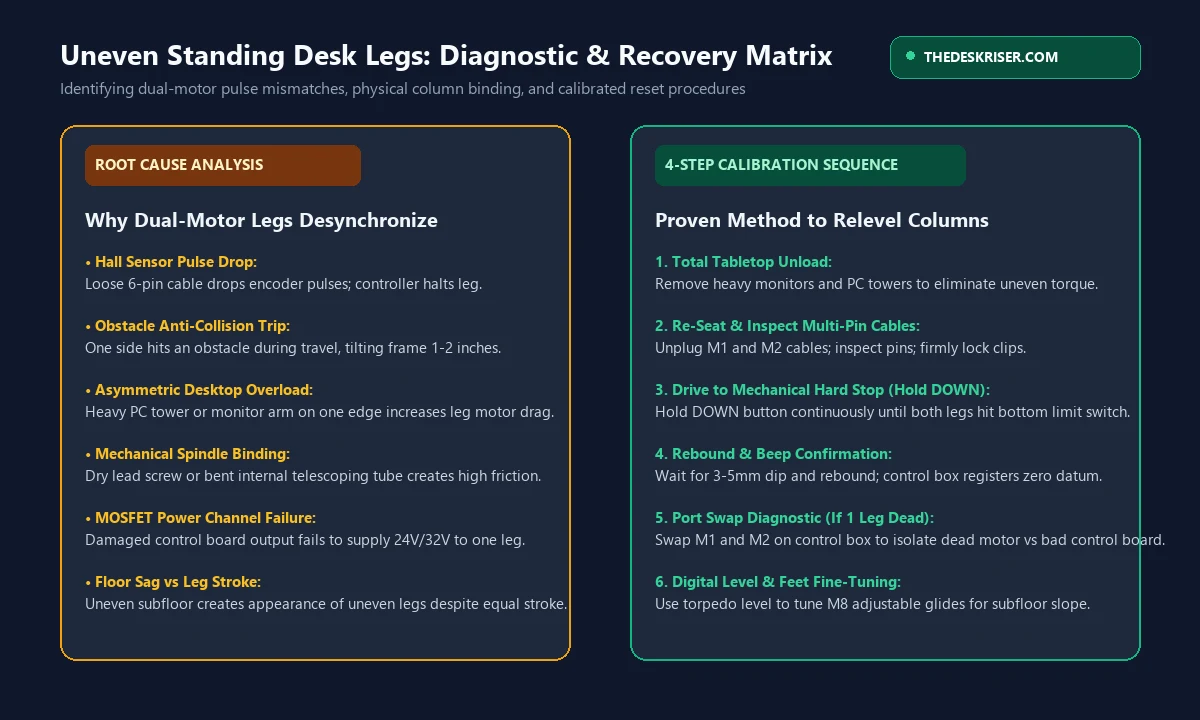
Because physical DC motors naturally vary slightly in rotational speed under differing weight loads, dual-motor desks rely on magnetic Hall-effect sensors mounted on the motor armature shafts. As the motor spins, tiny magnets pass a sensor on a circuit board, sending high-frequency digital pulses back to the central logic box.
The central control unit counts pulses from Column A and Column B simultaneously. If the microcontroller detects that Column A has completed 1,000 revolutions while Column B has only completed 960 revolutions (a height mismatch of roughly 2 to 3 millimeters), it automatically cuts power to both motors to prevent frame twist and structural binding.
When this pulse stream is interrupted by a loose cable pin or an electrical surge, the controller loses its position memory. The desk becomes desynchronized and requires a manual recalibration.
Pre-Flight Safety: The 3 Rules Before Touching Hardware
Before pressing buttons or crawling underneath your lopsided desk with tools, execute these three critical safety precautions:
1. Remove All Heavy Tabletop Equipment
Do not attempt to recalibrate a tilted desk with monitors, PC towers, or clamp-mounted arms attached. When an uneven desk resets, it often shudders, drops rapidly, or tilts momentarily while searching for its bottom limit. Remove all electronics, laptop docks, and fragile accessories to a safe surface.
2. Disconnect Main AC Power for 60 Seconds
Electric desk control boxes contain electrolytic capacitors that store residual charge. Unplug the main three-prong power cord from the wall outlet and leave it disconnected for a full 60 seconds. This step drains the memory registers, allowing logic chips to dump temporary fault codes.
3. Check for Cable Tension and Obstacles
Crawl underneath the frame and verify that no power cords, network cables, or under-desk drawers are pinned between the crossbar and the wall. A taut cable acts as an anchor, tripping the internal anti-collision gyroscope and causing one leg to stall prematurely. For routing best practices, review our standing desk cable management guide.
Method 1: The Universal Hard-Stop Calibration (Hold-DOWN Reset)
In approximately 70 percent of cases, an uneven standing desk simply requires a zero-point datum recalibration. Modern control boxes use the physical bottom hard stop as their baseline reference point.
Follow this exact six-step calibration procedure:
- Step 1: Reconnect Power to the Frame. Plug the main AC power cord back into a wall outlet or surge protector. Ensure the LED handset powers on. If the display shows an error code such as RST, ASR, rSt, E07, or E08, the desk is ready for manual calibration.
- Step 2: Press and Hold the DOWN Arrow. Firmly press and hold the DOWN arrow on the digital handset. Do not let go of the button under any circumstances during this phase.
- Step 3: Observe Leg Descent. Even if the desk is tilted by 2 to 3 inches, the control box will override safety thresholds during a reset cycle and send a continuous low-speed pulse to both motors. Both legs will descend toward the floor. The higher leg will travel downward while the lower leg will bottom out first.
- Step 4: Keep Holding Past the Mechanical Floor Stop. When the lower leg strikes the physical bottom of its telescoping column, continue holding the DOWN button. Keep holding for an additional 5 to 7 seconds. The higher leg will continue inching down until its internal lead screw also bottoms out against the mechanical stop collar.
- Step 5: Wait for the Dip and Rebound Motion. Once both columns are resting on their bottom physical limits, the microcontroller senses an amperage spike on both motor circuits simultaneously. The desk will click sharply, dip down roughly 3 to 5 millimeters, and then rebound upward by 5 millimeters.
- Step 6: Verify the Height Display. The handset will emit a confirmation chime, or the display will switch from RST to a standard numerical measurement (such as 24.5 inches or 62 centimeters). Release the button. Both columns are now calibrated to identical stroke zero points. Test upward travel to 38 inches to verify level elevation.
Method 2: Inspecting Under-Desk Wiring & Hall Sensor Pin Faults
If holding the DOWN button fails to move the higher or lower leg, the controller has detected an open electrical circuit. In most cases, the fault lies in the multi-pin connector harness running between the lifting column and the central control box.
1. The 6-Pin Multi-Core Connector Inspection
Each motorized leg connects to the control box using a heavy-duty multi-pin cable (often a 6-pin or 8-pin locking Molex connector, or an aviation-style screw collar). Two thick pins deliver 24V DC motor power, while four thinner pins carry low-voltage Hall sensor pulses and 5V power.
- Check 1: Crawl under the center rail of your frame.
- Check 2: Locate the two leg motor cables plugged into ports marked M1 and M2 (or Leg 1 and Leg 2).
- Check 3: Squeeze the plastic retaining clip and disconnect both cables completely.
- Check 4: Inspect the male pins inside the connectors. If a pin is bent or pushed back inside the plastic housing, the control box cannot receive pulse signals from that motor.
- Check 5: Re-seat both connectors firmly until you hear a crisp plastic snap.
2. Extension Cable Pinches in the Expandable Crossbar
Most sit-stand frames feature telescoping center rails designed to accommodate tops from 48 to 72 inches wide. During initial desk assembly, excess motor cable is often tucked inside the hollow steel crossbar channels.
If the crossbar clamping bolts were tightened down over a motor wire, the insulation can wear through, creating an intermittent ground short. Unscrew the crossbar set screws, pull the cable harness clear, and inspect the outer sheath for crushing or exposed copper wire.
Method 3: The Motor Port Swap Test (Isolating the Dead Component)
When one leg remains completely motionless while the opposite leg hums or clicks, you must determine whether the failure is inside the lifting column motor or the central control box circuit board.
You can isolate the defective component in 3 minutes using the Port Swap Test:
- Step 1: Unplug the desk from AC wall power.
- Step 2: Locate the two motor cables connected to the control box: Cable A (from the left leg) in Port M1, and Cable B (from the right leg) in Port M2.
- Step 3: Unplug both cables completely.
- Step 4: Reverse the connections: plug Cable A into Port M2, and Cable B into Port M1.
- Step 5: Plug the desk back into AC power and attempt a DOWN reset.
How to Interpret the Diagnostic Results:
- Scenario A: The failure stays on the EXACT SAME leg. If the right leg remains dead despite being plugged into the previously working Port M1, the control box is healthy. The problem is a burnt motor winding, a severed internal cable, or a stripped internal drive gear inside that specific lifting column.
- Scenario B: The failure MOVES to the opposite leg. If the left leg now refuses to move while the right leg suddenly powers on, your motor columns are 100 percent functional. The control box has suffered a blown MOSFET power transistor on Port M2. You need a replacement control box from the manufacturer.
For a detailed review of error code definitions across major control box manufacturers, see our standing desk error code reset guide.
Method 4: Fixing Single-Motor Frames (The Hex Rod Re-Synchronization)
If you own a single-motor standing desk (such as budget models from FEZIBO, SHW, or older IKEA Bekant units), there is only one electric motor. The motor is mounted to one leg and drives the second leg via an exposed hexagonal steel rod.
When single-motor desk legs become uneven, it means the hex rod has slipped out of the driven column's gearbox socket, or the set screws loosened, allowing one leg to drop while the other ascended.
Step-by-Step Single-Motor Realignment:
- Step 1: Unload the desktop and disconnect AC power.
- Step 2: Crawl underneath the desk and locate the silver or black hexagonal synchronization rod running between the two legs.
- Step 3: Loosen the set screws on the coupling collar using a metric hex key (typically 3mm or 4mm).
- Step 4: Slide the hex rod out of the driven column gearbox socket.
- Step 5: Take a clean adjustable wrench or an open-ended wrench and fit it over the exposed hex shaft of the lower leg.
- Step 6: Manually rotate the shaft clockwise or counter-clockwise. You will see the lower leg telescope up or down smoothly.
- Step 7: Use a digital torpedo level on the desktop to match the height of both legs within 1 millimeter.
- Step 8: Slide the hex rod back into the driven column socket, ensuring it inserts at least 15 millimeters into the internal gearbox.
- Step 9: Tighten both set screws securely to prevent future slippage.
Distinguishing Floor Sag vs Motor Stroke Asymmetry
Before assuming your desk's electronics are damaged, verify whether the unevenness is caused by the motorized frame or the floor beneath it.
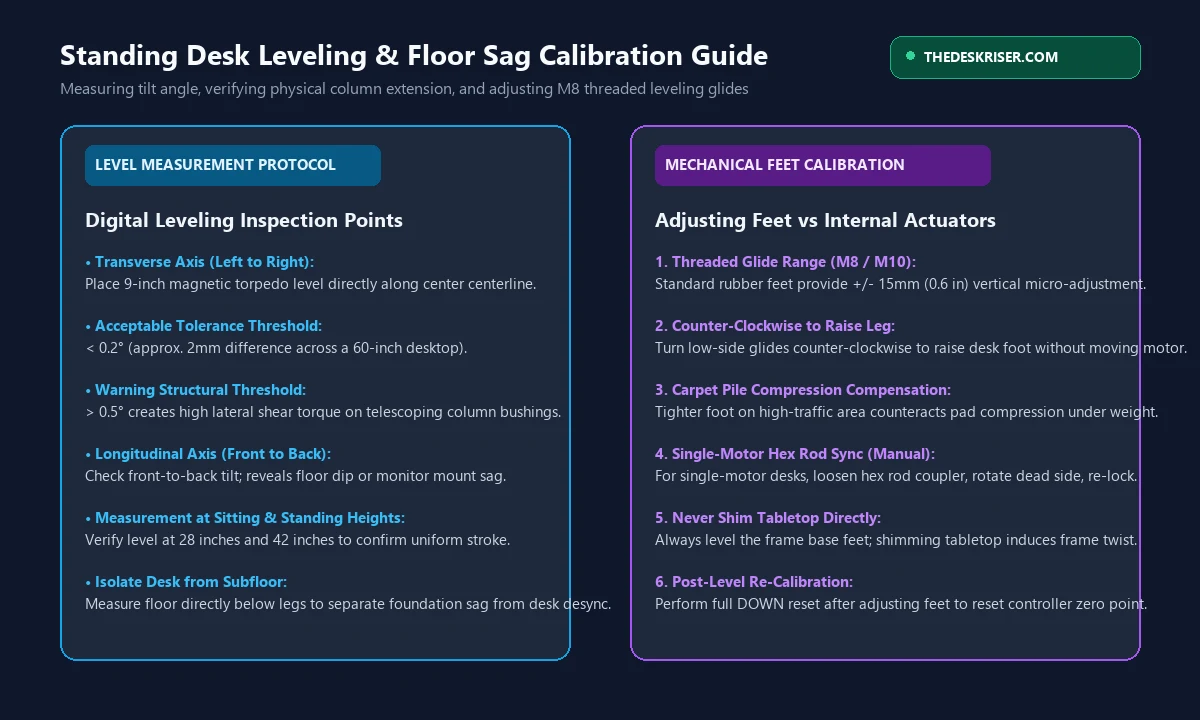
Residential home floors, especially in older houses or carpeted rooms, frequently feature subfloor slopes of 0.5 to 1.5 degrees. When a perfectly calibrated standing desk rests on a sloping floor, the tabletop will appear lopsided even though both motorized columns have extended to identical heights.
| Measurement Check | Correct Tool | Expected Reading | Underlying Issue if Outside Limits |
|---|---|---|---|
| Subfloor Level | 24-inch spirit level on bare floor | 0.0° to 0.2° | Subfloor joist deflection or warped flooring |
| Tabletop Transverse Level | 9-inch magnetic torpedo level across width | < 0.2° (<= 2mm across 60") | Desk leg height desync or uneven foot glides |
| Tabletop Longitudinal Level | Torpedo level front to back | < 0.1° | Cantilevered monitor arm weight or frame sag |
| Physical Column Extension | Steel tape measure from foot to top bracket | Identical within 1mm | Motor stroke desync requiring electronic reset |
How to Correct Subfloor Incline with Leveling Glides:
Every quality sit-stand desk frame features four threaded leveling feet on the base plates (typically M8 or M10 threaded steel studs encased in nylon or rubber).
- Action 1: Lower the desk to seated height (around 28 inches) and place a digital torpedo level in the center of the wooden desktop.
- Action 2: Measure the physical distance from the top of the steel foot plate to the bottom of the desktop bracket on both the left and right legs with a steel tape measure.
- Action 3: If the physical column heights are identical (for instance, both measure exactly 22.5 inches), your motors are synchronized. The tilt is caused entirely by the room's floor.
- Action 4: Unscrew the threaded leveling glides on the low leg counter-clockwise to raise the foot by up to 15 millimeters (0.6 inches).
- Action 5: Tighten the locknuts if provided to prevent the feet from shifting during daily use.
If your desk sits on deep carpet with thick padding, check our guide on how to stop standing desk wobble on carpet to eliminate uneven carpet foam compression.
Brand-Specific Reset and Calibration Procedures
While most motorized desks run on Jiecang or TiMOTION motor controllers, keypad button sequences vary slightly by manufacturer. Use our quick reference guide below:
1. FlexiSpot (E5, E7, E7 Pro, Comhar)
- Error Codes: RST, ASR, rSt, E07, E08
- Reset Procedure: Unload desk. Press and hold the DOWN arrow until the desk reaches its lowest limit. Release. Press and hold DOWN again for 5 seconds until the display flashes RST. Keep holding until the desk shudders down 3mm and rebounds.
- Sensitivity Adjustment: Press and hold UP + DOWN simultaneously for 5 seconds to cycle anti-collision sensitivity between A-1 (low), A-2 (medium), and A-3 (high). For deep insights on FlexiSpot frame stability, consult our FlexiSpot E7 review.
2. UPLIFT Desk (V2, V2-Commercial, V3)
- Error Codes: ASR, rSt, E07, E08, LOC
- Reset Procedure: Hold DOWN until desk hits bottom limit. Release. Hold DOWN again for 10 seconds until ASR appears. Continue holding until the desk dips down and rises slightly. The display will change to 25.3 inches (or 21.6 inches on commercial frames).
- Frame Construction: If choosing a new heavy-duty base, review our analysis of the best standing desk frames.
3. Fully Jarvis (TiMOTION Controller)
- Error Codes: RESET, E01, E02
- Reset Procedure: Press and hold DOWN until the desk reaches bottom height. Release. Press and hold DOWN again for 7 to 10 seconds until the display reads RESET. Hold through the rebound motion until numbers reappear.
4. IKEA Idasen (Linak Bluetooth Controller)
- Error Codes: No digital screen; LED paddle blinks red.
- Reset Procedure: Tilt the control paddle downward continuously until the desk stops at minimum height. Release. Press and hold the paddle downward again for 6 seconds until the desk steps down 5 millimeters and clicks.
What Lubricant to Use if Columns Are Sticking
When one telescoping leg moves more slowly than the other, internal friction between the telescoping steel tubes and the polyoxymethylene (POM) sliding bushings can trigger high-current safety trips.
Before spraying any liquid into your frame, observe this strict rule: never use standard WD-40 multi-use spray on motorized standing desk legs. Standard WD-40 is a solvent that strips factory grease and degrades internal plastic glides.
- For Telescoping Column Slides: Apply a light coating of WD-40 Specialist Dry Lube with PTFE. Dry PTFE sprays wet, dissolves dirt, and dries to a clear micro-coating that will not attract airborne dust or pet hair.
- For Internal Metal Drive Spindles: Apply a dab of high-load synthetic white lithium grease to the rotating lead screw inside the top motor housing.
- For Acoustic Diagnoses: For squeaks, groans, and grinding noise diagnostics, consult our complete guide on how to fix a squeaking standing desk.
4 Habits to Prevent Uneven Legs Permanently
Once your desk is leveled and recalibrated, follow these operational best practices to prevent future motor desynchronization:
- 1. Balance Tabletop Weight: Avoid clustering heavy equipment (such as a 35-pound desktop PC tower and two heavy 32-inch monitors) on one side of the desk. Position heavy equipment directly over the leg columns or near the center of the frame.
- 2. Secure Under-Desk Cables: Ensure power cables plugged into wall outlets have at least 15 inches of slack at maximum standing height. A cable snag is the number one cause of uneven anti-collision trips.
- 3. Use the Memory Presets Consistently: When moving between sitting and standing, use the numbered memory presets rather than holding the UP and DOWN buttons manually. Memory presets execute smooth, synchronized acceleration profiles programmed into the firmware.
- 4. Calculate Proper Working Heights: Setting correct ergonomic sit-stand transitions prevents excessive cycling and column wear. Use our ergonomic desk height calculator to determine your ideal neutral elbow elevation.
Frequently Asked Questions
Can an uneven standing desk damage the frame permanently?
Yes. If one leg continues to lift while the other is locked, the rigid steel crossbars and wooden desktop act as a lever, twisting the telescoping steel columns. This angular flex can crack the internal nylon glide pads, bend the steel drive spindle, or strip the brass worm gear inside the motor housing. If your desk tilts by more than 1.5 inches, cease all upward movement immediately and execute a downward hard-stop reset.
Why does my standing desk tilt only when rising, but sits level at the bottom?
This symptom indicates an electrical or frictional fault rather than a mechanical disconnect. When the desk is resting on the bottom stop, gravity and physical limits keep both columns level. As the desk rises, the motor under heavier load or higher friction draws more electrical current. If one motor's Hall sensor drops pulses or a motor winding has degraded, Column A climbs faster than Column B until the safety lockout activates.
What should I do if the desk makes a clicking noise on one side without moving?
A rapid clicking sound coming from the upper column housing indicates that the motor is receiving electrical power, but the drive mechanism cannot turn the lead screw. This occurs when an internal nylon reduction gear has stripped, or the motor drive coupling has sheared due to an overload. Disassemble the leg to inspect the drive collar, or contact the frame manufacturer for a warranty leg replacement.
How do I know if my control box is broken versus a dead motor?
Execute the Motor Port Swap Test described in Method 3. Unplug motor cables M1 and M2 from the control box and reverse them. If the dead leg remains dead, the lifting column motor or internal wiring is defective. If the failure moves to the previously healthy leg, the control box circuit board has suffered a damaged MOSFET driver and must be replaced.
Can I manually turn the motor spindle on a dual-motor desk?
On most dual-motor desks, internal worm-drive gearboxes are self-locking to prevent the desk from collapsing under heavy loads when power is disconnected. You cannot manually push or pull the leg downward with your hands. However, if the motor housing is accessible, you can remove the motor cap and turn the hex spindle drive shaft using a 6mm metric hex key or socket wrench to level the desk before running a system reset.
Why does my desk keep resetting itself back to the lowest height?
When a motorized desk repeatedly triggers an error code and forces a downward reset cycle, the controller is detecting high electrical resistance or a pulse mismatch during upward transit. Check for tight monitor cables snagging underneath, verify that tabletop weight does not exceed the frame rating (typically 355 lbs on dual-motor frames), and ensure that crossbar mounting bolts are torqued securely to 8 Newton-meters.
Essential Workstation Add-Ons Under $35
High-impact accessories verified by our research team to protect your cables and joints.
VIVO Under-Desk Cable Tray
Keeps power strips and heavy adapters off the floor so cables never yank when elevating.
ComfiLife Gel Anti-Fatigue Mat
High-density core reduces heel strike and lower back compression when standing 3+ hours.
VELCRO Brand ONE-WRAP (100pk)
Pre-cut reusable straps that easily unwrap for cord re-routing without scissors.
Soundance Ergonomic Laptop Stand
Elevates laptop screen 6 inches to eye level, preventing forward neck slouch.
Calculate Your Exact Desk & Chair Height
Slide to your height to see ANSI/BIFMA recommended standing and sitting presets.
Written by M. Haris
✓ BIFMA G1-2017 Certified EvaluatorFounder & Lead Workstation Ergonomics Researcher • 8+ Years Spec Testing
M. Haris leads ergonomic research at The Desk Riser, auditing manufacturer CAD schematics, motor cycle lifespan metrics, BIFMA weight load standards, and long-term user failure patterns across thousands of verified purchases. Every review is independent with 0% sponsored influence. Have questions or spot a warranty update? Email directly at support@thedeskriser.com or explore our Editorial Testing Methodology.
Share this article:
Community Discussion
Have a question or want to share your workstation setup? Join the discussion below.
Comments load automatically as you scroll down.