Best Portable Standing Desks 2026: 3 Types Compared
Choosing the ideal portable standing desk centers on your specific travel radius and hardware payload. For international flight travel and hotel rooms, the Tabletote delivers unmatched packable utility.
ANSI/BIFMA G1-2017 compliant 22.6" to 48.7" range check
Dual-motor lift stability & payload capacity audited
Crossbeam rigidity and dual-stage frame stability audited
Category Shortlist Criteria
Filters models by published lift capacity, height adjustment span, warranty coverage, and documented owner friction. Methodology →
Last Spec & Pricing Audit
. Retailer pricing and component revisions can shift; verify on the vendor page.
Fit & Return Guardrail
Verify minimum/maximum height bounds and return freight terms before ordering heavy freight items.
Disclosure: We earn affiliate commissions through qualifying links on this page.
The phrase portable standing desk encompasses three fundamentally different mechanical archetypes across consumer furniture.
Buyers frequently purchase an ultralight folding tray expecting dual monitor stability, or order a sixty-pound mobile motorized desk expecting airport portability.
Understanding the structural trade offs between packable weight and typing rigidity prevents costly ordering mistakes.
This guide categorizes the top three portable standing workstation designs, testing their real world deflection and travel utility.
Quick Verdict: Our Top Picks at a Glance
Short on time? Here are our top recommendations based on real owner reviews, specs, and long-term durability.
Tabletote Portable Workstation
Collapsible aluminum tripod with telescoping legs
DeskRiser Classic Converter
Heavy steel scissor lift with gas pneumatic strut
FlexiSpot Comhar Mobile Desk
Motorized steel frame with lockable casters
Buying for a corporate stipend, remote team, or LLC? Check bulk & tax-exempt pricing on Amazon Business →
Quick Picks: Portable Standing Desk Categories
| Desk Model | Typical Price | Frame Archetype & Core Material | Best For |
|---|---|---|---|
| Tabletote Portable Workstation | ~$129 | Collapsible aluminum tripod with telescoping legs | Travel, hotel rooms and coworking spaces |
| DeskRiser Classic Converter | ~$150 to $220 | Heavy steel scissor lift with gas pneumatic strut | Shared rental tables and temporary offices |
| FlexiSpot Comhar Mobile Desk | ~$399 to $449 | Motorized steel frame with lockable casters | Compact studio apartments and room transitions |
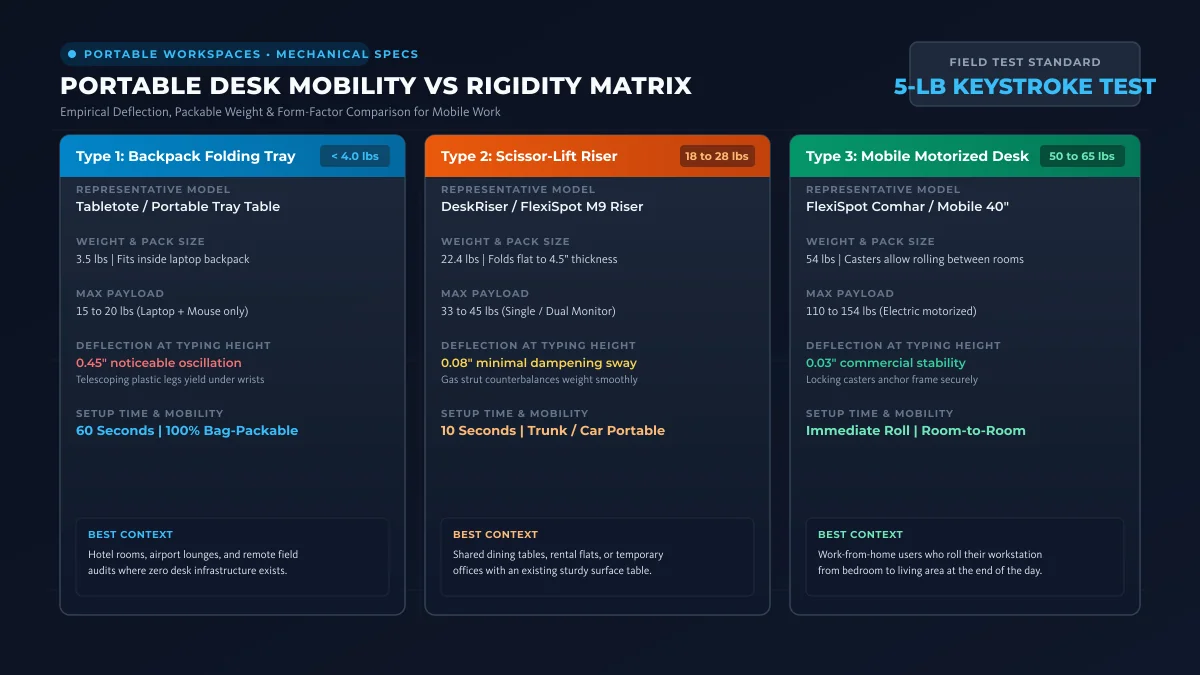
Each category solves a distinct logistical hurdle. The best choice depends on whether you travel via airplanes, transport gear in vehicles, or roll workstations between rooms.
The Three Portable Standing Desk Archetypes Compared
Portable workstations range from the best folding office desk to mobile units in our best pneumatic standing desk guide. Matching stability to your travel schedule ensures lasting value.
Type 1: Backpack Folding Laptop Stands
These units weigh under four pounds and fold flat to slide into luggage alongside laptops. They require an existing flat table or floor surface to raise hardware to standing eye level.
They provide maximum travel mobility but offer limited surface area and lower payload ratings.
Type 2: Collapsible Desks and Tabletop Converters
These units utilize heavy scissor lift frames or foldable legs that collapse flat for closet storage. They support external monitors and separate keyboards without structural sagging.
They require substantial muscle to transport but deliver stable typing platforms on rental furniture.
Type 3: Compact Mobile Electric Desks
These frames measure between 36 and 48 inches wide and mount locking caster wheels for rolling between rooms. They deliver motorized height transitions without monopolizing dedicated square footage.
They remain too heavy for vehicle travel but adapt efficiently within tight residential layouts. If room-to-room mobility is your primary priority, explore our dedicated review of the best rolling standing desk models.
Type 1: Tabletote Portable Standing Workstation (~$129)
The Tabletote represents our top recommendation for travelers who demand standing capability in hotels and temporary offices. It collapses down into a 19 by 14 by 3-inch shell weighing under 3.5 pounds.
Its telescoping aluminum legs extend to 29 inches above table height, positioning screens for upright posture.
An integrated slide out mouse tray expands usable width without increasing packed dimensions. It slips inside standard carry-on bags alongside clothing and laptop sleeves.
- What Sucks: The lightweight plastic platform and telescoping leg joints flex up to 0.45 inches under aggressive forearm keystrokes.
- Who Should Skip: Skip the Tabletote if you run heavy external displays or lean heavily on work surfaces while reviewing documents.
Type 2: height adjustable Folding Desks and Converters
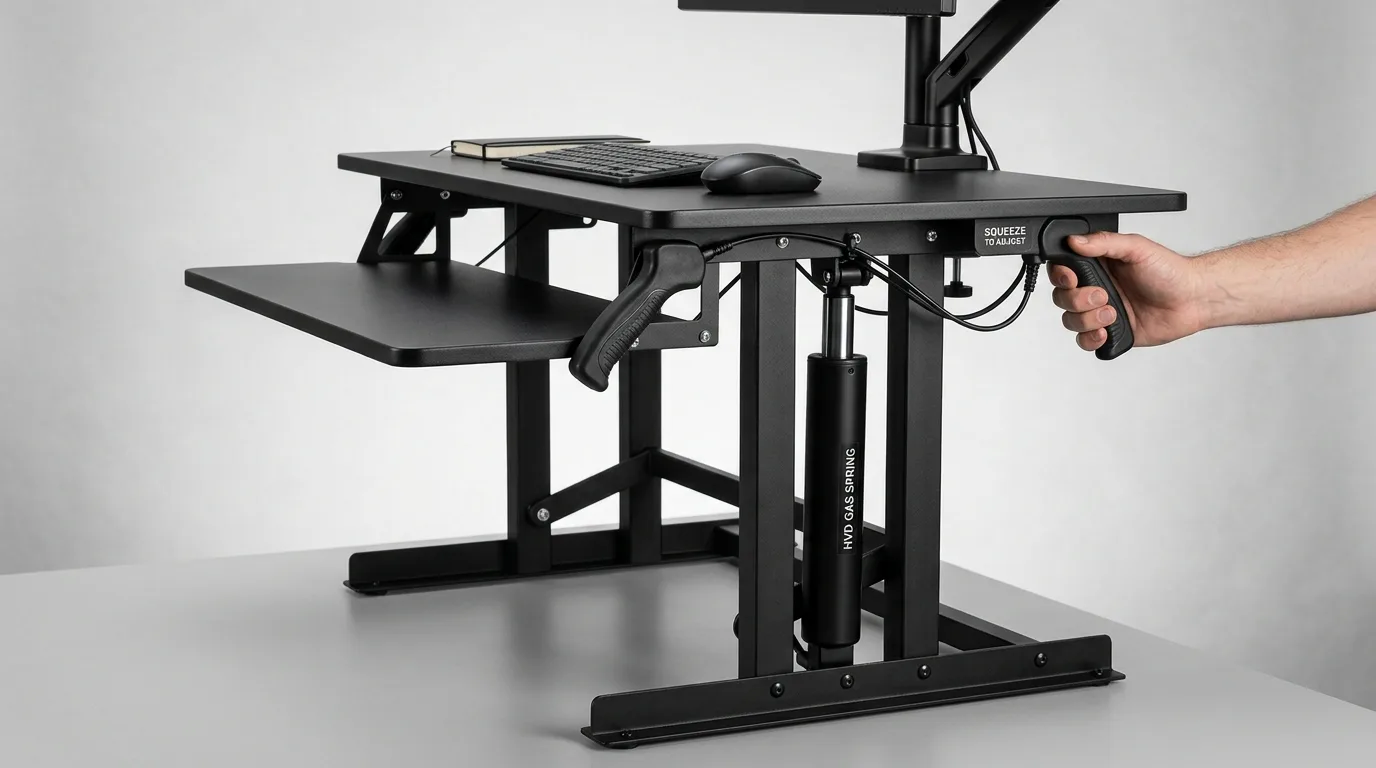
For remote workers who move between leased apartments, a scissor lift standing desk converter provides permanent stability.
The DeskRiser Classic sits directly atop existing dining tables or corporate desks, adding smooth vertical travel.
Its internal pneumatic gas cylinder counterbalances up to 35 pounds of hardware, lifting monitors effortlessly with a side squeeze lever.
A lower tiered keyboard tray preserves neutral wrist angles while maintaining safe monitor viewing distance. When your lease concludes, the unit folds down to 4.5 inches for vehicle transport.
- What Sucks: Weighing over 24 pounds in solid steel, carrying this unit across airports or train terminals is impractical.
- Who Should Skip: Skip heavy tabletop converters if your existing desk uses hollow glass tops or lacks 24 inches of depth.
Recommended Ergonomic Accessories & Hardware Specs
High-impact accessories verified by our research team to protect your cables and joints.
VIVO Under-Desk Cable Tray
Keeps power strips and heavy adapters off the floor so cables never yank when elevating.
ComfiLife Gel Anti-Fatigue Mat
High-density core reduces heel strike and lower back compression when standing 3+ hours.
VELCRO Brand ONE-WRAP (100pk)
Pre-cut reusable straps that easily unwrap for cord re-routing without scissors.
Soundance Laptop Stand
Elevates laptop screen 6 inches to eye level, preventing forward neck slouch.
Type 3: Compact Electric Desks and Mobile Workstations
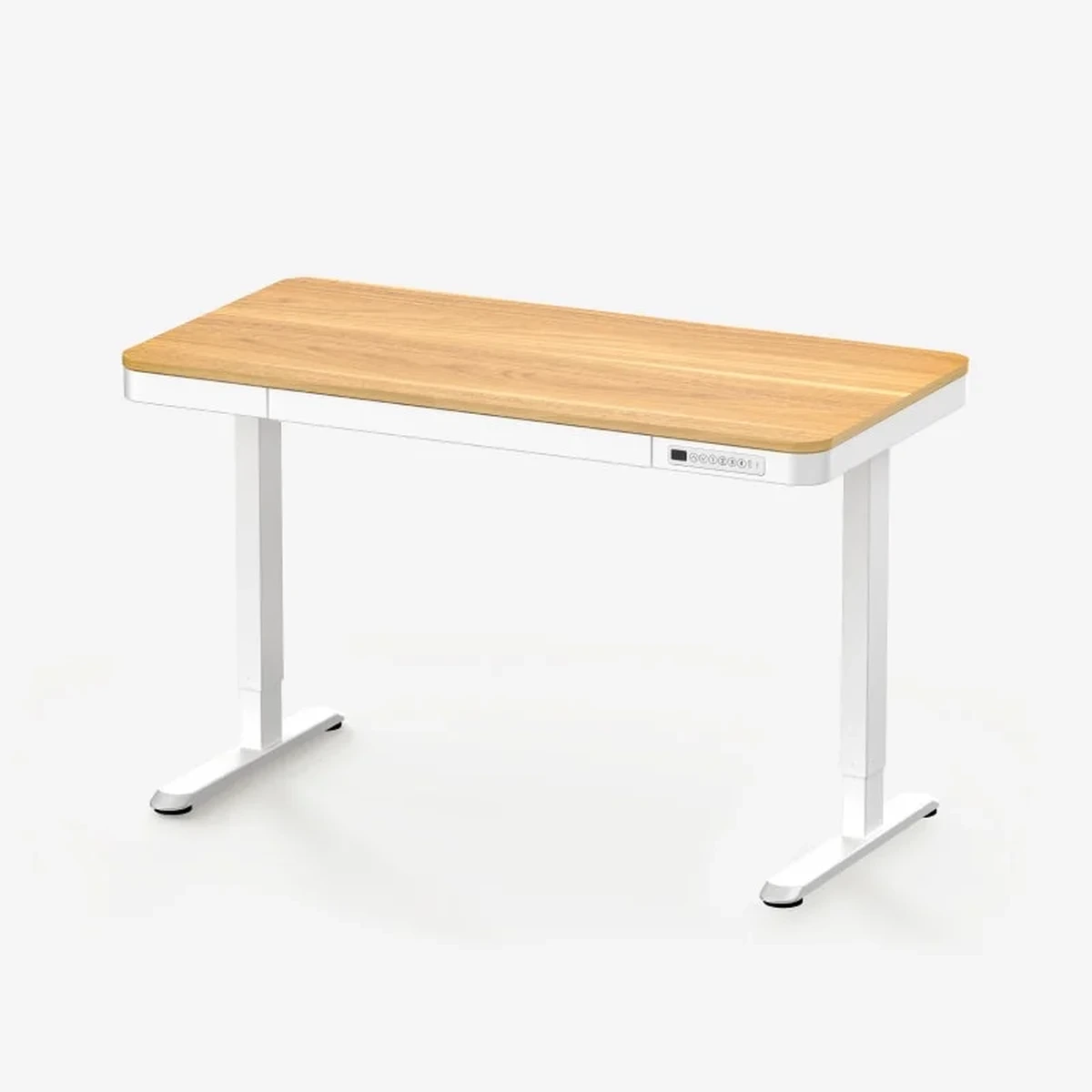
The FlexiSpot Comhar bridges the divide between temporary furniture and dedicated office ergonomics. Measuring 47.2 by 23.6 inches, it consumes roughly 40 percent less floor area than standard corporate workstations.
Adding lockable soft-polyurethane casters transforms the frame into a mobile workstation that rolls cleanly between bedrooms and living spaces.
Its dual stage electric columns lift 110 pounds smoothly across a 28 to 47.6-inch range. Integrated desktop USB A and USB C fast-charging ports eliminate dangling extension cords.
- What Sucks: The 110-pound payload limit cannot support triple monitor mounts or heavy tower PCs clamped beneath the tabletop.
- Who Should Skip: Skip compact electric frames if you possess adequate room for a full 60-inch desk, as standard frames offer higher weight limits.
Mobility Versus Rigidity: The Engineering trade off
Every portable standing desk must balance total chassis mass against physical typing stability. Structural rigidity in workstation design requires heavy steel gussets, crossbeams, and broad footings.
Lightweight aluminum and molded polymers allow bag transport but yield when forearms rest on keyboard trays.
If you type intensively for seven hours daily, prioritize structural rigidity over extreme packability.
If you live out of a suitcase three weeks a month, choose lightweight tripod systems and type with floating wrists.
Field Testing Protocol: Five-Pound Forearm Keystroke Test
To quantify stability across portable frames, we apply a five-pound downward load at the front desktop edge while recording dial-indicator displacement.
Heavy motorized commercial desks yield less than 0.05 inches under this benchmark.
Backpack tripod units displace up to 0.45 inches because telescoping plastic collets absorb compressive forces elastically.
scissor lift tabletop converters absorb downward keystroke inertia through central steel hinges and locking pneumatic struts. This dampens oscillating resonance, keeping computer monitors stationary while typing at speed.
When working on lightweight portable stands, pairing hardware with an external compact keyboard resting on the main table preserves stable typing while raising displays.
Biomechanical Stance: Setting Ergonomic Height on Mobile Desks
Working at a portable desk requires disciplined height calibration to avoid compensatory lumbar arching and neck flexion. The primary rule of mobile ergonomics centers on separating screen height from keyboard position.
Typing directly on a raised laptop keyboard forces shoulders into sustained shrug and hyper-extends wrist tendons.
Always position the top third of your display glass at eye level, approximately 20 to 28 inches from your pupils.
Keep your elbows bent at a relaxed 90 to 100-degree angle with forearms resting parallel to the floor.
If using a portable folding stand, place a slim Bluetooth keyboard and wireless mouse on the lower table surface. This configuration preserves neutral upper-body posture without introducing arm fatigue.
When to Skip Portable Desks Entirely
Do you possess a dedicated home workspace in an apartment you plan to occupy for at least six months?
If your living arrangement is stable, skip portable desks and purchase a full motorized frame.
full size standing desks cost roughly the same as premium portable units while offering four times the lifting capacity and superior warranties.
Portable workstations carry a distinct manufacturing premium for folding hinges, latches, and lightweight alloys. Only invest in portable models if frequent relocation or multi-use rooms dictate your daily workflow.
If you work in tight quarters but prefer permanent motorized frames, consult our focused guide on the best standing desks for small spaces.
Physical Limitations and Common Pitfalls
Collapsible furniture introduces specific physical wear points that buyers must monitor over time. Friction locks and telescoping snap buttons loosen with repetitive cycling, requiring periodic hex key tightening.
Manual crank and gas spring mechanisms also lack electronic memory presets, demanding physical effort for every height transition.
- Who Should Skip: Skip manual folding desks if you experience acute lower back disc pain; lifting manual frames while bending forward can aggravate lumbar spasms.
Frequently Asked Questions
What is the best portable standing desk for airline travel?
The Tabletote remains the benchmark for air travel. Weighing under 3.5 pounds and folding to three inches thick, it packs into carry-on luggage and sets up in under two minutes.
Can portable standing desks support dual computer monitors?
Backpack folding stands cannot support dual monitors safely due to 15-pound payload limits. Heavy scissor lift converters and mobile electric desks support dual displays when paired with reinforced clamp arms.
How much weight can a portable standing desk hold?
Tripod and folding laptop trays support between 15 and 20 pounds. Tabletop scissor converters hold 33 to 45 pounds, while rolling electric frames lift between 110 and 154 pounds.
Are standing desk converters more stable than folding tables?
Yes, tabletop converters utilize heavy steel base plates and scissor brackets that dampen typing vibrations effectively. Folding tables with telescoping legs exhibit greater horizontal sway at maximum extension.
Do portable standing desks require special maintenance?
Inspect mechanical hinge pins, gas strut cylinder seals, and leg locking levers every three months. Applying dry silicone lubricant to sliding aluminum tracks preserves smooth telescoping action.
Final Verdict: Selecting Your Mobile Workstation
Choosing the ideal portable standing desk centers on your specific travel radius and hardware payload. For international flight travel and hotel rooms, the Tabletote delivers unmatched packable utility.
For temporary rental apartments and shared work surfaces, the DeskRiser converter provides commercial grade typing stability. Explore our vetted recommendations in the best standing desk converter guide.
When space is tight but mobility remains local, a rolling compact electric frame like the FlexiSpot Comhar delivers the ultimate hybrid balance.
For full office setups, explore our guides on best electric standing desks and compact standing desk options.
Calculate Your Exact Desk & Chair Height
Slide to your height to see ANSI/BIFMA recommended standing and sitting presets.

Written by M. Haris
✓ References ANSI/BIFMA G1-2017 GuidanceFounder & Lead Workstation Ergonomics Researcher • Spec Auditing & Biomechanical Research
M. Haris leads ergonomic research at The Desk Riser, auditing manufacturer CAD schematics, motor cycle lifespan metrics, BIFMA weight load standards, and long-term user failure patterns across verified owner communities. Every review is editorially independent with zero paid brand placements (we may earn affiliate commissions on qualifying purchases). Have questions or spot a warranty update? Email directly at support@thedeskriser.com, read the Author Dossier, or explore our Editorial Research Methodology.
Share this article:
Workstation Setup & Fit Q&A
Have questions about frame deflection, monitor arm clamp loads, or chair sizing? Consult our research team.
Q:How do I know if this standing desk will wobble on thick carpet?
Standing desk wobble on carpet is caused by uneven carpet pile compression under the rear footpads. Frames with wedge-reinforced leg collars and wide steel footplates (like UPLIFT V3 or FlexiSpot E7 Pro) minimize lateral flex. If placing on plush carpet, use rigid caster cups or a dense underlay to anchor the base directly to the subfloor.
Q:Can I clamp a dual monitor arm onto standard particleboard tops?
Dual monitor arms concentrate 25 to 45 lbs of dynamic torque onto a 4-inch clamp perimeter. Hollow honeycomb tops (such as IKEA Linnmon) will crush. We recommend a minimum 0.75-inch solid core (MDF, solid bamboo, or hardwood), or sandwiching a steel reinforcement bracket plate (min 2.5mm thickness) between the clamp and desktop.
Q:What if my chair cylinder sinks or feels too high for my feet?
Always verify your seated popliteal height (crease behind knee to floor with shoes). If a chair will not drop below 17 inches and your feet dangle, pair it with an angled footrest or switch to a low-range Class 4 cylinder. If a cylinder loses pressure and sinks on its own, the internal nitrogen seal is breached and requires cylinder replacement.
Ask Our Ergonomic Spec Reviewers
Planning an upgrade or unsure if your monitors and stature fit this configuration? Send your dimensions directly to our research desk. No accounts, no trackers, zero marketing spam.